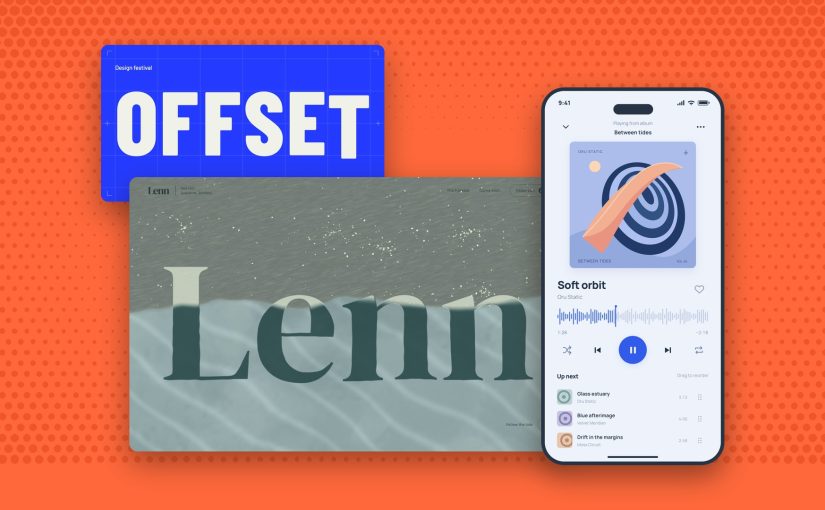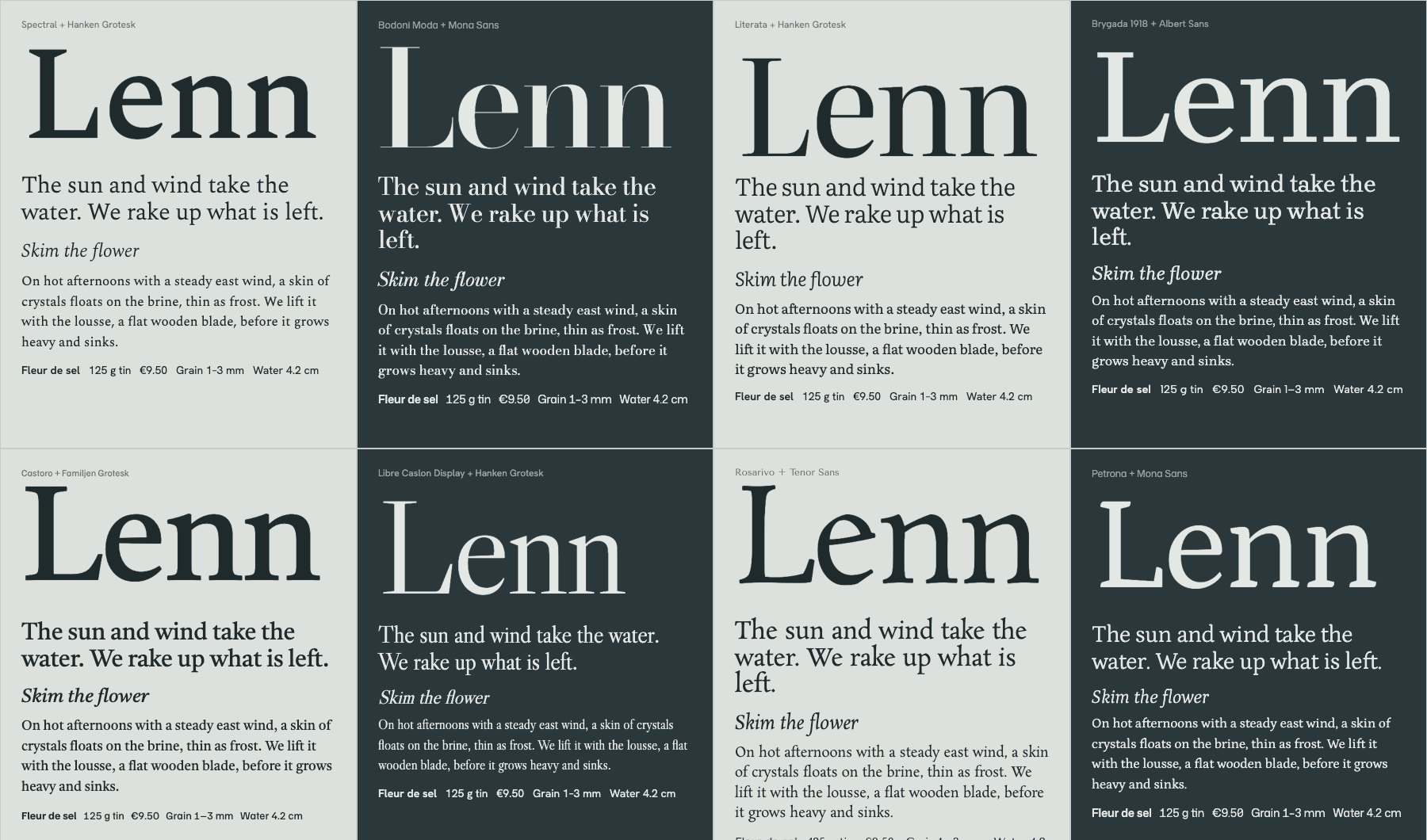
Font pairings 2026: we checked the fonts on 2,190 websites designers loved. Most of them used just one.

TL;DR

  • 🔍 We counted instead of guessing. 2,190 websites featured on Awwwards, SiteInspire, Land-book and 21 other galleries this year, each loaded in a browser that reported the font every line of text is drawn in. Plus 1,466 Fonts In Use entries for print and branding.
  • 1️⃣ The most popular pairing is one font. 60% of sites set the headline and the body in the same family. The contrast moved from the typeface to the size.
  • 🥇 Inter is still number one. It’s on 13% of the sites, and on 24% of Framer sites, where it’s the default. PP Neue Montreal is the paid favourite. Roboto, Open Sans and Montserrat barely show up.
  • 🤝 When designers do pair, nobody copies anybody. 871 paired sites, 811 different pairs. The classic listicle pairs, Montserrat + Lora and friends, appeared zero times.
  • ⌨️ The third font is a mono. 23% of sites add a monospace for labels and small print. Geist Mono leads.
  • 📏 How they set it. Headlines at regular weight, tracked a little tight, four times the body size. Body at 16 pixels with a 1.4 to 1.5 line height.
  • 🆓 You can copy most of it for free. A live playground, AI prompts and CSS at the end, with free stand-ins for the paid favourites.

A long one, with charts, real examples and a playground. Every TL;DR point jumps to its section, so go straight to the part you came for.

Every January the internet publishes the same article. “25 perfect font pairings for the new year.” Montserrat with Lora. Playfair Display with Source Sans. Oswald with Roboto.

The Muzli blog ran one too, back in 2024. Montserrat and Lora were number one.

These lists almost never check whether designers actually use the pairs. So this year I did.

I checked 2,190 websites that design galleries featured in 2026 and asked the browser which font every piece of text is drawn in. Montserrat + Lora showed up zero times. Playfair + Source Sans, Raleway + Open Sans, Oswald + Roboto: zero, zero, zero.

What designers did instead is more interesting, and a lot easier to copy than a list. Here’s what they used, how they set it, and how to steal it for your next project.

How we counted

Every day the Muzli feed pulls in the websites design galleries feature: Awwwards, CSS Design Awards, SiteInspire, Land-book, One Page Love and 19 more, plus our own Muzli Picks. From January 1 to October 20 that came to 7,079 gallery posts, or 4,176 unique websites once you count each site once.

I loaded 2,506 of them, spread across the whole year, in headless Chrome. That’s a real browser with no window, driven by a script. For every line of text on each page I asked two things. How big is it? And which font is Chrome actually drawing it in?

That second question matters more than it sounds. CSS asks for a font and lists fallbacks, and sites rename their fonts all the time: “primary”, “brand-sans”, “custom_131815”. The browser knows which font file it really used, so that’s what we counted.

Each site then got two roles:

  • Headline font. The family of the big type: the main h1 if there is one, otherwise the largest text on the page.
  • Body font. The family with the most characters at paragraph sizes, 12 to 22 pixels.

If the two match, the site uses one family. If they differ, that’s a pairing.

316 sites didn’t count. They were offline, blocked the visit, or drew their text on a canvas or as images, which a browser can’t read back as text. That leaves 2,190 websites.

For everything that isn’t a website, I used Fonts In Use, the archive where type nerds document typefaces in the wild. 2,715 of its entries came through the Muzli feed this year, and 1,466 of them show work made in 2025 or 2026.

Sixty seconds of vocabulary

  • Typeface, font, family. A typeface is the design (Inter). A font is one style of it (Inter Bold). A family is all the styles together. This article counts families.
  • Grotesk. The plain, no-nonsense sans-serif family tree Helvetica belongs to. Most of the fonts below are grotesks.
  • Serif. Letters with the little feet at the end of the strokes. Think newspapers and book covers.
  • Mono. Short for monospace. Every letter takes the same width, like code.
  • Variable font. One file that holds every weight, so you can pick 450 instead of choosing between 400 and 500.
  • Foundry. A studio that designs and sells typefaces, like Pangram Pangram or Dinamo. Free fonts mostly come from Google Fonts and Fontshare.

OK. Let’s see what designers picked.

The most popular pairing is one font

60% of the sites set the headline and the body in the same family. No pairing at all.
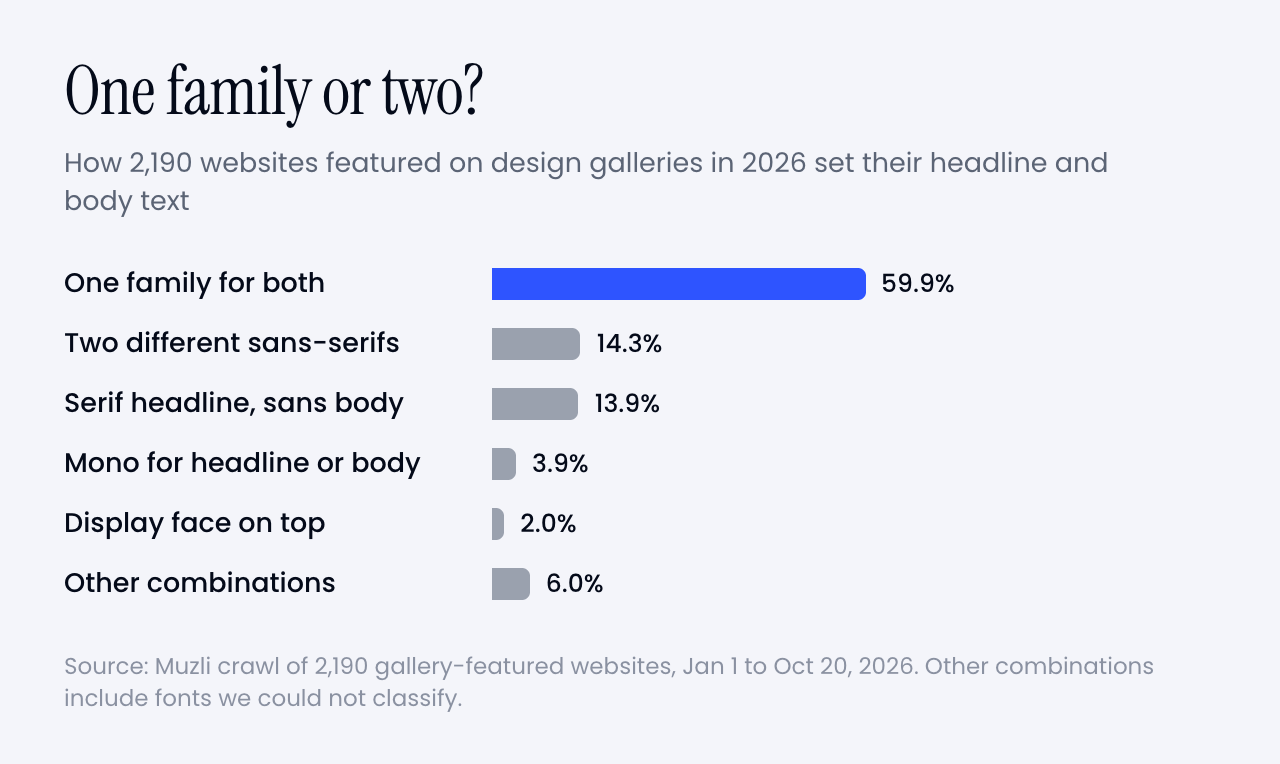
Bar chart. 60% of sites use one family for headline and body. Serif headline over a sans body, two different sans-serifs, a display face on top and mono combinations make up the rest.
Six in ten sites never pair at all. Shares of 2,190 sites, weighted by month.

That doesn’t mean the pages look flat. The contrast just moved.

The headline is now four times the body size. The median headline on these sites is 64 pixels over 16-pixel body text. At that scale, the jump in size does the job a second typeface used to do.

Modern families also bring their own contrast. Inter has optical sizes that run from text to display, so big headlines get tighter, crisper letters. Neue Haas Grotesk comes in Display and Text versions. A variable font gives you every weight in between. You get a headline that feels different from the body without inviting a second personality to the party.

Think of a good suit. One fabric, cut differently for the jacket and the trousers, instead of a tweed jacket with jeans.
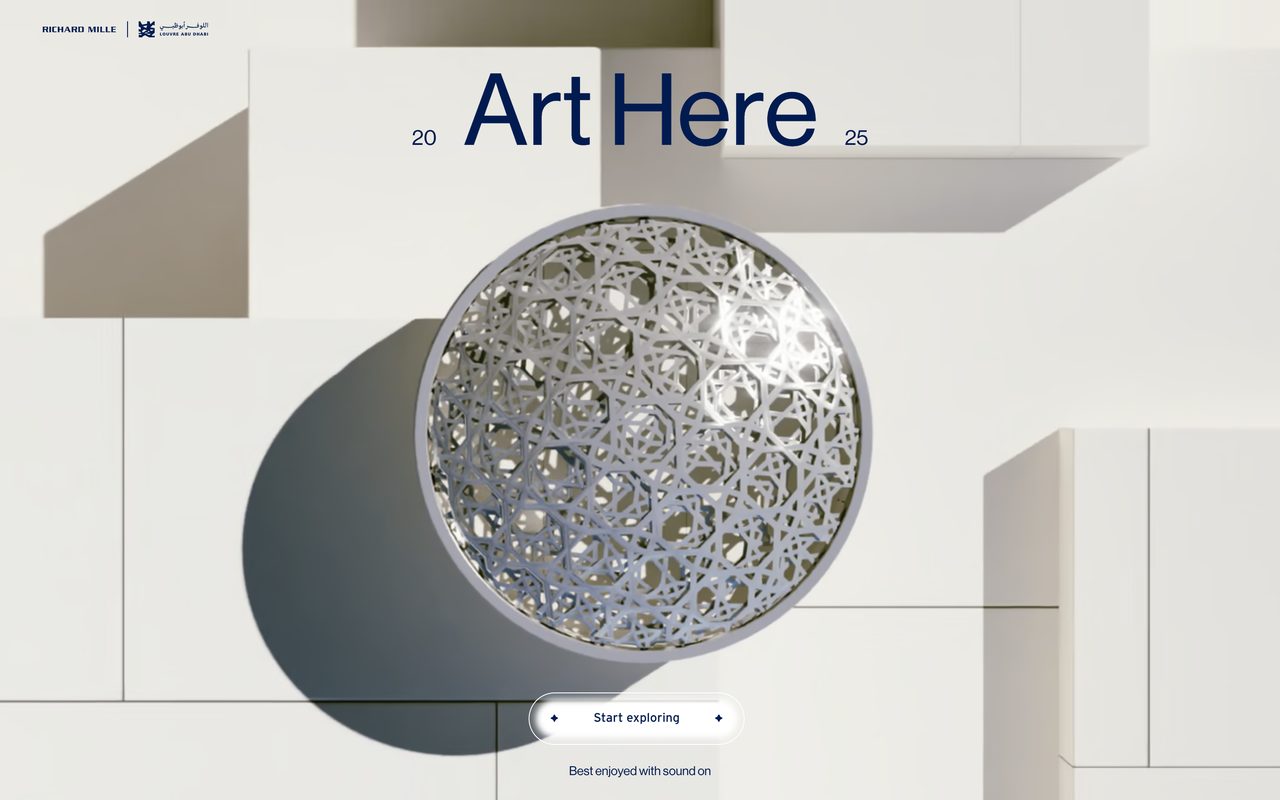
The Richard Mille Art Prize 2025 site, with a large blue Neue Haas Grotesk headline over a sculpture
One family, two sizes. The Richard Mille Art Prize 2025 site sets everything in Neue Haas Grotesk. Image: artprize-shadows.com
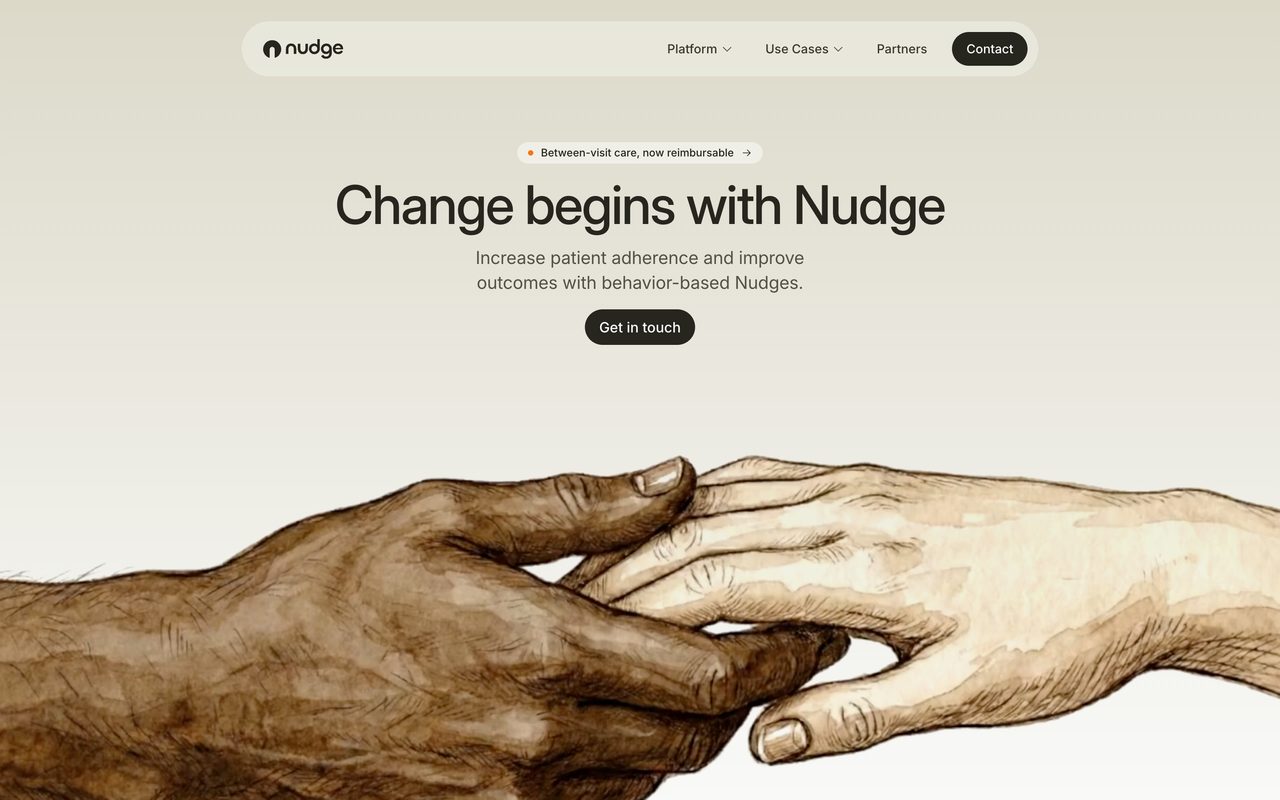
The Nudge homepage, with a centred Inter headline and a short Inter paragraph above an illustration of two hands
Nudge does the same with Inter: headline, paragraph and button in one family. Image: getnudge.info

Matthew Butterick put it bluntly: “Most documents can tolerate a second font. Few can tolerate a third.” In 2026 most sites skipped the second one as well.

So the honest answer to “what should I pair with Inter?” is, more often than not, more Inter.

Which fonts are all these one-family sites using? That’s where the list gets surprisingly short.

The typefaces designers used the most
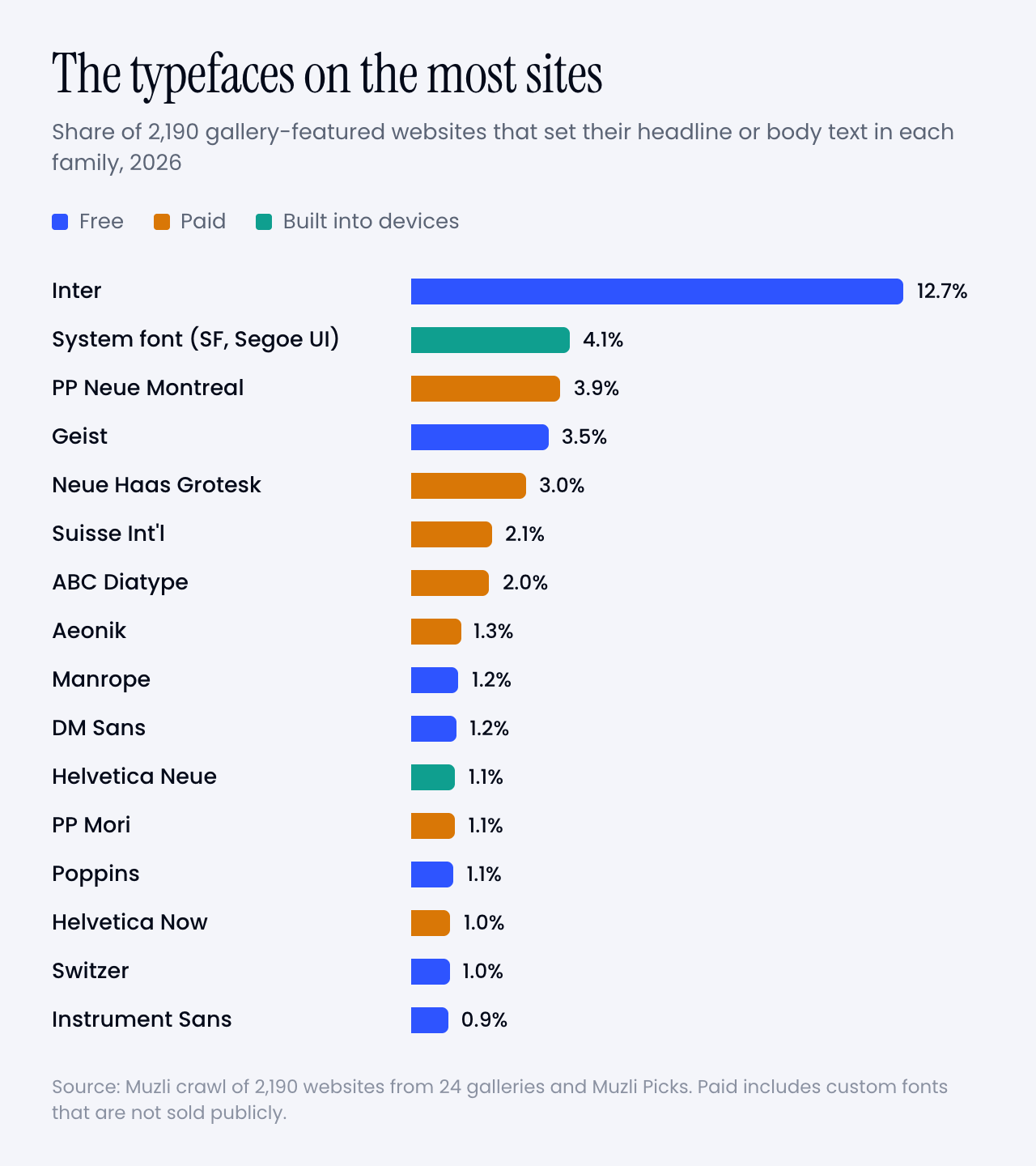
Bar chart of the typefaces used for headline or body text. Inter leads by far, followed by the system font, Geist, PP Neue Montreal, Neue Haas Grotesk, ABC Diatype, Suisse Int'l and Aeonik.
Inter is on 13% of the sites. Nothing else reaches 5%. Blue is free, amber is paid or custom, green comes with your device.

🥇 Inter

Inter sets the headline or the body on 13% of the sites, more than three times as often as PP Neue Montreal, the next family down. It’s free and open source, and Rasmus Andersson built it as a workhorse for everything from dense interfaces to signage.

It also has a secret weapon. It’s the default. Framer’s help pages say new text blocks start in Inter and Inter Display, and on the Framer sites in this crawl 24% use Inter. On Webflow sites it’s 10%. Never underestimate a default.

And when designers do pair, Inter is everybody’s favourite partner. It’s the body font under 15% of all pairings, quietly carrying the paragraphs while a serif or a display face takes the headline.

🍏 No web font at all

Second place goes to no web font at all. 4% of the sites set their headline or body in the system font, the one your device already has: San Francisco on a Mac or iPhone, Segoe UI on Windows, Roboto on Android. It loads instantly, costs nothing and looks native everywhere.

Count Helvetica, Helvetica Neue, Arial and Times New Roman straight from the operating system too, and 7% of these designer sites set a headline or body without loading a single font file for it.

💸 PP Neue Montreal and the paid grotesks

The most used paid family is PP Neue Montreal from Pangram Pangram, on 3.9% of the sites. Behind it sits a tight cluster of paid grotesks: Neue Haas Grotesk (3.0%), Suisse Int’l (2.1%), ABC Diatype from Dinamo (2.0%), Aeonik (1.3%) and Helvetica Now (1.0%).

Put them side by side and they’re cousins. Neutral, a little tight, at their best at big sizes. The designer look of 2026 is a well-made grotesk, set large.

▲ Geist

Geist is Vercel’s free family, on 3.5% of the sites. It lives mostly on product sites: 59% of the Geist sites came from SaaS landing-page galleries like Land-book and Saaspo. Its sibling Geist Mono is even more common, on 4.1%, which is a clue to the third font.

🌍 Meanwhile, on the rest of the web

The Web Almanac 2025, which measures millions of sites, finds Roboto on about 10% of pages, Poppins on 6%, Open Sans on 5% and Montserrat on 3 to 4%. Inter sits at 1.4%.

On the sites designers put in galleries, it’s the other way round. Roboto sets the headline or the body on 0.7% of them. Open Sans on 0.3%, Montserrat on 0.5%, Poppins on 1.1%. Inter, meanwhile, is about 9 times as common here as on the web at large.

The fonts the web uses most are the fonts designers avoid. If you want a page to look designed in 2026, that’s the cheapest tip in this article.

When designers pair, nobody copies anybody

40% of the sites do use two families. Here’s the twist: 871 paired sites, 811 different pairs. 94% of the pairs appear on exactly one site, and the most repeated one appears on 4.

Fonts converge, pairs don’t. Everyone shops in the same small store and leaves with a different outfit.

The handful of pairs that did repeat, none of them on more than 4 sites:

  • Oswald over Inter: 4 sites
  • Playfair Display over Inter: 4 sites
  • Fraunces over Inter: 3 sites
  • Instrument Serif over DM Sans: 3 sites
  • PP Editorial New over PP Neue Montreal: 3 sites
  • PP Editorial New over Inter: 3 sites
  • Instrument Serif over Inter: 3 sites
  • Instrument Sans over Inter: 3 sites
  • GT Alpina over Season Sans: 3 sites
  • STK Bureau Serif over STK Bureau Sans: 3 sites

Yes, Playfair Display made the list. Just not over Source Sans.

Fonts In Use tells the same story about print and branding. Of its 623 recent designs that use exactly two typefaces, 565 use a pair no other entry uses. Yet the single fonts repeat. Inter, Neue Haas Grotesk, Suisse Int’l, Helvetica and Neue Montreal top that list too.

So stop hunting for “the pairing of the year”. It doesn’t exist. What repeats is the pattern, and there are only a handful.

📰 Serif headline, grotesk body

About a third of the pairs (35%) put a serif on top of a sans, and that sans is Inter more often than anything else.

The serifs vary far more than the sans. Instrument Serif leads, then Displaay’s Season Mix, GT Alpina, PP Editorial New, Fraunces and Commercial Type’s Feature. Nearly all of them are high-contrast display serifs, set big at regular weight, often with one word in italic for flavour.
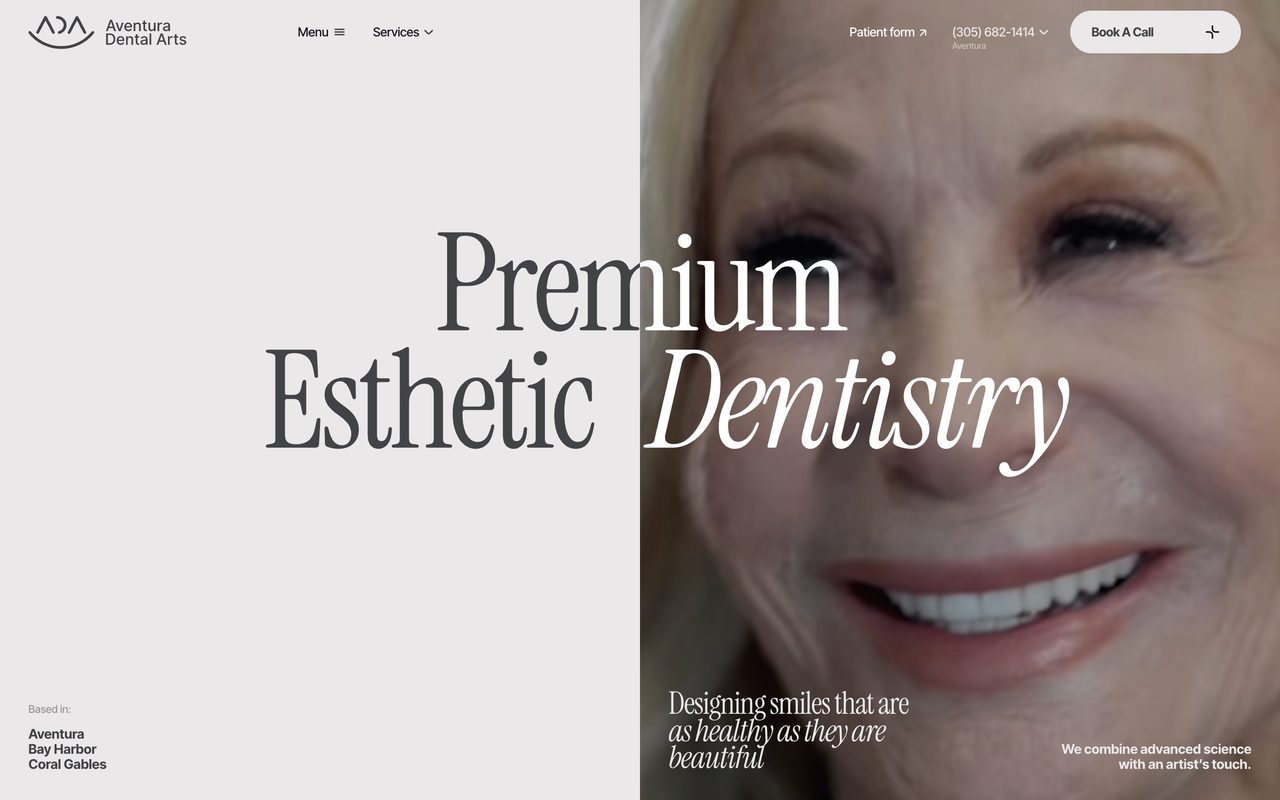
Aventura Dental Arts homepage with the headline Premium Esthetic Dentistry in Instrument Serif, the last word in italic
Instrument Serif over Inter Tight, with one italic word doing the emotional work. Image: aventuradentalarts.com
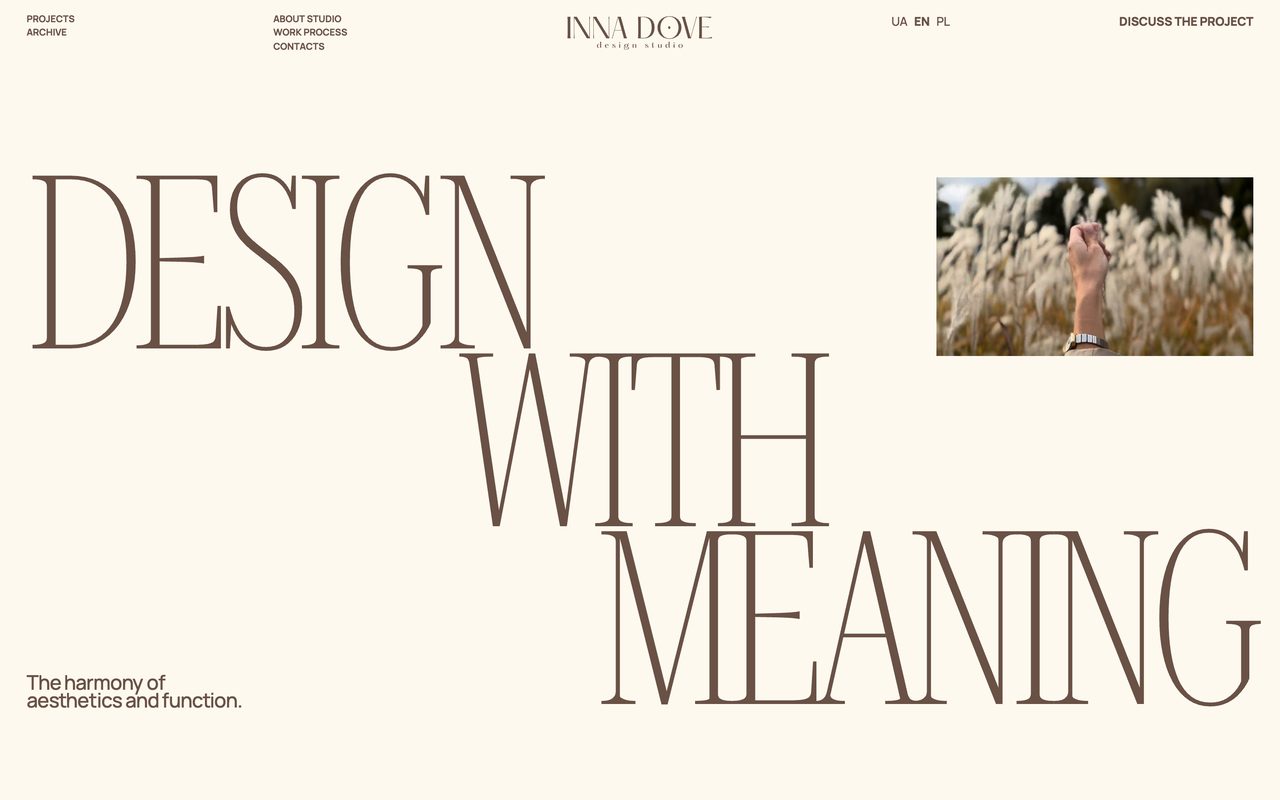
Inna Dove's homepage with a tall condensed serif headline, Design with meaning, over a small sans caption
A tall, condensed Roboto Serif headline over Manrope. Image: innadove.com

A word on Instrument Serif. It’s free on Google Fonts, it’s the top-ranked serif in Google Fonts’ own popularity sort, and last November Creative Bloq reported designers complaining it’s “starting to look lazy”. In our crawl it’s on 0.9% of sites. Popular, sure. Everywhere, not yet.

🧱 Two grotesks, one loud, one quiet

Another third (36%) are two sans-serifs. That sounds like a contradiction until you look at them. A grotesk with character on top, a neutral workhorse underneath: Neue Haas Grotesk over PP Neue Montreal on Sutera, Aeonik over Inter on ToDesktop, Archivo over Manrope on the Museum of Money.

The contrast is in personality, not in category. If the two look like siblings, use one.

👯 Same designer, two styles

Butterick’s one rule of thumb for mixing fonts is to “combine fonts by the same font designer”. A small group of sites follows it: Klim’s Martina Plantijn over Founders Grotesk, PP Editorial New with PP Neue Montreal, Untitled Serif with Untitled Sans, Displaay’s Season Mix with Season Sans. 5% of the pairs come from a single foundry.
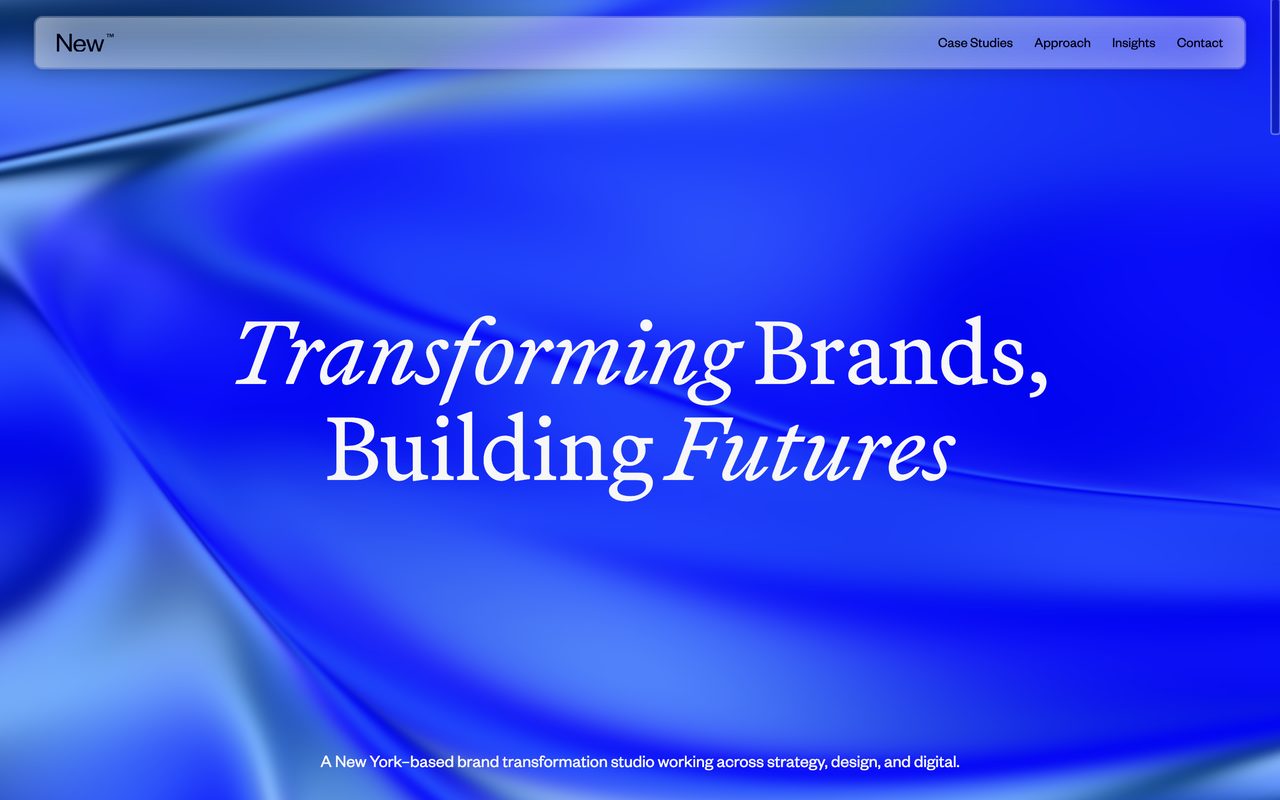
New Studio's homepage with the headline Transforming Brands, Building Futures in Martina Plantijn on a blue gradient
Martina Plantijn for the headline and Founders Grotesk for the rest, both from Klim. Image: new.studio

It’s the safest way to pair two very different typefaces. The same hand drew both, so the proportions already agree.

📣 A display face on top

The loudest pattern and one of the rarest. 5% of the pairs put a display face like Anton, Oswald, Bebas Neue or Unbounded on top. It works when the headline is a poster, and almost nowhere else.
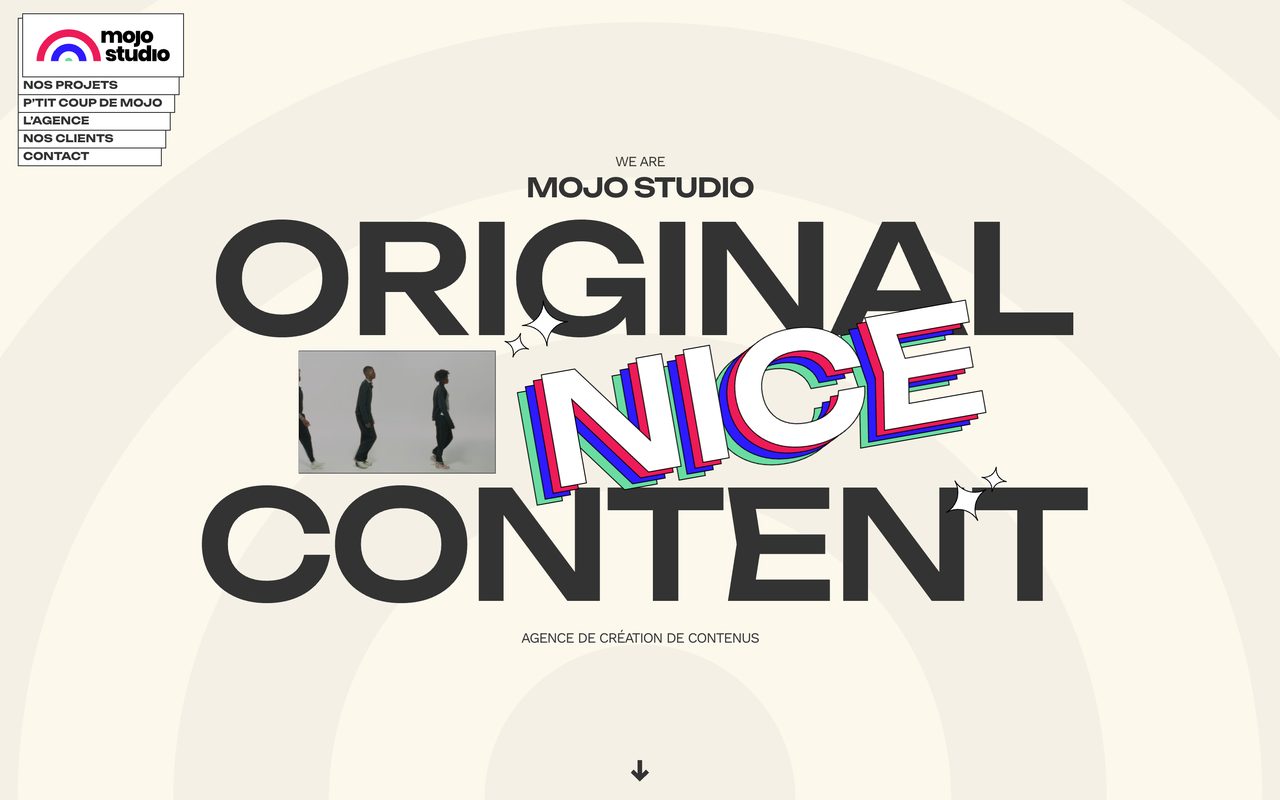
Mojo Studio's homepage with Original Nice Content set huge in Unbounded
Unbounded for the shout, Work Sans for everything else. Image: mojostudio.co

The third font is a mono

23% of the sites use a monospace somewhere, and hardly ever for code. It’s for the small stuff: navigation, labels, dates, prices, the “Est. 2026” line.

Geist Mono is the favourite, then IBM Plex Mono and JetBrains Mono, then DM Mono, Roboto Mono and Space Mono, plus plenty of sites that simply use the system’s own mono. The usual move is a grotesk with its own mono sibling (Geist with Geist Mono, Diatype with Diatype Mono) or with a free mono from Google Fonts.
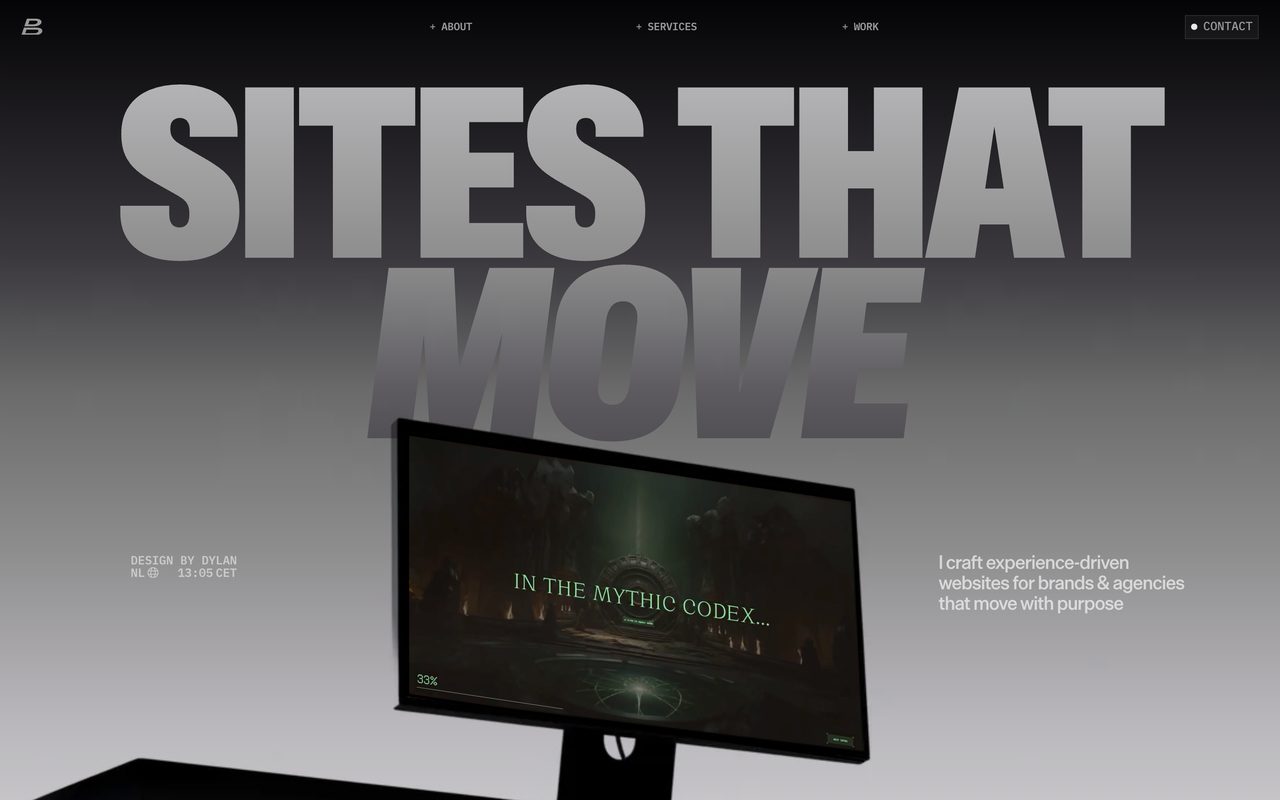
Dylan Brouwer's portfolio with Sites that move in a huge grotesk and small monospace labels around it
Die Grotesk for the headline, IBM Plex Mono for every small label. Image: dylanbrouwer.design

Why it works: a mono label says “precise, technical, considered” in eleven pixels. It’s the typographic version of a lab coat. If your one-family page needs a little extra, add a mono before you add a second sans or serif.

How they set it

The browser also reports how each headline is set, so here are the numbers designers actually ship.

headline: weight 400 · tracking −1.4% · line height 1.0 · 64px

body: 16px · line height 1.4 · weight 400

Headlines are regular, not bold. 42% of them are set at weight 400 and another 16% at 500. Only 17% go bold or heavier. When the type is four times bigger than the body, weight stops being the thing that makes it a headline.

58% of headlines are tracked tighter than default, mostly by 1 to 3%, and the median line height is 1.0. Big type set at its default spacing looks loose. Tighten it until the words hold together as one shape.

The favourites each have their own habits:

  • Inter: weight 600 · tracking −2.5% · line height 1.05
  • PP Neue Montreal: weight 500 · tracking 0% · line height 1.0
  • Neue Haas Grotesk: weight 400 · tracking 0% · line height 1.0 · uppercase on 20% of sites
  • Geist: weight 500 · tracking −2.5% · line height 1.0
  • Instrument Serif: weight 400 · tracking −2.0% · line height 1.0

Paid or free

Here’s the uncomfortable bit. 67% of the headline fonts on these sites are paid or custom-made, and so are 56% of the body fonts. Free fonts cover 29% of headlines and 37% of body text, and system fonts the rest.

That’s a big part of the gap between a gallery site and a template. If you can’t license the favourites, these free fonts get you into the same neighbourhood:

  • PP Neue Montreal → Switzer from Fontshare, or Inter
  • Neue Haas Grotesk, Helvetica Now, Suisse Int’l → Inter, with its display optical size for headlines
  • ABC Diatype → Geist
  • PP Editorial New → Instrument Serif

They’re not clones, and a trained eye will spot the difference. But scale, spacing and restraint carry most of the look, and those cost nothing.

Try it this week

Start with the playground. Every recipe in it uses free fonts and the settings we measured, so you can see the patterns from this article with your own words in them. Click the text to edit it, switch recipes, and hit Get CSS when one clicks.

Seven free recipes built from the crawl. Best at full width, so open it in a new tab if your screen is small.

Three ways in, depending on how you build.

🎨 No code, 15 minutes.

  1. Open three sites you admire, from Muzli or Awwwards. Check their fonts with Inspect → Computed → Rendered Fonts. Count how many families each one uses. My bet: one or two.
  2. Take your current project and set everything in one family. Make the headline four times the body size, drop it to a regular or medium weight, and tighten the tracking a little. Only add a second font if the page still feels flat.
  3. Try the recipes in the playground above, with your own headline typed in.

🤖 With AI tools. Paste one of these into Claude, Lovable, v0 or Framer AI. They name the font, the source and the measured settings, which is what stops the model falling back to its favourite default.

Set this page in ONE typeface family: Inter from Google
Fonts. Headlines: weight 600, letter-spacing -0.025em,
line-height 1.05, about 4x the body size
(clamp(40px, 7vw, 64px)). Body: 16px, weight 400,
line-height 1.5. Build hierarchy with size and weight
only. Do not add a second typeface.
Pair a serif headline with a sans body. Headlines:
Instrument Serif (Google Fonts), weight 400,
letter-spacing -0.02em, line-height 1.0, about 4.5x the
body size. Body: Inter 16px/1.5. Small labels: Inter 500,
12px, uppercase, letter-spacing 0.08em. Keep everything
else in Inter.
Use Geist for headings and body text and Geist Mono for
labels, navigation, dates and numbers (12px, uppercase,
letter-spacing 0.02em). Headlines: Geist 500,
letter-spacing -0.025em, line-height 1.0. Both fonts are
free from Google Fonts.

💻 Writing the code yourself. The playground’s “Get CSS” button gives you any recipe as a ready snippet. Here’s the most common setup on the sites we checked, in its free version:

@import url("https://fonts.googleapis.com/css2?family=Inter:opsz,wght@14..32,100..900&display=swap");

body {
  font-family: "Inter", system-ui, sans-serif;
  font-size: 16px;
  line-height: 1.5;
}

h1 {
  font-size: clamp(40px, 7vw, 64px);
  font-weight: 600;
  letter-spacing: -0.025em;
  line-height: 1.05;
  font-optical-sizing: auto; /* big sizes get Inter Display */
}

Where taste comes from

Yes, this is the ad break. But it’s a relevant one.

Every website in this study reached me the same way it can reach you: through the Muzli feed. Muzli turns your browser’s new tab into a stream of the best design from more than 200 sources, including the galleries above, plus the Picks that Eyal Zuri, our Co-Founder and Creative Director, chooses by hand. More than 900,000 people have signed up.

That matters for type because taste in typography is mostly mileage. You learn what “tight but not cramped” looks like by seeing a few thousand headlines, not by reading a pairing chart. Open a new tab twenty times a day and you get those miles for free.

And when a site stops you, do what my crawler did. Right-click the headline, choose Inspect, open the Computed tab and scroll to the bottom. Under “Rendered Fonts” Chrome tells you exactly which font it’s drawing, even when the CSS calls it “primary-font”.

Get Muzli for your browser, it’s free.

Worth bookmarking

🆓 The free ones from this list

  • Inter. The designer’s own page. Free, open source, with optical sizes from text to display.
  • Geist and Geist Mono. Vercel’s family, free, and the most used mono on these sites.
  • Instrument Serif. The serif of the moment. Use it before everyone calls it lazy.
  • Fontshare. “Quality fonts. Free.” Satoshi and Switzer live here.

💸 The paid favourites

🔎 Check for yourself

  • Fonts In Use. Every entry names its typefaces. Search a font, see who used it with what.
  • Typewolf’s usage lists. Another count from curated sites, with a different method and a lot of overlap.

📚 Go deeper

The verdict

The font pairing, the way the listicles sell it, is mostly dead on designer websites. 60% use one family, the rest invent their own pairs, and nobody is setting Montserrat over Lora.

What’s alive is craft inside one family: scale, weight, tracking, an optical size, maybe a mono for the small print.

One thing to watch: the serif headline. It’s the pattern most likely to tip into cliché next year, and Instrument Serif is the font most likely to take the blame.

So here’s your homework. Open your current project, delete the second font and make the headline four times the body size. If the page still needs something, you’ve earned your pairing.

Pick one family. Make the second one earn its place.


Sources: Muzli crawl of 2,190 websites featured on 24 galleries and Muzli Picks between January 1 and October 20, 2026, with shares weighted by month; Fonts In Use; HTTP Archive Web Almanac 2025, Fonts; Framer Help; Butterick’s Practical Typography. Images: the sites named in each caption.
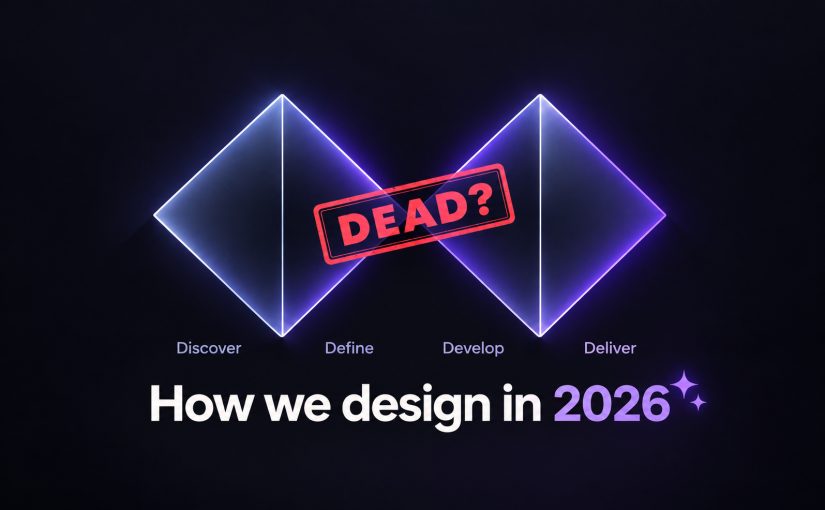
AI didn’t kill the design process. It made being dirt cheap. The new workflow, the tools, and what you should do today.

Grab a coffee, this one is long. Design process is a big subject and I have opinions about it. The TL;DR below doubles as a menu, so tap the part you came for.

TL;DR

OK. Let’s start by remembering what designers have actually been doing all these years.

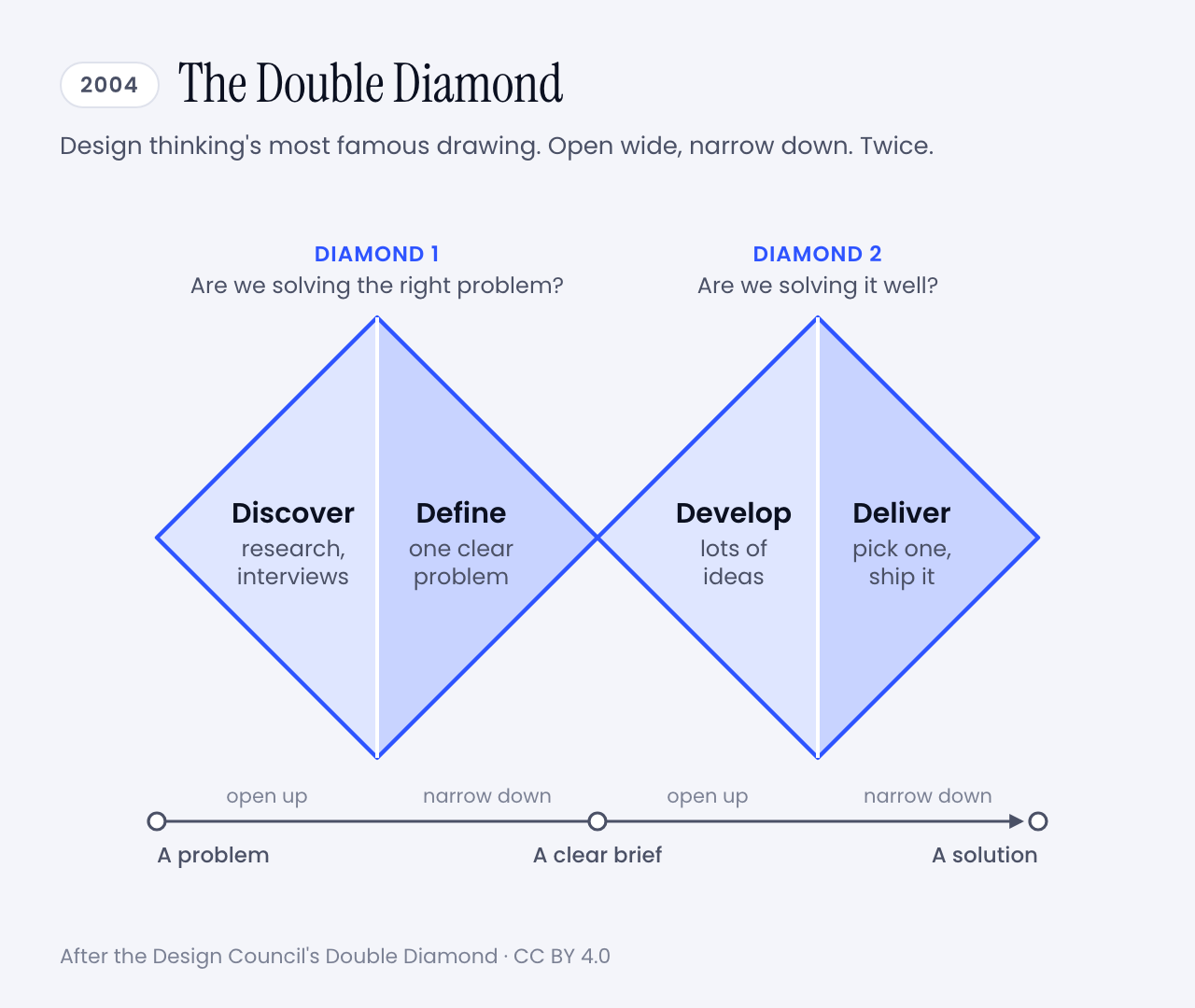
If you have worked in design for longer than a week, you have seen the picture. Two diamonds, side by side.

It is called the Double Diamond, and it is the best-known drawing of how design is supposed to happen. It has four steps, and all four start with a D:

  • Discover. Go and research the problem. Talk to people.
  • Define. Boil that research down to one clear problem.
  • Develop. Come up with lots of possible answers.
  • Deliver. Pick one, finish it, ship it.

Each diamond opens wide and then narrows. First you collect, then you choose. You do that once for the problem and once for the solution.

The Double Diamond: two diamonds side by side. The first covers Discover and Define and asks whether we are solving the right problem. The second covers Develop and Deliver and asks whether we are solving it well.
The whole method on one napkin. Image: Muzli, after the Design Council’s Double Diamond (CC BY 4.0)

This is design thinking in its most famous form, the method most of us were taught and have been using for years. I certainly have. Research first, sticky notes second, pixels much later. If your portfolio has a slide with personas on it, you know the family.

And it worked. For twenty years this was how we explained ourselves, planned projects and won budgets.

Then, one afternoon, a product manager typed a paragraph into a box and had a working prototype before the meeting ended. Nobody discovered or defined anything. The diamonds never came up.

I did not invent that scene. In Anthropic’s launch post for Claude Design, a product manager at Datadog says the team now goes from a rough idea to a working prototype before anyone leaves the room.

No wonder the question got loud. In March, Lenny’s Podcast, an interview show for people who build software products, gave an episode the title The design process is dead.

So is it? And is design thinking going down with it?

I have been designing and building software for more than twenty years, and I have seen a few tectonic shifts in that time. Flash died. Phones ate the desktop. Photoshop gave way to Sketch, and Sketch to Figma.

Each one felt like the end of the craft for about six months. Then it was simply how we worked.

So my short answer is no. The useful answer is longer, and it comes with a plot twist. The man who led the team that drew those diamonds stopped defending them three years ago.

Here is the route. First where the process came from and what broke it. Then how good designers work now, a new diagram to replace the old one, and how we do it at Muzli. Then advice, in two letters. One is for beginners and one is for people who remember slicing PSDs. Tools and prompts wait at the end.

Sixty seconds of vocabulary

One pit stop before the story, so nobody gets lost later.

  • Design thinking. The workshop method that IDEO and Stanford’s d.school spread in the 2000s: empathize, reframe the problem, brainstorm, prototype, test, implement. The one with the Post-its.
  • Mock and prototype. A mock is a picture of a screen. A prototype is something you can click. A code prototype is the real thing, unfinished.
  • Agent. An AI that takes steps on its own instead of only answering. It opens files, writes code, runs it, looks at the result and tries again.
  • Vibe coding. Building software by describing what you want to an AI and running the code it writes without reading every line.
  • Brief. What you hand the AI. The same thing you would hand a freelancer, and just as decisive.
  • Rules file. A plain text file that holds your design rules, so the AI reads them every time. You will meet it as CLAUDE.md, DESIGN.md or a skill.
  • Design system. The shared kit a product is built from: colours, type, spacing, components.
  • A/B test. Show version A to half of your users and version B to the other half, then see which half does better.
  • Telemetry. Counters built into a product that tell its makers what people did with it.

That is the whole glossary. Back to the diamonds.

💎 What changed: the diagram lost its author first

The origin story matters here, so bear with me for a minute.

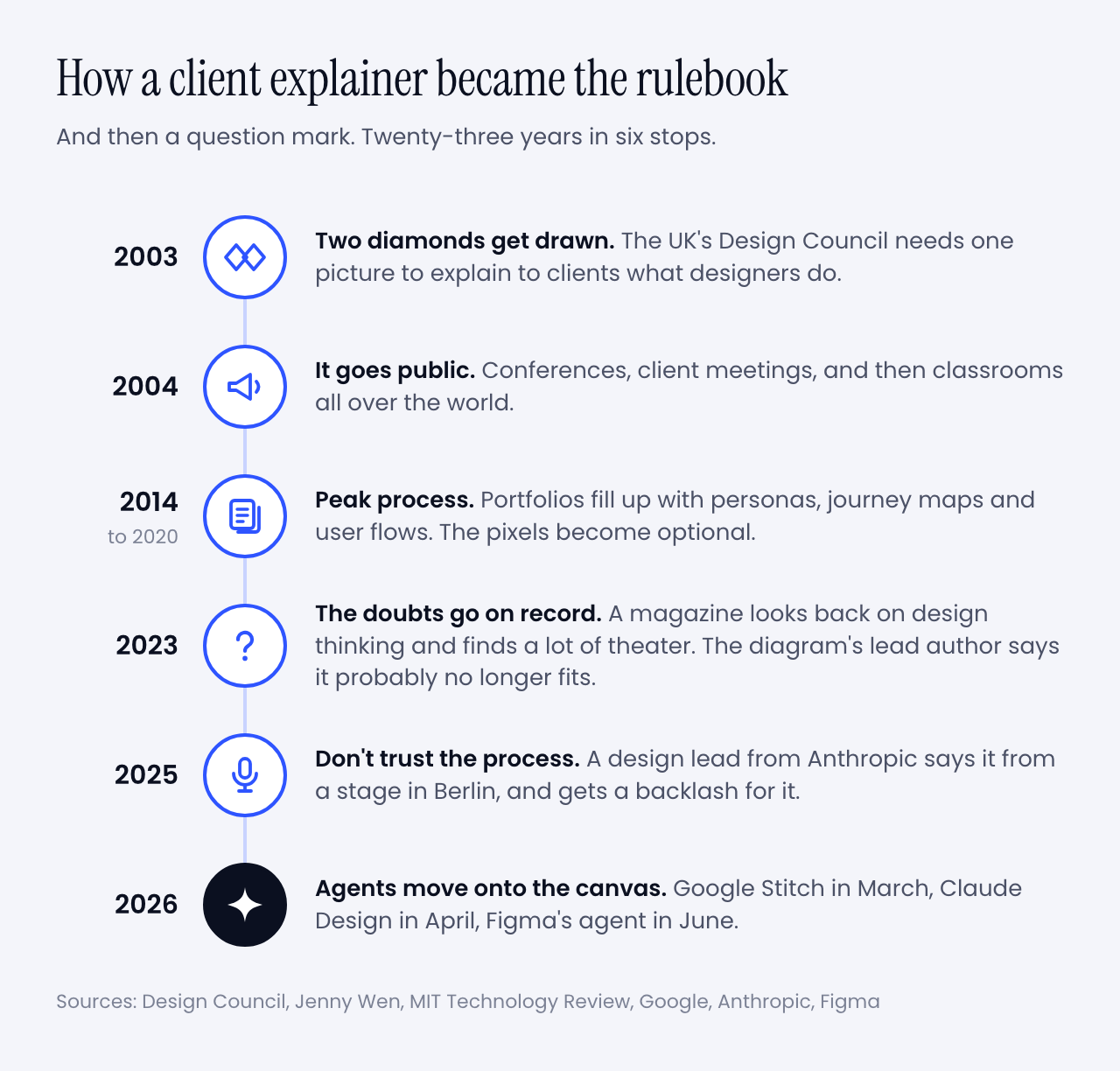
In 2003 the UK’s Design Council had an awkward problem. It was telling businesses to take design seriously, and it had no standard way to describe what designers do.

Its new director of design and innovation was Richard Eisermann, a designer who had worked with Ettore Sottsass in Milan and then at IDEO and Whirlpool. He put the question to his team. They reviewed their own projects, borrowed from forty years of earlier models, and came back with two diamonds and four words picked to be easy to remember.

Now look at what it was for. Eisermann has written that the goal was a framework to help clients understand the work. It had to be quick to get through and easy to remember, and nobody was supposed to get precious about it.

Then the explanation became the job.

A timeline in six stops. 2003: two diamonds get drawn. 2004: the diagram goes public. 2014 to 2020: peak process. 2023: the doubts go on record. 2025: the Don't trust the process keynote. 2026: agents move onto the canvas.
From a team meeting to a question mark. Image: Muzli

I lived through the middle of that timeline. You probably did too.

Jenny Wen led design for Claude at Anthropic and ran the FigJam and Slides teams at Figma before that. In an essay from 2024 she dates the peak to 2014 through 2020. Portfolios stopped showing the product and started showing journeys, flows, personas and user stories. Proof that someone had followed the process. The pixels became the unserious part.

Design thinking was getting the same treatment. In February 2023, before any of today’s design agents existed, MIT Technology Review looked back on two decades of it. It found agencies that ran the workshops, handed over recommendations and left before anything shipped. It also had a name for box-ticking that changes nothing: innovation theater.

And now the twist I promised.

Three months later, for the diagram’s twentieth anniversary, the Design Council published a piece by Eisermann himself, asking whether the Double Diamond was still fit for purpose. His answer took two words: “probably not”.

His reasons read like a forecast. The diagram is a straight line. It has no step for measuring whether the design worked. And generative tools, he wrote, let you begin anywhere, by putting a finished-looking thing on the table and asking what if.

The tools he had in mind were ChatGPT and Midjourney, which tells you how long ago 2023 was. This year alone, Google Stitch became a design canvas with an agent in it, Anthropic shipped Claude Design, and Figma put an agent into every paid plan.

My favourite detail is in Google’s announcement for Stitch. It says you can skip the wireframe and start from the business goal and the feeling you are after. A company that size is now selling the reversed order as a feature.

So the diamonds were wobbling long before AI. Why did AI finish the job? Follow the money.

💸 The process was a price tag

Measure twice, cut once is good advice when wood is expensive. The Double Diamond is that advice with better typography.

You spent weeks discovering and defining because building was the costly part, and building the wrong thing meant months gone. The process was insurance.

Simon Willison did the arithmetic after watching Wen’s talk. A wrong direction used to waste months of development. With AI doing the building it wastes days, so you can afford more risk and more exploring.

For a first version, even days is out of date. I know because I timed it.

In September I wrote three briefs, the kind a studio gets from a client: a product website, a title sequence and a gesture prototype. Claude Opus 5.5 built each one in 50 to 81 minutes. A week later GPT-6.1 Sol built the same three in 17, 8 and 11 minutes, for $1.88 in total. Nobody at Muzli edited the results.

Here is one of them. Go on, scroll it.

Running live in this frame. One written brief, 81 minutes, no edits from me. Built by Claude Opus 5.5.

Vendors tell the same story through their customers. That Datadog product manager says a week of briefs, mockups and review rounds turned into a single conversation. It is a testimonial in a launch post, so season to taste. My stopwatch agrees with it anyway.

When the cut is nearly free, you stop measuring twice. You cut five times and keep the best one.

That is the whole change. Everything else in this article follows from it.

One caution before I get carried away. The wood got cheap, and the room it has to fit in stayed the same size. A user’s attention costs what it always did. So does the trust you burn by shipping something half right. I’ll come back to that, because it is the reason design thinking is not going anywhere.

But first, the fun part. What does a designer’s week look like now?

🔁 How people design now

Let’s start with one person’s week, because she was kind enough to put numbers on it.

Wen told Lenny’s Podcast that a few years ago 60 to 70% of her time went to mocking and prototyping. Now it is 30 to 40%. Another 30 to 40% goes to sitting with engineers while they build. And a new slice is writing code herself, the last-mile polish designers used to file tickets about.

Then: mocks 60-70% · with engineers ~20% · meetings ~10%

Now: mocks 30-40% · with engineers 30-40% · plus her own code

The rest of her picture is just as interesting:

  • Vision shrank. The two-to-ten-year vision deck became a direction for the next three to six months, often delivered as a prototype.
  • Research stayed. Her team has a researcher running studies and surveys, and everyone reads them. She still prototypes and still mocks. The proportions changed.
  • Figma stayed too. She uses it to lay eight or ten directions side by side. A coding tool pulls you down one path and you get attached to it.
  • Shipping moved earlier. Her team releases things early, labels them as previews and repairs them in public. She is blunt about the condition. It only works if the fixes keep coming.

She also says the classic process, the one designers were taught to trust, is basically dead, and that it was dying before AI arrived.

You could say that is one unusual team at an AI lab, and you would be partly right. So let’s look at everybody else.

Figma’s 2026 AI report draws on three years of surveys of designers, developers and product managers. In the last year the share of designers taking part in development doubled, to 41%. Developers doing design work went from 44% to 60%. Two years ago 7% said AI had meaningfully changed how their team works together. Now 41% say so.

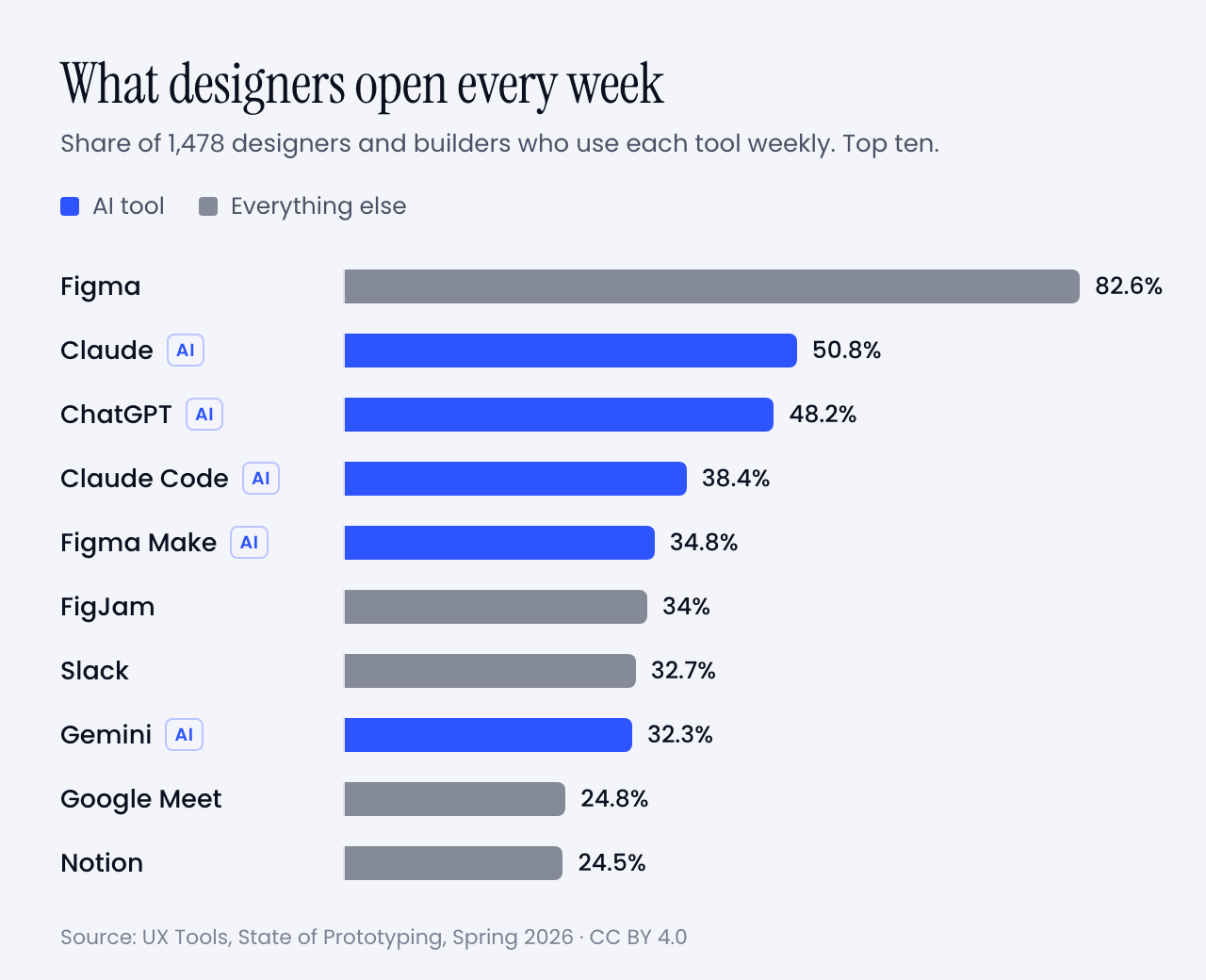
Then there is the question of what designers open every week. UX Tools asked 1,478 of them this spring.

Bar chart of weekly tool use among designers: Figma 82.6%, Claude 50.8%, ChatGPT 48.2%, Claude Code 38.4%, Figma Make 34.8%, FigJam 34%, Slack 32.7%, Gemini 32.3%, Google Meet 24.8%, Notion 24.5%
Share of designers who use each tool every week. Five of the top ten are AI. Data: UX Tools, State of Prototyping, Spring 2026 (CC BY 4.0). Chart: Muzli

Read that sample with care. It came through a tools newsletter and its sponsors, several of which sell AI prototyping, so it leans toward the curious. Even so, a few numbers made me sit up:

  • 59.1% built their own tool or app with AI in the previous six months.
  • 71.1% added AI to their workflow or made it central in the same period.
  • 1.4% trust AI output with no oversight. The largest group, 34.2%, treats it as a first draft to edit heavily.
  • 37.7% have not started. Same companies, same Slack channels.

It is also messier than any of this sounds, and I would rather say so. Wen says keeping up is hard, for designers and engineers alike. In the same survey the top obstacle was time to learn the tools, at 55.7%. Too many tools came next at 53%, then the quality of what AI produces at 52.2%.

So the old diagram is retired and the new way of working is a bit of a blur. That felt like a job for a new diagram.

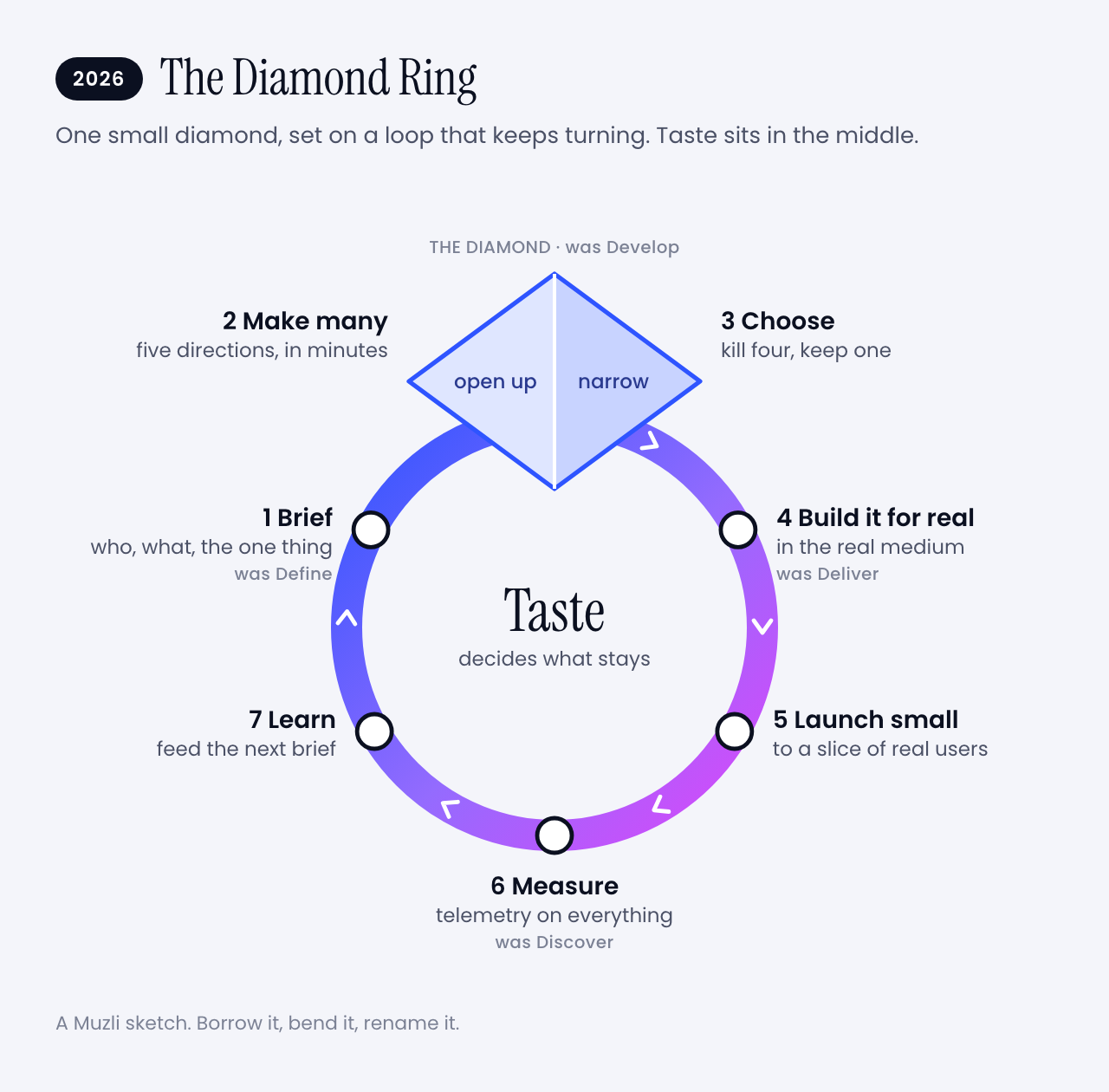
💍 So I drew a new one: the Diamond Ring

The Double Diamond got famous because it had a shape you could draw on a napkin and a name you could say in a meeting. The new way of working deserves the same courtesy. Here is my attempt.

The Diamond Ring: a loop with seven stops. Brief, then a small diamond where you make many and choose one, then build it for real, launch small, measure and learn, and back to the brief. Taste sits in the middle.
After twenty years of two diamonds, design finally got a ring. Image: Muzli

I kept one diamond, because opening wide and then narrowing down is still how good ideas happen. I made it small, because it now takes an hour instead of weeks. And I set it on a ring, because the work never reaches the right-hand edge of the page any more. It goes round.

The four old words are all still in there. They changed places. Let’s walk the ring.

✍️ 1. Brief

You write down who it is for, what it has to do, the one thing people should remember and what you refuse to ship. Twenty minutes, one page. This used to be called Define and it came second. Now it comes first, and everything after it is only as good as this page.

🌀 2. Make many

Ask for five directions that disagree with each other. Then five more. This is the opening half of the diamond, and it used to be the part budgets killed. Anthropic pitches Claude Design on exactly this. Designers usually explore two or three directions because that is all the schedule allows.

✂️ 3. Choose

Kill four out of five. Wen’s thesis is that once making is open to everybody, the skill is in choosing and curating. Nobody can do this part for you, and it is where the design happens. The old diagram never drew it.

🔧 4. Build it for real

Take the survivor into the real medium. Fix the spacing yourself. Tune the motion in code. The handoff ceremony goes away because you are already standing in the code.

🚀 5. Launch small

Ship it to some of your users, with a label that says it is early. Wen’s team does this in public and keeps the fixes coming. At Muzli we show a new thing to half of new users and keep the other half as they were. More on that in a minute.

📏 6. Measure

Count what people do with it. This is the step Eisermann said his own diagram forgot.

🔍 7. Learn

This is Discover, moved from the first step to the last, and it never stops. The Design Council’s own updated guidance allows for it. Early ideas can be built and tested as a way of discovering. For AI products there is no alternative. Wen points out that you can’t mock every state of something that answers differently each time.

You still talk to people first when you know nothing about them. What stopped is waiting for the research to finish before anyone is allowed to make something.

Then you go round again, with a better brief.

And the middle of the ring? That is taste. It decides which of the five directions survives, which fix matters and when a thing is good enough to show. Hold on to that word. I am going to try to sell you something with it later.

It is a sketch, of course. Borrow it, bend it, rename it. Just please don’t turn it into a certification programme.

🏗️ How we build things at Muzli

That was the theory. Here is what it looks like in an ordinary week at Muzli, because we would feel like frauds selling you a ring we don’t wear ourselves.

1. We prototype in the real thing. Big changes still start in Figma. Small ones start as a working build, usually on the day the idea turns up, with Claude Code doing most of the typing. We review what runs. We rarely review a picture of it.

2. We launch to half. The Trending row in the Muzli new tab went from an idea to a live test in one day. Half of the people who installed Muzli after that got it. The other half did not, and they are our control group.

3. We test small things on purpose. Which category is ticked by default when you set up Muzli. Whether a row sits on the left or the right. Which store an install button opens. Usually a few of these run at the same time, and they are built so they don’t trip over each other.

4. Telemetry goes in before the feature does. Every experiment gets its own label in our analytics before the build ships. Every step of onboarding reports in. Every click knows which row and slot it came from. If we can’t measure a thing, it is not ready to launch.

5. We read the results like pessimists. Before a test starts, we work out how many people it needs and write down the date we will look. When a release seems to have helped, we run the same comparison on dates when nothing shipped. Embarrassingly often, nothing also gets a lift.

6. We let a flat result be an answer. One of our tests looked like a clear win after two weeks. Then we split it by install date, and the whole win came from three days of installs. It is still running. Plenty of tests simply come back flat, and that is fine. A flat result is a decision in three weeks instead of an argument for three months.

7. Where there is too little traffic for a test, we use judgment. Some pages will never get enough visitors. There we ship on taste, write down the numbers from before, and compare after.

None of this needs a big team. It needs the habit of asking what would prove you wrong before you get attached.

Which is, when you think about it, exactly what the two diamonds were trying to teach us.

🧠 Is design thinking still viable?

Time for the question in the headline. Yes, as a way to think. No, as a list of deliverables.

Being wrong got cheap in the prototype. It is as expensive as ever in production.

A wrong prototype costs you an afternoon. A wrong product still costs you users and their trust. NN/g, which is nobody’s idea of a hype shop, expects trust to be a major design problem for AI products this year, because people who were let down by one AI feature are slow to try the next.

That keeps the two questions at the centre of the diamonds alive. The first diamond asks whether you are solving the right problem. The second asks whether you solved it well. No tool has made either one optional.

What is dying is the paperwork around them:

  • The persona with a stock photo and an alliterative name. Goodbye, Busy Brenda.
  • The journey map made to be presented, then never opened again.
  • The rule that nothing starts until discovery is finished.
  • The handoff as a ceremony.
  • The five-year vision deck.

Now for the part I find funny. The two loudest camps in this argument agree with each other.

Wen’s talk is called Don’t Trust the Process, and the conference that hosted it describes it as no rejection of research or strategy. NN/g’s State of UX 2026 says the jobs that remain will ask for judgment and range more than deliverables, warns against performing the rituals of design without results, and calls research more important than before.

One side says the process is dead. The other says design deeper. Both are telling you to stop producing proof of process and start producing judgment.

Why judgment in particular? Because everyone now gets the same first draft.

  • Researchers have measured it. A study in Science Advances had 293 people write short stories, some of them with AI-generated ideas. Readers rated the AI-assisted stories higher, and the weakest writers gained the most, enough to catch up with the strongest. The strongest gained nothing. The AI-assisted stories were also more alike. It was stories, and interfaces may behave differently. The pattern will still look familiar.
  • I saw it in my own tests. Opus 5.5 and GPT-6.1 Sol got the same title-sequence brief a week apart. An easing curve is the shape of an animation’s acceleration, and both models named one of theirs shunt. Both read the festival’s name, Offset, as a printing term. Neither had seen the other’s work.
  • NN/g expects the same of interfaces. Before long, anybody will be able to produce one that looks fine until you get close.

AI raised the floor and left the ceiling where it was.

That is why 90% of the people Figma surveyed say design matters at least as much as it did before AI, and nearly six in ten say more.

One warning, from the person best placed to give it. Wen thinks AI will get better at taste, and that designers may be leaning on that word too hard. What she expects to stay human is narrower. Someone has to decide what gets built, and someone has to answer for it.

So don’t build a career on the claim that machines have no taste. Build it on being the one who decides.

Which raises a fair question. Where do you get the taste to decide with?

🏆 Where taste comes from (yes, this is where I sell you Muzli)

I have now used the word taste a dozen times, so let me be useful about it.

Taste is mileage. You get it by looking at a lot of good work, noticing why it is good, and doing the same again tomorrow. Nobody is born knowing why one landing page works and its neighbour does not.

That happens to be what Muzli has been doing for twelve years.

Muzli is a browser extension that puts design worth seeing into every new tab you open. It draws on Dribbble, Behance, Awwwards and hundreds of other sources, and people sort it every day. More than 900,000 people have signed up for it.

The sorting is the point. In 90 days this summer, 190,636 things came through Muzli’s pipes. Eyal Zuri, Muzli’s co-founder and creative director, gave 114 of them a Pick. The flood is the argument for the filter.

Put it next to the ring above. A model can make you fifty landing pages before lunch. Knowing which of the fifty is good is the part in the middle, and you train it one new tab at a time.

So yes, this is the ad break. It is also my honest answer to the question above.

Get Muzli, it is free. And when all these tools help you make something you are proud of, share it on Muzli Me and nominate it for a Pick. I care about the work far more than about which tool wrote the code.

Right. Two letters now. The first is for people at the start of the road.

🌱 If you are starting out

The market first, without sugar. NN/g says entry-level openings are still rare and hard to land, and that people hoping to get into UX will keep outnumbering them. It adds that if your work is assembling components from a design system, AI can already do it.

Now the good half of the story. Wen says most companies hire only seniors these days, and she thinks they are missing something. A newcomer who is humble, eager and has no rituals to unlearn is one of the three kinds of designer she most wants.

You have less to throw away than anyone else in the building.

Here is what I would do with that:

  1. Build real things and put them online. This is Wen’s whole advice to young designers: make a lot, share it, find people who do the same. A project that runs beats a case study about a project.
  2. Don’t let the tool do your learning. Ask it why, every time, and rebuild one thing by hand each week. The evidence for this one is below the list.
  3. Learn the fundamentals the tool can’t judge for you. Type, hierarchy, spacing, colour, accessibility. You can’t direct what you can’t name. If you can’t say why a layout feels off, all you can type is make it better, and so can everyone else.
  4. Look at great work every day. See the ad break above. I mean it, though.
  5. Learn the old process anyway, as questions. Know the Double Diamond. Run one real test with people who aren’t your friends. You will need the vocabulary in every interview, and the habit of asking who this is for never expires.
  6. Show the cuts. In your portfolio, show the five directions you killed and say why. Choosing is the skill nobody can generate. Keep the brief and the rejects.
  7. Go deep in one thing before you go wide. Wen’s other two profiles are the strong generalist and the deep specialist. Nobody starts as the first. Pick type, motion, illustration, research or code, get good enough that people notice, then widen.

About number 2. Anthropic ran a controlled experiment with 52 mostly junior engineers learning a new code library. The group with AI help scored 17% lower on a quiz about what they had just built, 50% against 67%.

The exception matters more than the average. People who used the AI to ask why and to get explanations averaged 65% or more. People who handed the whole task over averaged under 40%. Those groups were small, and the researchers call it a pattern rather than proof.

The trial also used code, so the jump to design is my bet. I would still make it. A gym only works if you lift the weight yourself.

One last number, and it is an encouraging one. In the UX Tools survey, students and people between jobs were the group least likely to call AI central to how they work, at 21.7%. At startups it was 38.8%. It is a small group in the sample, so hold it loosely. But the people competing for the scarcest jobs appear to be using the tools least, and that is a gap you can close in a month.

And now the second letter, for my own generation.

🎖️ If you have been doing this for twenty years

First, the irritation is reasonable. Wen says her talk drew a backlash from people whose careers rest on the old process. NN/g lists being told you will be replaced unless you vibe code among the things practitioners are tired of hearing. Both are fair. Neither changes the arithmetic.

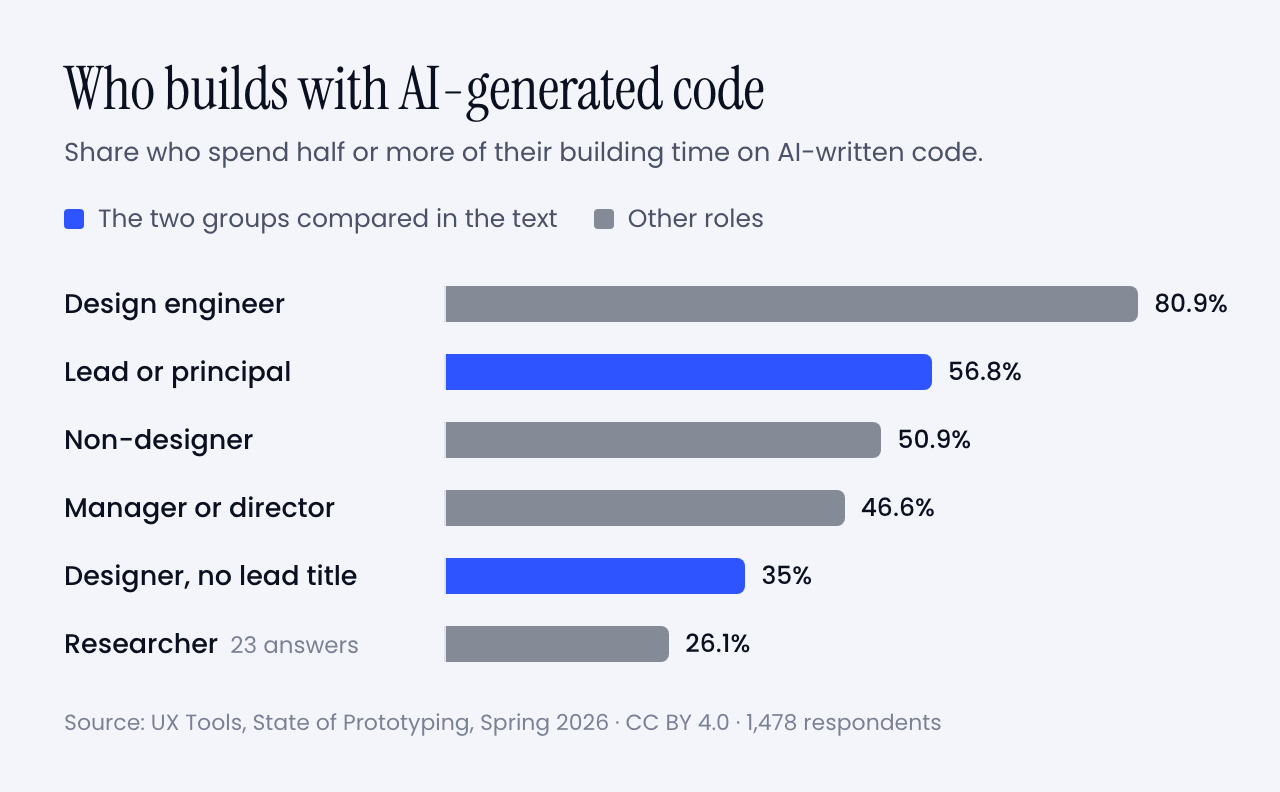
Happily, the arithmetic is kinder than the mood. Seniority is no obstacle. In the UX Tools survey, 56.8% of leads and principals spend half or more of their building time on AI-generated code. Among designers without a lead title it is 35%. Managers sit at 46.6%.

Bar chart of the share who spend half or more of their building time on AI-generated code, by role: design engineer 80.9%, lead or principal 56.8%, non-designer 50.9%, manager or director 46.6%, designer without a lead title 35%, researcher 26.1%
Share who spend half or more of their building time on AI-generated code, by role. Only 23 researchers answered, so treat that bar as a hint. Data: UX Tools, State of Prototyping, Spring 2026 (CC BY 4.0). Chart: Muzli

So the old dogs are learning the trick faster than the young ones. And look at what you already own that just went up in value:

  • A library of what good looks like, built from thousands of decisions.
  • The reflex to ask who it is for before asking what it looks like.
  • Scars. You know which pretty ideas die in production, and why.
  • The standing to say no in a room, and to answer for it afterwards.

What to put down: the handoff, the gate, the deck, and the belief that pixels in code are someone else’s job.

And what to pick up:

  1. Don’t learn React. Learn the tools. That is Wen’s advice to senior designers. You don’t need to build from scratch. You need the coding tools in your kit. Start with the last mile. Fix the spacing yourself and see what happens to your Tuesday.
  2. Write your taste down. Your instincts are an asset only when the machine and the team can read them. Put them in a rules file. Twenty years of opinions, finally in a format something will obey.
  3. Become the editor. You used to review one direction on Friday. Review ten on Monday morning. Critique is the skill you have practised longest, and the one the new workflow is shortest of.
  4. Keep one research habit and speed it up. A prototype in the morning, three users in the afternoon. You know how to run that session. Most people generating prototypes don’t.
  5. Hire the beginner. They bring no habits to unlearn. You bring the judgment. It is the fairest trade on the market right now, and Wen says most companies are passing it up.
  6. Buy yourself the time. The biggest obstacle in the survey was time to learn the tools. Block two hours a week and defend them like a client meeting.

That is the pep talk done. Let’s get practical.

🧰 Tools and hints

You don’t need twelve tools. Too many tools was the second-biggest complaint in the survey. You need one for each job on the ring.

🎨 For making many and choosing: Figma

Figma agent · open beta on all paid plans since 24 June 2026 · code layers on a waitlist

Still the weekly tool for 82.6% of the survey. The agent can draft and rework designs inside your file, take over the repetitive chores and critique what is there. You can give it your own files and rules to work from.

Open it when you need ten options side by side. The Muzli blog covered what the agent does inside a file in May.

🧪 For a first working version: Claude Design or Google Stitch

Claude Design · included in all paid Claude plans

Stitch · from Google Labs · exports your rules as DESIGN.md

Describe the thing, get a first version, then comment on it the way you would comment on a junior’s work. Claude Design can read your codebase and design files to build a design system, so the output stays on brand. Stitch lets you talk to the canvas out loud.

Open one when the question is whether an idea deserves a second hour. The Muzli blog has a getting started guide and a one-week follow-up for Claude Design.

🛠️ For building it for real: Claude Code, Codex or v0

Claude Code · included in Claude Pro, $20 a month · runs in a terminal, a code editor, Slack or the desktop app

For the last mile, and for prototypes that have to behave like the product. Codex is OpenAI’s version of the same idea. v0 gives you a hosted app from a prompt with nothing to install.

Open one when a static frame can’t show what you mean. The setup is in my Opus 5.5 piece, start to finish.

🗣️ For thinking out loud: the assistant you already pay for

Claude and ChatGPT are the second and third most-used tools in the survey. Use one to pull themes out of interview notes, to argue against your concept, or to draft a test script.

Then do the interviews yourself.

Nine habits that matter more than the tool

1. Brief like a studio. Who it is for, the mood in three words, the one memorable thing, what moves. The full template is in my Opus 5.5 piece.

2. Ask for directions before you ask for a design. This is the fix for the one-path problem Wen describes.

Before designing anything, give me five different
directions for [what] for [who]. Make them disagree
with each other. For each one: a name, the idea it is
built on, who would love it and who would hate it.
Do not blend them. Wait for me to pick.

3. Ban the defaults by name. Left alone, a model falls back on a house style. List what you never want to see again, and add to the list every time it annoys you.

4. Put your taste in a file. Let the AI interview you for it.

Interview me to write my design rules. Ask ten
questions, one at a time, about type, spacing, colour,
motion, and what I never want to see. Push back when
I am vague. Then write the rules as a short file I can
give to any design or coding tool.

5. Make it look at its own work. In my model tests, this loop is the reason the builds worked.

Take screenshots at desktop and phone width. As an art
director, list the three weakest things you see and the
principle each one breaks. Fix only those. Then tell me
what you would still not show a client.

6. Ask why, every time. This is the habit that separated the people who learned from the people who didn’t in Anthropic’s trial.

Explain the five decisions in this design that a senior
designer would question. For each one: the principle,
why it matters here, and how I can check it myself next
time. Do not fix anything yet.

7. Test the real thing the same day.

Here is my prototype: [link or description]. Write a
20-minute test for three people who match [audience].
Five tasks, no leading questions, what to watch for in
each, and the result that would prove my idea wrong.

8. Decide what would prove you wrong before you ship. Write down the number or the behaviour that says it worked. Then go and look on the date you promised yourself.

9. Keep the receipts. Save the brief, the rejects and the reason for each kill. That is your case study now.

Try it this week

🌱 If you are new

  1. Pick one small real problem: a friend’s shop, a club’s sign-up page, your own portfolio. Write the one-page brief.
  2. Run the directions prompt in any tool above. Kill four. Write one sentence on each kill.
  3. Run the why prompt on the survivor. Then rebuild one section by hand in Figma, and put both versions online.

🎖️ If you are experienced

  1. Run the interview prompt and save the rules file it writes.
  2. Take one open ticket you would normally spec. Build it instead, with the rules file loaded.
  3. Sit with one engineer for an hour and finish the last mile together.

👥 If you run a team

  1. Replace one status meeting with a review of five generated directions.
  2. Give everyone two protected hours a week to learn one tool. One.
  3. Pick one thing you are about to ship to everyone. Ship it to half instead, and write down what you expect to see.

Worth bookmarking

📚 The argument, from the people making it

📊 The numbers

🧰 The tools

🧪 From Muzli

The landing

That was a lot, so let me land it.

My verdict: the design process is alive, and in better shape than it has been for years. It lost the paperwork and kept the thinking.

The detail I am watching is the word taste. It has become the profession’s safe room. The person who led design on Claude says the machines will get better at that too. That leaves a skill that is narrower and harder: deciding what gets made, and putting your name on the decision.

So skip the deck this week. Take the next thing you would normally spec. Before you write the spec, build three versions of it. Show them to one person who would use it. Then write two lines on which ones you killed and why.

Those two lines are your process now. And if anyone asks which method you follow these days, tell them you are engaged.

The diamonds were how we explained the work to the people paying for it. Now you can show them the work.


Sources: Design Council, Richard Eisermann, Jenny Wen, Lenny’s Podcast, Simon Willison, MIT Technology Review, Figma, NN/g, UX Tools, Anthropic, Google, Science Advances. Charts and diagrams: Muzli. Survey data: UX Tools (CC BY 4.0). Double Diamond: Design Council (CC BY 4.0).

GPT-6.1 Sol built our 3 Opus 5.5 briefs for $1.88. Here are the live demos, the prompts and what else OpenAI’s DevDay gave designers.

This is a long one. Every point in the TL;DR links to its section, so skip to the part you came for.

TL;DR


A developer keynote has a script. A model gets cheaper. A model gets faster. A live demo misbehaves and somebody types instead.

OpenAI’s DevDay hit all three in about 50 minutes, and opened with a plush blob in a beret.

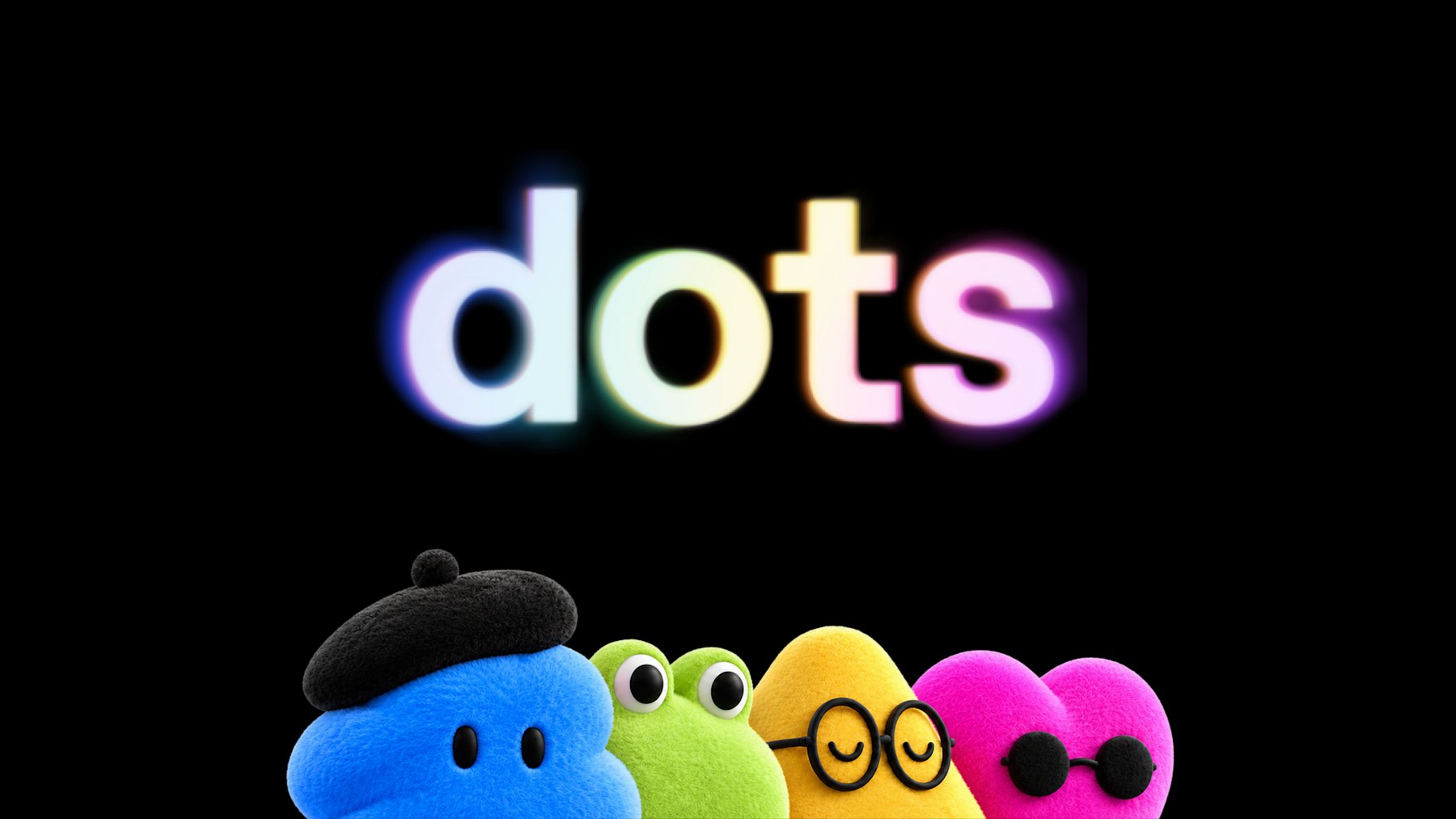
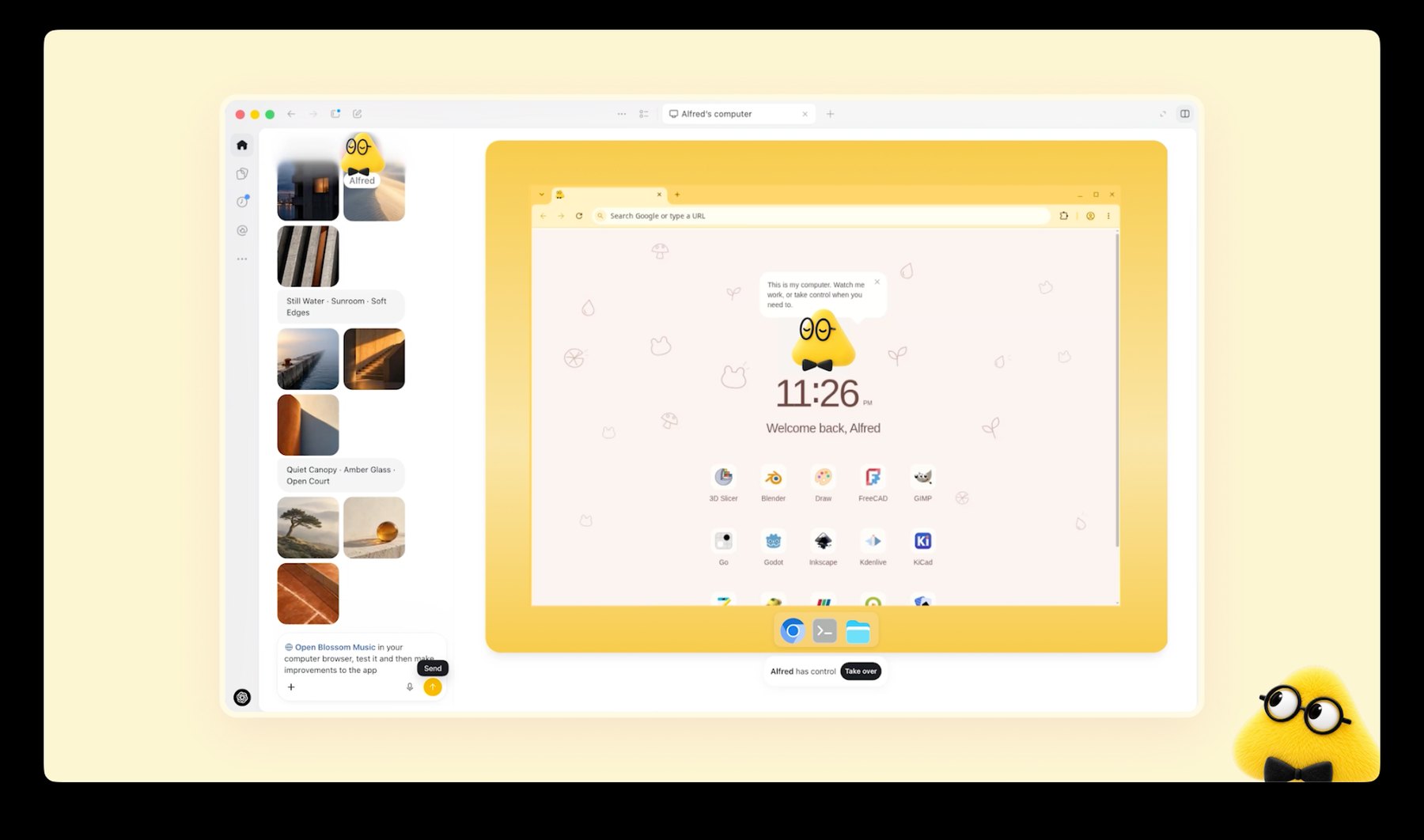
It is called a dot. It is an AI agent with its own computer that keeps working after you close your laptop, and OpenAI drew it as a soft toy. TechCrunch’s headline settled on “bubbly agentic avatar”.

Four plush characters under a glowing dots wordmark: a blue one in a beret, a green frog, a yellow one in round glasses and a pink heart in sunglasses
The four dots from OpenAI’s launch art. Each stands for an agent with its own cloud computer. Image: OpenAI

Most of the day was not for us. OpenAI counted more than 20 launches, and its post about the new model never uses the words design, interface or visual.

Six of them matter anyway. One is that model, GPT-6.1 Sol, which costs half of what Opus 5.5 does. Last week we wrote three briefs to find out what Opus 5.5 could design, and published what came back. We still had the briefs.

So we ran them again. Below is what Sol built, live, next to the Opus versions, with the time and the bill.

After that comes the rest of DevDay, starting with my favourite launch. It’s a sign-in button. Stay with me.

Sixty seconds of vocabulary

  • GPT-6.1 Sol. OpenAI’s new mid-priced model. GPT-6 is the generation. Astra is the flagship, Sol sits under it, Luna is the small fast one.
  • Opus 5.5. Anthropic’s model from last week’s piece. The one we measure Sol against here.
  • ChatGPT Work. The part of ChatGPT that does tasks instead of chatting: documents, decks, sites. Sol lives there. It is not in the regular chat yet.
  • Codex. OpenAI’s coding agent, its answer to Claude Code. It now sits inside the ChatGPT desktop app.
  • Sites. ChatGPT’s own hosting. It builds a web page and gives you a link.
  • Dot. An agent that keeps running on its own computer in the cloud and messages you when it needs a decision.
  • Plugin. A connector between ChatGPT and another app, like Figma. A plugin extension lets that app show its own interface inside ChatGPT.
  • Tokens. The unit AI is billed in. Everything the model reads and writes costs tokens.
  • Effort. How long the model thinks before it answers. Sol defaults to medium. We ran it on high.
  • GSAP and Lenis. Two free libraries our briefs ask for by name. One animates, the other smooths scrolling.

That is the whole glossary.

🤖 The model: GPT-6.1 Sol

Released 29 September 2026 · $2 in, $10 out per million tokens · ChatGPT Work and Codex, Plus plan and up · API name gpt-6.1-sol

OpenAI’s pitch fits in a heading: “Near-Astra intelligence for a fifth of the price”. Astra is the flagship, at $10 and $50. Sol is what the Plus plan gets.

Opus 5.5 costs $4 and $20, so Sol is half that. It is also exactly what Anthropic charges for Sonnet 5.5, the cheaper tier we told you to watch last week. That one shipped the day before DevDay. We have not run these briefs on it.

A cheaper model only matters once it is good enough that you stop rationing attempts.

The launch post will not tell you whether it is. It is charts about code, PDFs, business workflows and science. As with Opus last week, the evidence has to come from building things.

One tester got there before us. Ramanpal Singh at PromptsLove built five apps and gave his only perfect score to a watch page with a 3D model that comes apart as you scroll.

On motion he was blunt: “It struggled when I asked for cinematic motion design.” Our second brief is a title sequence. Good.

🧪 Same three briefs, different model

Each brief went to Sol once, word for word. It got the setup Opus had: the same design guidance file, a real browser it could drive and take screenshots with, and the standing instruction to check its work there and fix what it saw, at least twice. We told it the page would be embedded here, about 720 pixels wide.

The guidance file is Anthropic’s frontend-design skill. Yes, we handed OpenAI’s model its rival’s house rules. It is a text file. It worked.

Opus ran inside Claude Code. Sol ran through OpenAI’s API, the pay-per-use route developers use, in a small rig we wrote to give it the same abilities: read a file, write one, edit it, and use the browser. We set effort to high.

No references, no notes from us, one attempt each, and no person touched the files afterwards. One of our own tools hung during the title-sequence run. We fixed the tool, replayed that single check and left the stalled minutes out of its time.

🎨 A website: sea salt, and a hero made of water

The client every studio turns down, again. Two people, a great story, no budget.

Build a one-page website for Lenn, a two-person sea salt
harvest on the salt marshes of Guérande, in Brittany.
Visitors are chefs and food lovers who might order a tin
or come and visit.

Mood: quiet, tidal, tactile. Grey Atlantic light, not
beach kitsch. Pick distinctive type, one or two families.

The one memorable thing: the hero is water. A real-time
WebGL water surface fills the screen and ripples where the
cursor moves, with the Lenn wordmark under the surface,
refracting. As you scroll, the tide drains away and salt
crystals appear on the clay.

After that: how the salt is raked by hand (a short
scroll-driven story in three moments), the three salts and
what to cook with each, visiting the marsh, and ordering.

Motion: one orchestrated page load, then scroll-linked
scenes with GSAP ScrollTrigger and Lenis. No fade-up on
every section. Respect prefers-reduced-motion. It must work
on a phone. Quality bar: a site we would feature on Muzli
Picks. Single HTML file, libraries from a CDN.

GPT-6.1 Sol · 17 minutes · 3 fix passes · 51 KB · $0.98

Live demo. Move your cursor over the water, then scroll inside the frame. It holds on to your scroll wheel, so move the cursor out of the frame to keep reading. Open full screen, or open the Opus 5.5 version of the same brief. Built by GPT-6.1 Sol from the prompt above.
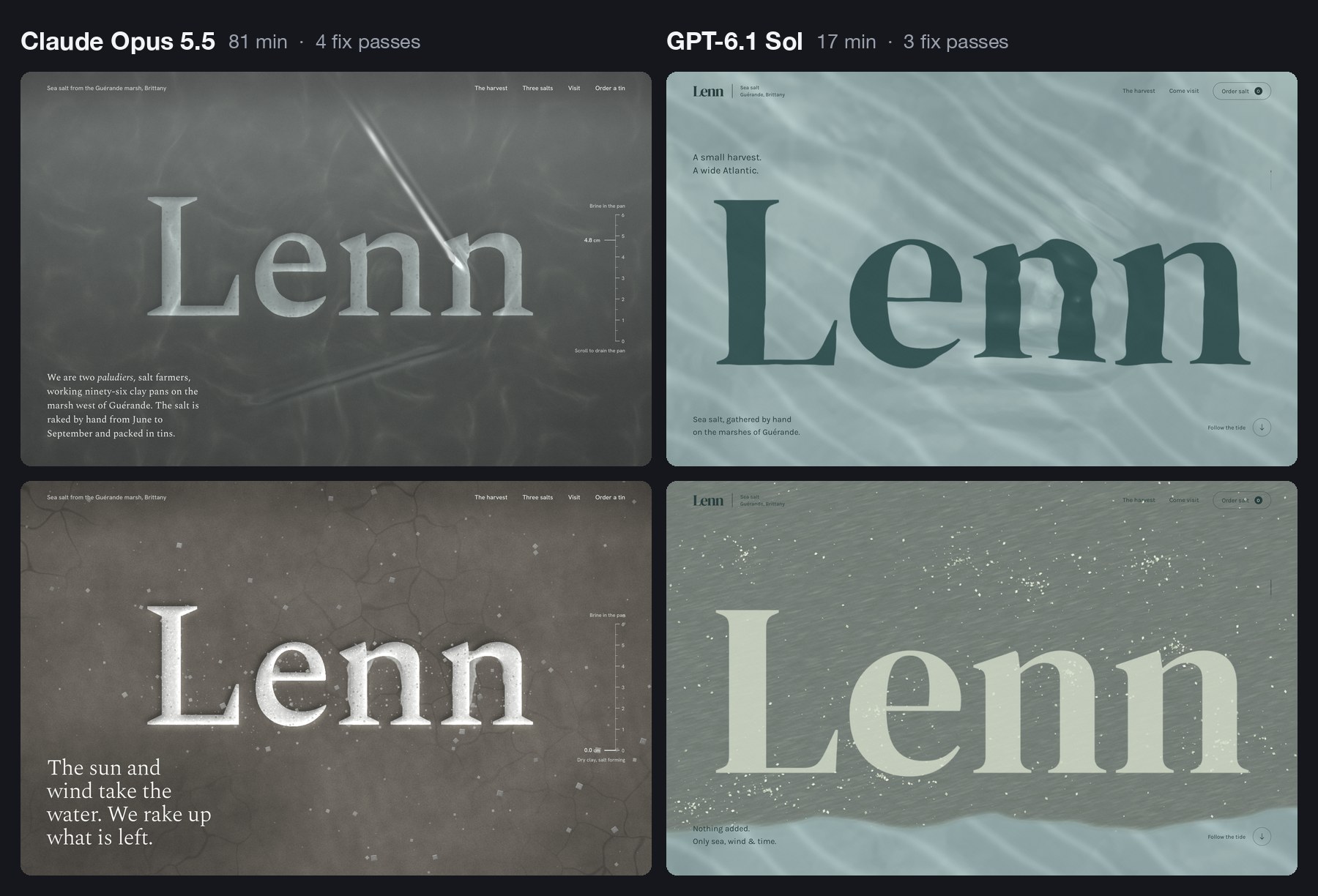
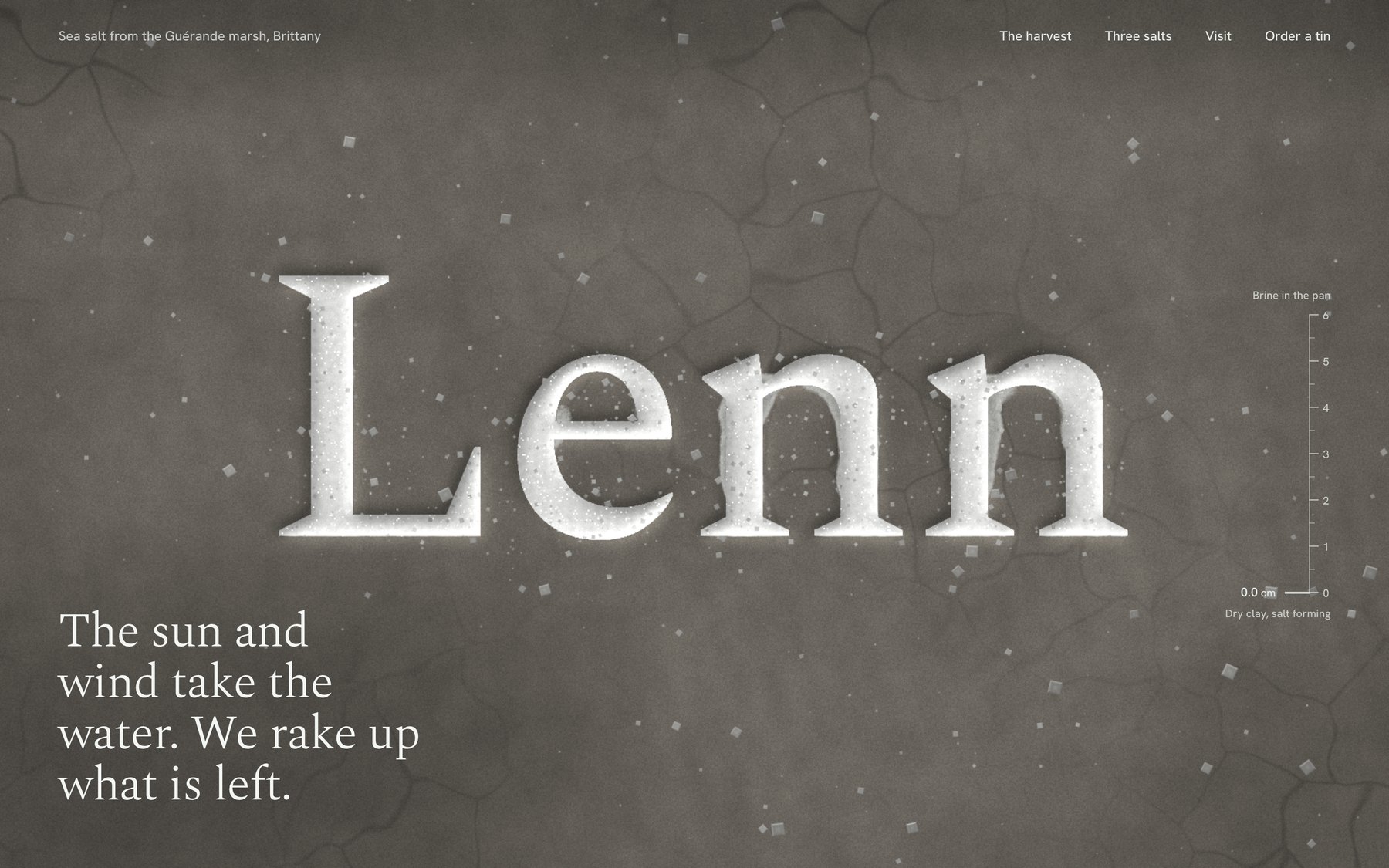
Two versions of the Lenn website side by side. On the left, by Claude Opus 5.5, a pale wordmark carved into dark grey clay under water, with a tide gauge. On the right, by GPT-6.1 Sol, a dark green wordmark under pale sea-green water. Below each, the same hero after scrolling, drained and scattered with salt
Same brief, two models. Top row, the hero under water. Bottom row, after you scroll. Image: Muzli, built with Claude Opus 5.5 and GPT-6.1 Sol

It did everything on the list. The hero is live water, drawn on the graphics card, with the wordmark lying under it. Move the cursor and the letters bend.

Scroll and a tide line travels down the screen. Above it the wordmark dries pale on grey clay while salt gathers in clusters.

Below the hero there is a pinned harvest story in three steps, drawn as the pans seen from above. Then three tins drawn in code and a map of the marsh. The type is DM Serif Display and Karla.

Nobody asked for the next part. The order form adds up and saves a summary, and a small planner lets you pick a month for a visit. Sol’s extras are practical ones.

Its notes show it read the same warnings Opus read. Before building, it wrote: “I’m avoiding the usual cream-and-terracotta craft-food look and photographic placeholders.” On the second pass it wanted the salt to “gather in natural clusters rather than read as scattered confetti”.

On its first look, the water was a black rectangle. A shader, the small program that draws the water, had failed to compile. Sol read the browser’s error log, fixed it and moved on. That loop is the reason any of this works.

Now put it next to the Opus version. Opus carved the wordmark into the clay, added a tide gauge that falls from 4.8 cm to zero, and wrote the harvest in the marsh’s own vocabulary. It took 81 minutes. Sol took 17 and made the site a client signs off. Opus made the one you screenshot.

One real flaw, and you may have just met it. Inside a frame like the one above, Sol’s page keeps your scroll wheel even when it has nothing left to scroll, so the article around it stops moving.

Opus hit the same trap last week, noted that “a blog reader could get stuck”, and handed the wheel back to the page. Sol checked that its page scrolls inside a frame. It did not check what happens at the end.

What it tells you: at 17 minutes and under a dollar, you stop asking for one site. You ask for three directions and pick.

🎬 Motion: a title sequence you can scrub

This is the brief I expected it to fumble.

Make a 12-second looping title sequence for a fictional
design festival called Offset, as a web page.

Think opening titles, not a website: kinetic type on a
strict grid. Letters slide in along the grid, the grid
itself rotates and stretches, colours swap in hard cuts on
the beat, and it resolves into the Offset lockup with the
dates (14-16 May, Vilnius) before looping cleanly.

Build it on one GSAP timeline. Add a small After Effects
style transport bar at the bottom: play/pause, a scrubber I
can drag, the current time, and 0.25x / 1x speed. Easing
should feel designed, so name the curves you use in a code
comment. Single HTML file. No stock fade-ins.

GPT-6.1 Sol · 8 minutes · 2 fix passes · 16 KB · $0.36

Live demo. Press play, drag the scrubber, switch to 0.25x. Open full screen, or open the Opus 5.5 version of the same brief. Built by GPT-6.1 Sol from the prompt above.
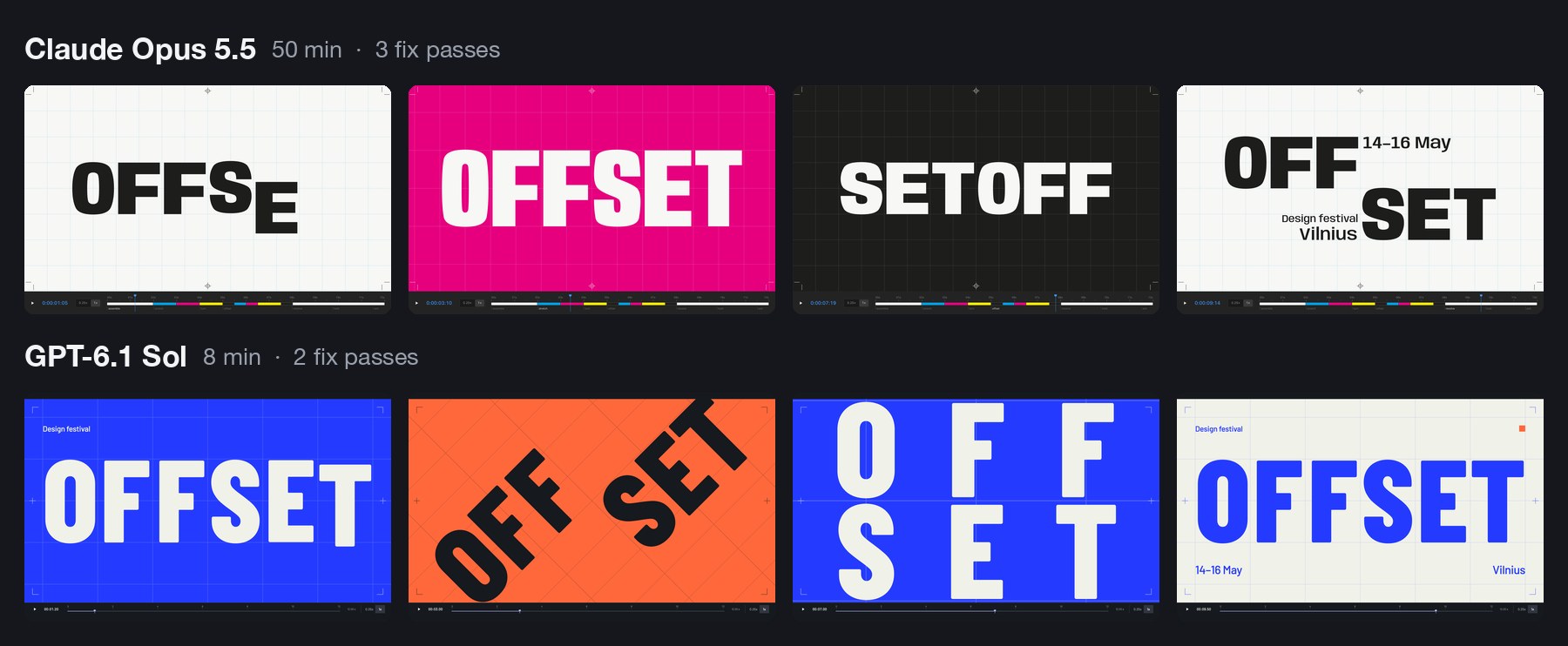
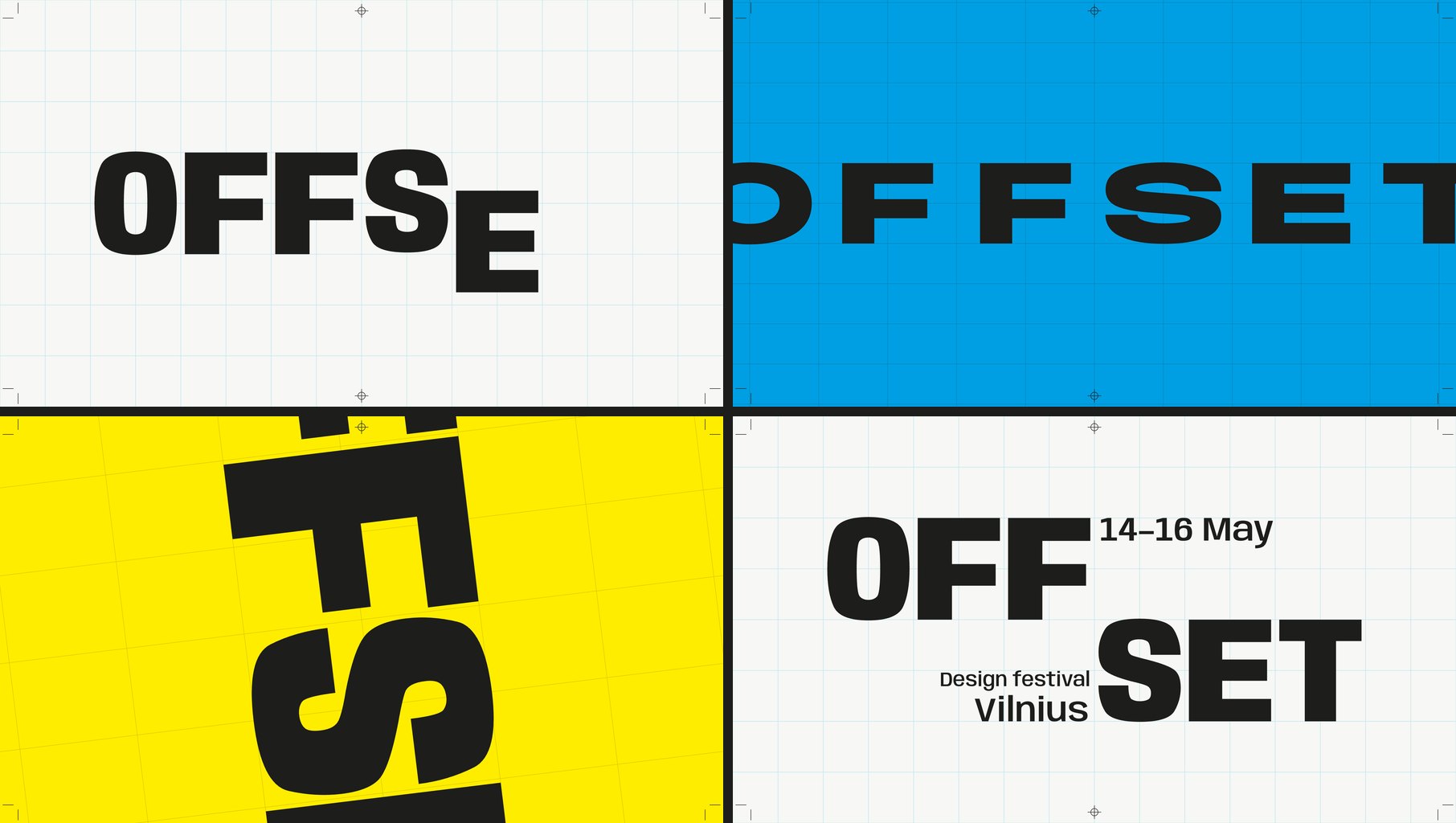
Two rows of four frames. Top, by Claude Opus 5.5: the word Offset on paper, magenta and black, reading SETOFF in one frame, then a stacked OFF SET lockup. Bottom, by GPT-6.1 Sol: Offset in white on ultramarine, tilted on orange, split into two rows, then a blue lockup on paper with 14-16 May and Vilnius
Four moments from each loop. Image: Muzli, built with Claude Opus 5.5 and GPT-6.1 Sol

It did not fumble. Twelve seconds on one GSAP timeline, and a last frame that matches the first. Barlow Condensed in ultramarine, paper, ink and orange.

The letters ride in on six columns. The whole grid swings through a quarter turn, the word blows up past the edges of the frame, splits into two rows and lands on the lockup with the dates. The colours change in hard cuts.

It named its curves, as asked:

register  (.16, 1, .30, 1)   a fast rail move, precisely
                             arrested.
torque    (.76, 0, .24, 1)   heavy symmetric acceleration
                             for grid pivots.
shunt     (.83, 0, .17, 1)   a short hold, then a decisive
                             regrouping.

Here is the strange part. Last week Opus named its curves rail, shunt and crank. Two models from two companies read one sentence about letters sliding along a grid, and both thought of a railway yard. Both called a curve “shunt”. The word is not in the brief or in the guidance file, and neither model saw the other’s work.

They also both read the festival’s name as a printing term. Sol planned “a moving print-registration system” and put crop marks in the corners. Opus went the whole way: four ink plates, a print run, and the word reeling round until it read SETOFF, which in printing is another word for offset.

That is the gap in one example. Sol used the idea as trim. Opus built the whole sequence out of it.

One requirement slipped. The brief wanted cuts “on the beat”. Sol’s cuts land at 2, 3, 4.5, 6, 7.65 and 11.5 seconds, which is nobody’s idea of a beat. Opus set a tempo of 120 BPM and cut on it.

What it tells you: bring the concept and Sol executes it in eight minutes. If you want the concept supplied, that is still the slower, more expensive model.

👆 Interaction: a player you can catch mid-spring

A Figma prototype shows where a screen ends up. It cannot show how it feels to throw it there.

Prototype the mini player to full player transition of a
music app, in a phone frame, as a web page I can use with
a mouse or a finger.

The mini player sits above a tab bar. Drag it up and the
album art grows out of it into the full player, following
my finger 1:1, then settles with a spring. Fling it down to
dismiss; the release speed decides whether it closes. In
the full player: a waveform I can scrub, a like button with
a small burst, and a queue I can reorder by dragging.

Everything must be interruptible: grab it mid-animation and
it stops where it is. Add a "slow motion" switch that runs
all motion at 10% speed so I can review the curves.
Draw the album art in code. Single HTML file.

GPT-6.1 Sol · 11 minutes · 3 fix passes · 38 KB · $0.53

Live demo. Drag the mini player up, fling it down, grab it halfway. Turn on slow motion. On a phone it fills the screen. Open full screen, or open the Opus 5.5 version of the same brief. Built by GPT-6.1 Sol from the prompt above.
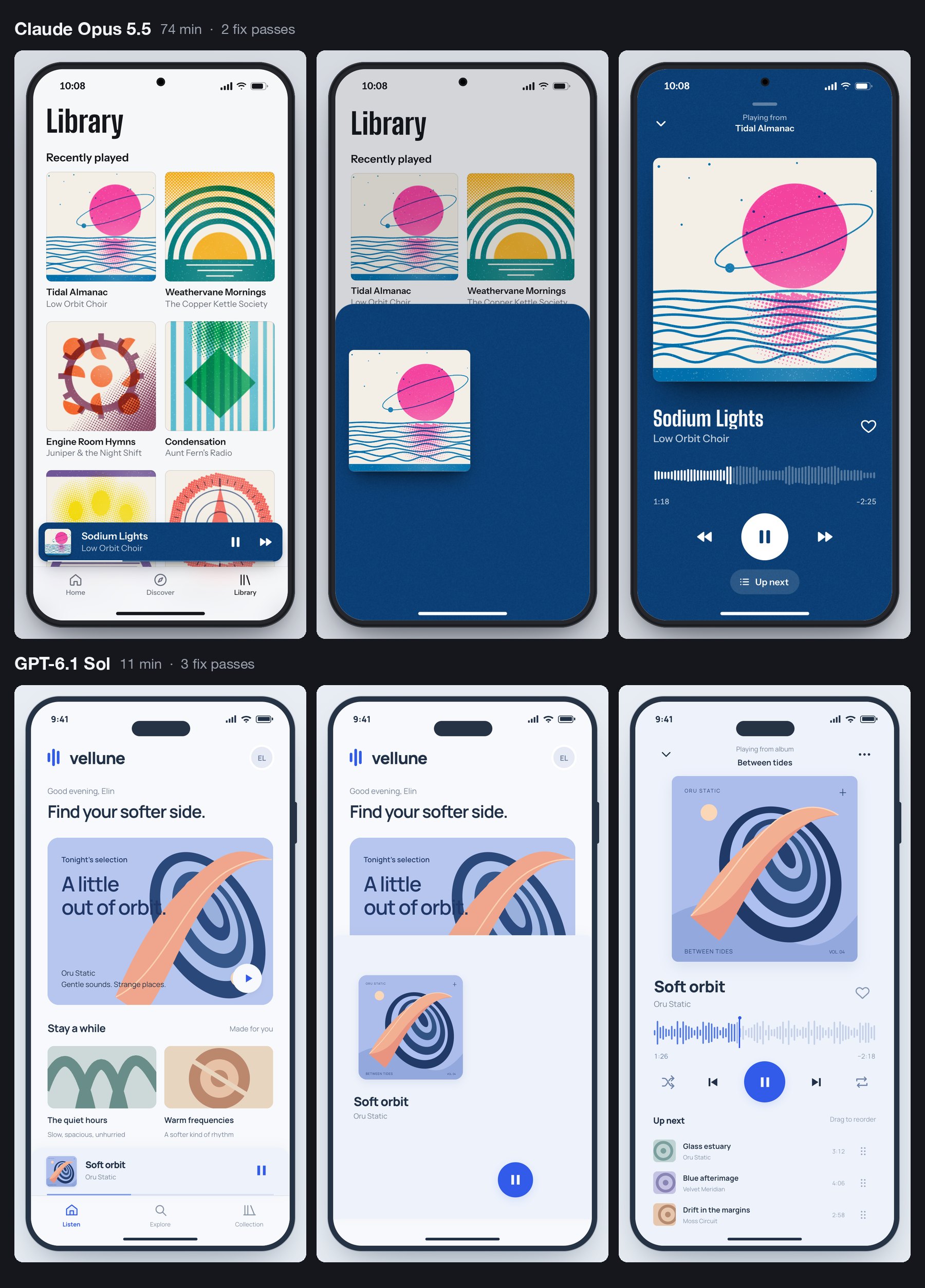
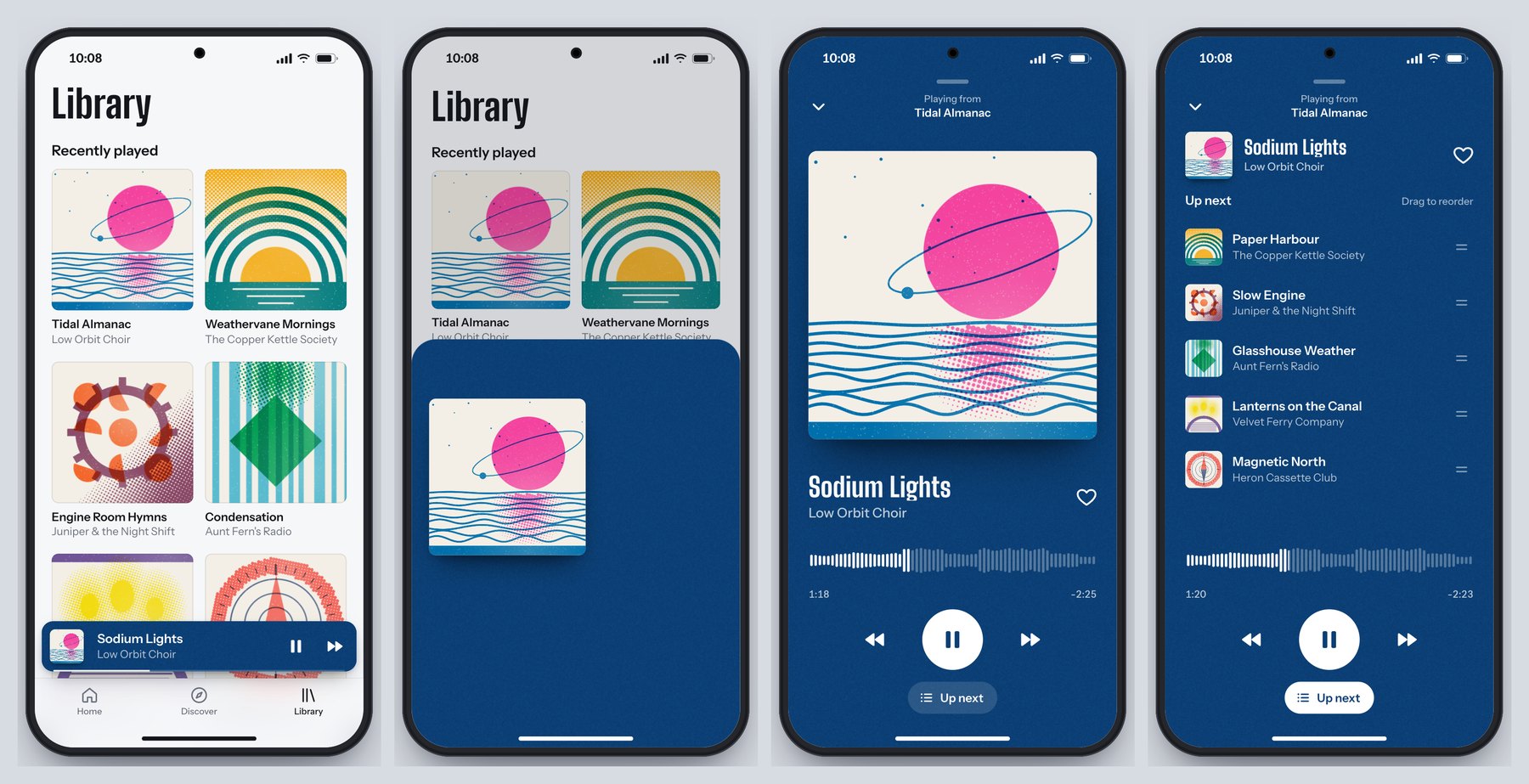
Six phone screens in two rows. Top, by Claude Opus 5.5: a library of risograph-style album covers, the cover growing mid-drag on a deep blue sheet, and the full player. Bottom, by GPT-6.1 Sol: a pale blue home screen, a small cover mid-drag, and a full player with a waveform and an Up next queue
Home, mid-drag and full player, from each model. Image: Muzli, built with Claude Opus 5.5 and GPT-6.1 Sol

Sol invented an app called vellune and one album, drew the cover in code, and built the whole transition around that one piece of art travelling from the mini bar to the full player.

The requirements hold. The sheet follows the pointer one to one, and Sol measured it: “a 33 px pointer move produced 33 px of sheet movement”. Let go and a spring takes over, written by hand with no library, at stiffness 230 and damping 25.

Fling down fast and it closes. Drag the same distance slowly and it springs back open. We tried both. The waveform scrubs, the heart throws a small burst, the queue reorders, and the slow-motion switch runs everything at a tenth of the speed. Grab the player mid-flight and it stops where it is.

It found its own bugs in the screenshots: a play button in the wrong place, the mini player covering the tab bar, a title colliding with the cover halfway through a drag.

It missed one. A press that does not move counts as a tap, and a tap toggles the player. So touching the album art in the open player closes it. The Opus version stays open.

A person finds that in ten seconds. A screenshot never will.

Against the Opus version, the difference is appetite again. Opus drew six albums as two-colour risograph prints and let the player take its colours from the cover. Sol drew one album cover, two simple playlist tiles and a clean pale-blue interface that could belong to any streaming app. Both would do their job in a design review. Only one gives the room something to talk about afterwards.

What it tells you: “does this gesture feel right” now costs 53 cents and eleven minutes to answer.

⚖️ What three runs add up to

Three briefs is a small test. One attempt each, in a rig we built, outside OpenAI’s own apps. Trust the pattern more than the decimals.

  • Speed changes the method. Sol needed about 35 minutes for all three. Opus needed about 205. When a build takes 80 minutes, you write one brief and wait. When it takes ten, you run three directions before lunch and give notes on the one that deserves them.
  • It builds the drawing. Sol is the builder who delivers exactly what is on the plan, plus a sensible extra socket. Opus is the one who phones at nine to say he had an idea about the staircase. Which one you want depends on the week.
  • It checks what it thinks of checking. Both models look at screenshots and fix what they see. Neither can feel a spring. Sol let two things through that Opus did not: the scroll trap and the tap that closes the player.
  • Good guidance travels. Anthropic wrote the skill file for Claude. Sol read it and avoided the same clichés by name. What you learned about briefing last week still applies.
  • Price is no longer a reason to skip the test. $1.88 bought three working builds, each about half the file size of its Opus twin. We can’t give you the same bill for Opus, because it ran on a Claude Code subscription and no invoice exists. On list price it costs twice as much per token, and it worked about six times as long.

All six builds are live, in pairs, further down.

🗓️ The rest of DevDay, sorted for designers

OpenAI’s recap runs to 25 entries. Besides the model, five are worth your time.

The first is the one I’m most excited about, and the one you can do least with this week. The other four follow in the order I would open them.

🔑 Sign in with ChatGPT: the one I’m most excited about

Sign-in: everyone · spending your plan in other apps: Plus and Pro · 16 launch partners, including Notion, Vercel and Devin · other apps: a waitlist

An app with an AI feature pays the AI company for every request you make. So it eats the cost, asks you to paste in a developer key, or sells you its own credits on top of its subscription. Grant Harvey at The Neuron called these the “three ugly choices”.

Sign in with ChatGPT adds a fourth. The button itself has been on a few partner sites since July.

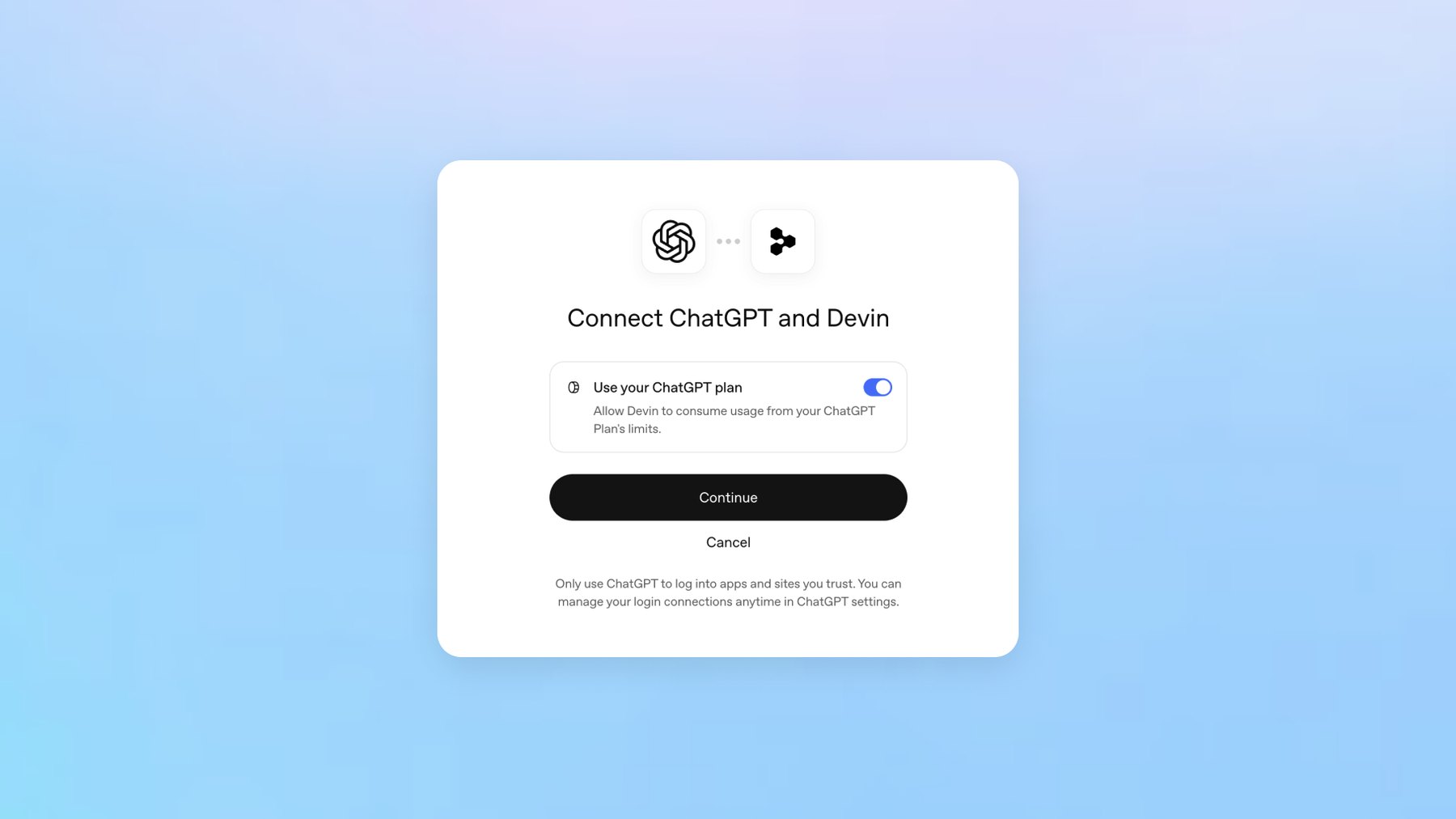
What DevDay added is the second step. After signing in, you can let the app spend from your ChatGPT plan. The consent screen has one toggle, labelled “Use your ChatGPT plan”.

It is bring-your-own-bottle for AI. The app provides the table, you bring the tokens, and the house may still charge corkage. OpenAI’s help page says the same in plainer words: the app “may charge separately for its subscription, infrastructure, services, or premium features”.

A consent dialog titled Connect ChatGPT and Devin, with one toggle labelled Use your ChatGPT plan, a Continue button and a Cancel link
One toggle decides whether an app may spend from your ChatGPT plan. Image: OpenAI

You decide how much each app may pour. In ChatGPT’s settings you give it a weekly share of your plan, from 10% to all of it. Sharing your plan does not show the app your chats.

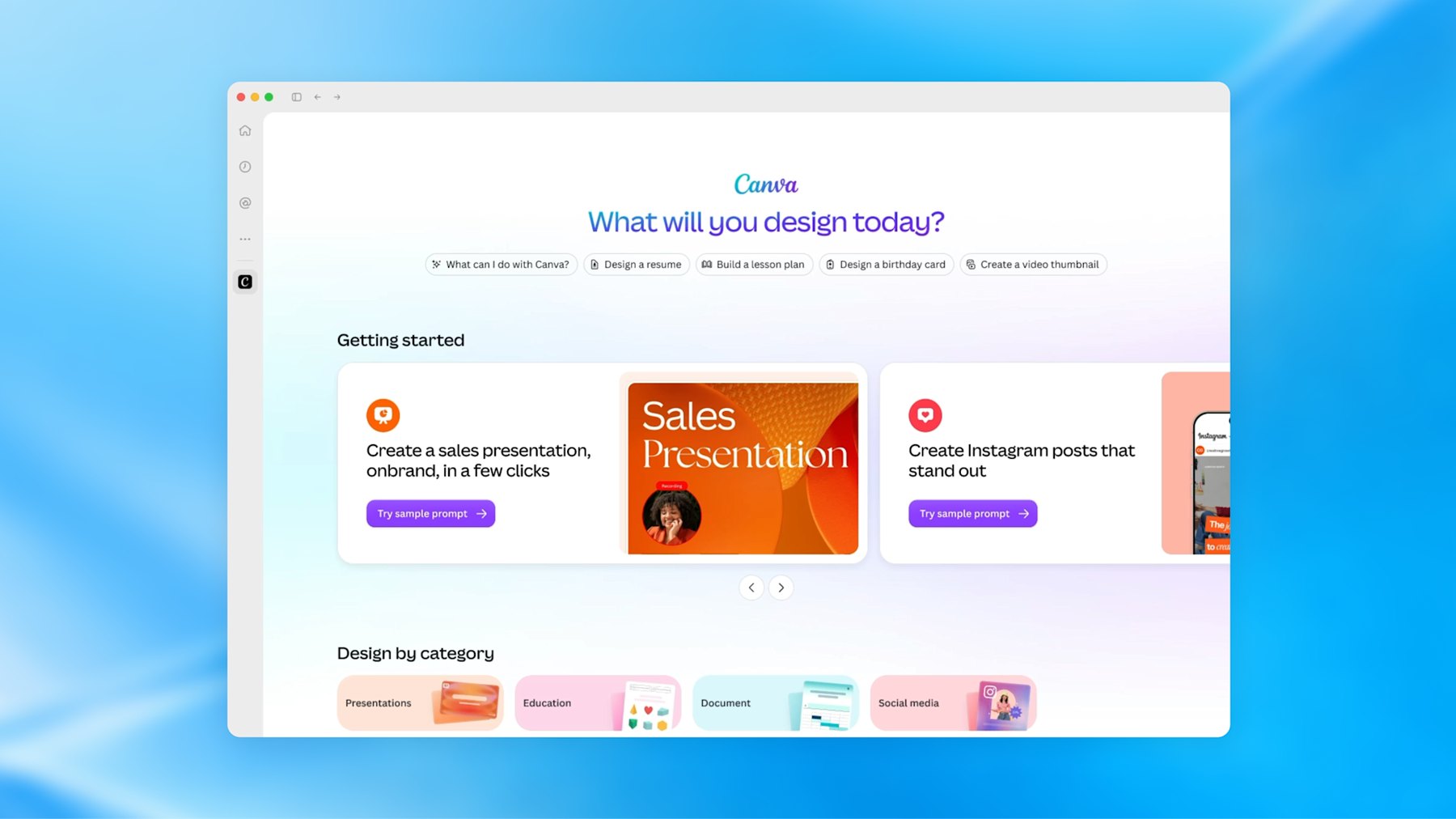
For now the partners are mostly developer tools. Notion is on the list, Lovable is coming, and Canva takes only the sign-in.

My excitement is partly selfish. At Muzli we use a few AI design tools in-house that we have never shipped to you.

This button would let them run on your plan instead of our bill, inside a limit you set. I’m adding it to Muzli as soon as OpenAI lets us in.

That is the catch. Plan sharing is open to open-source tools and a few selected companies. Every other app, Muzli included, joins a waitlist.

And for now a plan cannot pay for image generation, which design tools will notice.

I also hope it doesn’t stay an OpenAI feature. Every’s DevDay review called OpenAI “the first major lab to take this step”. Anthropic’s help page still tells anyone building a product for others to “use API key authentication”.

I want this button from every AI company, so you pay once for the model you like and take it into every tool you open.

What it unlocks: AI features your company does not pay the model bill for, and fewer AI subscriptions for everyone using them. The screens it needs are below.

🌐 Sites: ChatGPT hosts what it builds

Public beta · Plus, Pro, Business, Enterprise and Edu · a chatgpt.site address or your own domain

You have a prototype in a chat window. Getting it to a link you can send a client still means a hosting account and a favour from a developer.

Sites removes that step. Ask ChatGPT for a website, or type @Sites. It builds, shows you a private preview, and publishes when you say so.

You pick who can open it: selected people, your workspace, or everyone. You can point your own domain at it.

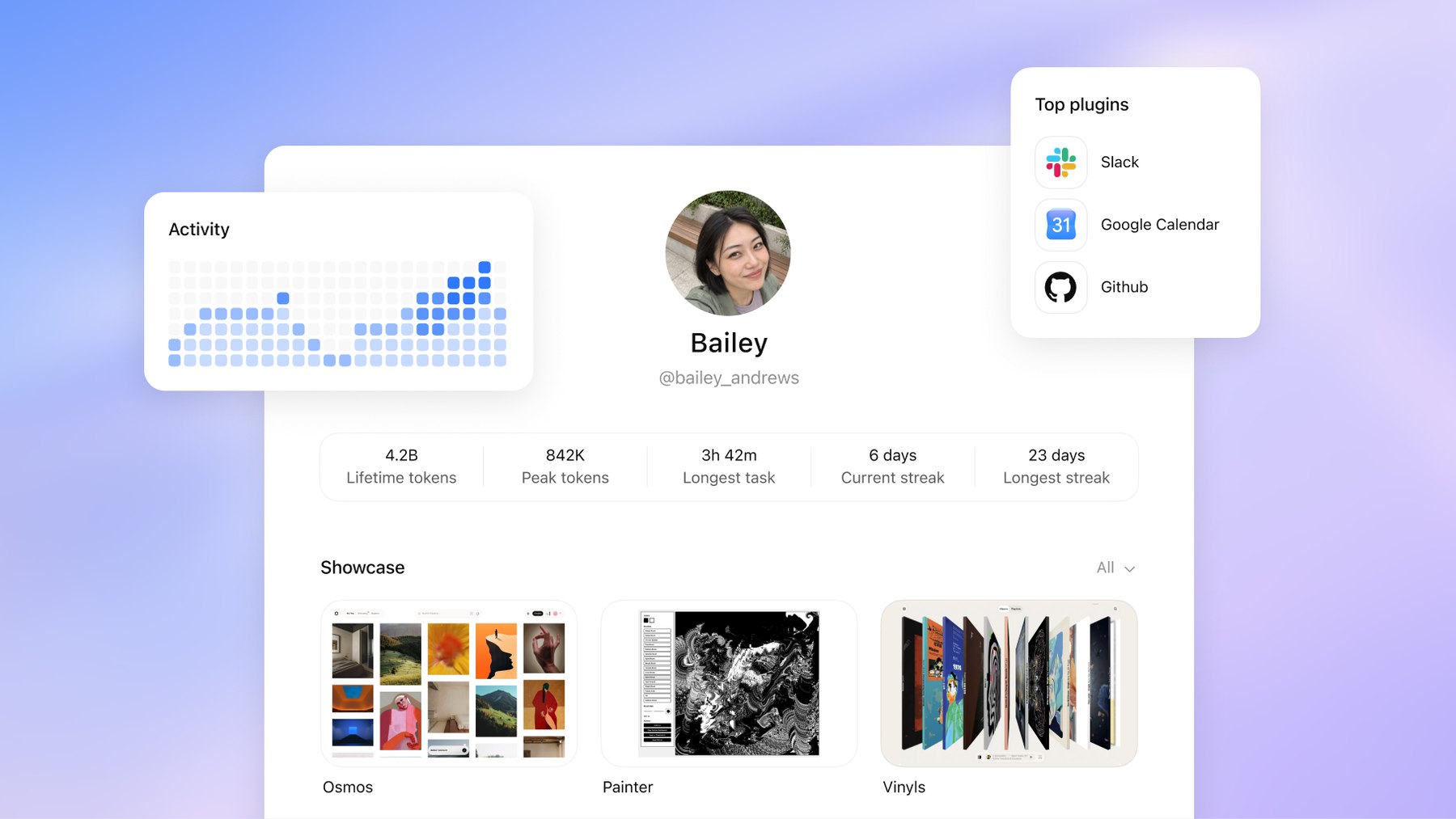
It is not new. At the DevDay session, Simon Willison noted that it “launched earlier this year and is already hosting 8m sites”. What DevDay added is the layer around it: scheduled tasks that keep a Site current, Sites that read each visitor’s own connected apps on business plans, and shareable profiles.

A profile is a page at chatgpt.com/u/your-name that shows up to 12 of your Sites. OpenAI’s mock-up also shows an activity grid and a count of lifetime tokens, which makes it the first portfolio I have seen that reports how hard you worked the machine. The catch is that people have to be signed in to ChatGPT to see it.

A mock-up of a ChatGPT profile page for a user called Bailey, with an activity grid, counters for lifetime tokens and streaks, a list of top plugins and a showcase of three Sites
OpenAI’s mock-up of a shareable profile: activity, token counts and a showcase of Sites. Image: OpenAI

OpenAI also publishes a showcase of Sites with the full prompts that built them. What those prompts teach is further down.

We did not publish through Sites for this piece. Our demos sit on our own server, so this section comes from OpenAI’s documentation. We have not used it ourselves.

What it unlocks: a brief becomes a link in one sitting, on the $20 Plus plan, which is €23 here in the EU. A pitch microsite. A case study with a working prototype in it. A client review that needs no deploy.

🧩 Plugin extensions: your tools move into the chat window

All plans, per OpenAI · on the web, "coming soon" for Free and Go · Figma mentions need the desktop app

Until now an app inside ChatGPT was a connector. The chat could fetch things from Figma, and that was all. An extension gives the app its own interface in three places: an entry in the sidebar that opens it full screen, a panel beside the conversation, and a viewer that opens when you click a file the app owns.

OpenAI’s three launch examples are all design tools:

  • Canva builds and previews designs in a sidebar tab.
  • Figma lets you search for your files and mention them from the message box.
  • Adobe opens files for editing “with Acrobat and Photoshop directly in ChatGPT”.
The ChatGPT desktop app with Canva open as a full-screen sidebar app, showing the heading What will you design today and cards for presentations and Instagram posts
Canva running as a sidebar app inside ChatGPT. Image: OpenAI

Think of a brand’s corner inside a department store. You get the footfall. They own the floor plan.

What it unlocks: for you as a user, fewer trips between a chat and a canvas. For you as a designer of products, a new place to design for, with someone else’s rules. If your company ships a plugin, somebody has to design the version of your product that lives in a narrow panel beside a conversation.

🫧 Dots: the mascot and the agent

Rolling out now · Pro and Business Premium · on Pro, not in the European Economic Area, Switzerland or the UK · runs on GPT-6 Astra

A dot is one never-ending conversation with an agent that has its own computer in the cloud. You give it a goal. It keeps going while your laptop is shut and messages you, in ChatGPT, Slack or Teams, when it needs a decision.

Think of a colleague who never closes the laptop and has read all your email. That is the promise, and also the worry.

OpenAI’s own example for our trade: “A new design arrives, and dots turn it into a working app while the team focuses on customer feedback.” Look closely at the launch screenshot and the desktop of the dot’s computer holds Blender, GIMP, Inkscape and Kdenlive.

The ChatGPT app showing a dot called Alfred and its own computer: a browser window on a yellow desktop with icons for Blender, GIMP, Inkscape, Kdenlive and other apps
A dot’s own computer, from OpenAI’s launch post. Blender, GIMP and Inkscape are on its desktop. Image: OpenAI

Now the small print. Dots need a Pro plan, which starts at $100 a month, or Business Premium. On Pro, OpenAI does not offer them in the European Economic Area, Switzerland or the UK. If you are a designer in Europe on a personal plan, a dot is a screenshot for now.

And the one long hands-on review says wait. Dan Shipper at Every tested a dot for days. It “has become the main way I use ChatGPT”, he wrote, and it was “too buggy for me to recommend now”. His advice is to give it a week or two.

The design story is the blob itself. Meta’s Muse did it, Grok Bots did it, and now dots. The always-on agent keeps arriving as a soft toy.

TechCrunch called it “the latest example of a company attempting to make AI more relatable”. I would put it less kindly. The more access a product asks for, the softer its mascot gets.

What it unlocks: handing over the watching. The feedback channel. The launch whose scope keeps moving. Just not this month, and not in Europe.

📄 Space, Pages and slides

Space and Pages: Pro, Business and Enterprise · slides: "in the coming weeks"

Space is where ChatGPT now keeps your files, shared with your team and its agents. A Page is a document that people and AI edit together. OpenAI’s list of uses includes turning “a teammate’s design into engineering tasks”.

The part for us is slides. OpenAI says you will “create interactive slides with ChatGPT and your team, from a conversation or your own template”, then present them in ChatGPT or “export to PowerPoint or Google Slides with formatting intact”.

What it unlocks: read “your own template” twice. When an agent builds the deck, the template is the only thing holding the brand in place. Name the layouts and lock the colours.

Last week Every watched Opus 5.5 turn its green into purple in a deck built from its own template. Nobody has shown this one doing better yet, so try it on a deck that does not matter.

The rest is plumbing and pricing. Ultrafast makes Astra write up to eight times faster for people on the new $500 plan. Codex runs in the cloud and takes orders by voice.

If none of that raised your pulse, you read it correctly.

What the room made of it

  • Read it as one move. Grant Harvey at The Neuron: “OpenAI spent DevDay assembling the pieces of an operating layer for AI agents.”
  • Impressive, and tiring. Dan Shipper closed Every’s review with: “I’d be even more excited if the next time I opened ChatGPT, there was less for me to figure out.”
  • Some of it was overdue. Simon Willison live-blogged from the room, failed demos included. On Sites getting sharing controls: “(I admit I thought they had that feature already.)” On signing in with ChatGPT: “I’ve wanted this one for years!” Sam Altman said as much in the closing session: “we should have done it a long time ago”.
  • The safety argument has not gone away. Axios noted that OpenAI said the same week it would hold back its newest flagship, GPT-6.1 Astra, over security concerns.

🧭 What changes in your work

  • Design the lending moment. If your product has AI features, someone will ask for “Sign in with ChatGPT”. OpenAI’s guidelines already sketch the screens: a ChatGPT button as prominent as your other sign-in options, a one-time “You’re using your ChatGPT plan” note, a “Using ChatGPT plan” label by the message box, and a “Usage limit reached” state whose main button opens ChatGPT’s settings, with your own credits second. Your pricing page has to say which of your plans include it. All of it still needs your product’s voice.
  • Design the side-panel version. A plugin extension is your product in a panel beside a chat. Decide which three tasks deserve that panel. Everything else stays a link.
  • Make screens an agent can read. Dots operate software by looking at it, the way our rig’s browser did. Icon-only buttons, hover-only actions and unlabelled states were always bad for people. Now they also stall your customer’s assistant.
  • Test what screenshots can’t see. Our two bugs were a scroll that would not let go and a tap in the wrong place. Both are invisible in a still image. Put your hands on every build before it leaves the room.

Try it this week

🛠️ If you do not write code: the fifteen-minute tour

  • Open the six demos in pairs, full screen. Scroll both salt sites. Scrub both title sequences at 0.25x. Fling both players shut. Decide which one you would have signed off, and notice why.
  • Open Frame Studio or Type Field in OpenAI’s showcase. Press “Try it live”, then read the prompt under “Build process”. Count the lines that forbid something.
  • If you have the Plus plan, open ChatGPT, switch to Work, pick GPT-6.1 Sol and paste a brief with the word “website” in it. Look at the private preview before you publish anything.

🛠️ If you build with AI tools

OpenAI’s own showcase prompts forbid different things than ours do. Ours ban looks: no fade-up on every section, no beach kitsch. Theirs ban fakes.

The Type Field prompt says: “Do not claim to have designed an existing font, fabricate unsupported variable axes, or simulate width by merely stretching every glyph.” Frame Studio wants real animation, “not stock footage or a screenshot pretending to play”. A good brief needs both lists.

So last week’s template grows two lines. We have not run this one through Sites ourselves:

Build a website for [who]. @Sites
Visitors are [audience] who want to [job].

Mood: [three words]. Not [the cliché you fear].
Type: [families, or "pick distinctive type"].

The one memorable thing: [the moment people will
screenshot]. Everything else stays quiet.

Sections: [in order].

Motion: [the one orchestrated moment]. Respect
prefers-reduced-motion. Works on a phone.

Do not use: [the looks you are tired of].
Do not fake: logos, awards, reviews, or a form that
pretends to send.

Save a version and show me the preview. Do not
deploy until I say so.

That last line matters. OpenAI’s docs warn: “Every Sites deployment URL is a production deployment.”

A build is cheap now, so ask for directions first:

Before building, give me three directions for this
brief: three palettes, three type pairings and three
versions of the one memorable thing. One short
paragraph each. I will pick one, then you build.

After the first build, send the follow-up aimed at the two bugs our screenshots missed:

Now use it like a visitor, not a camera. Scroll to the
very end and keep scrolling. Tap every element once
without dragging. Open it inside an iframe on a longer
page. Tell me what surprised you, then fix it.

🛠️ If you write code

The model name is gpt-6.1-sol. A first call looks like this:

import OpenAI from "openai";
const client = new OpenAI();

const response = await client.responses.create({
  model: "gpt-6.1-sol",
  reasoning: { effort: "high" },
  input: "Your brief goes here.",
});
console.log(response.output_text);

In Codex it is one flag: codex -m gpt-6.1-sol.

One call writes a page. What made ours work was the loop around it. The model gets a browser tool, loads its own page, looks at the screenshot, reads the error log and edits the file. Our rig is about 700 lines of Python on top of Playwright.

If you give the model tools, use the Responses API. OpenAI’s docs say Chat Completions does not support function calling for this model.

If you already have a project, OpenAI’s docs supply the prompt:

Deploy this project with Sites. Check whether it is
compatible, make any required changes, and give me
the deployment URL.

🆚 Opus 5.5 and GPT-6.1 Sol, side by side

Here are all six, in pairs. My verdict: the Opus versions are more creative and more refined. Sol’s are faster and far cheaper, and every requirement but one works.

🎨 Lenn, the sea salt website

  • Opus 5.5, live. 81 minutes, 4 fix passes, 97 KB. A wordmark carved into the clay, a tide gauge that drains from 4.8 cm to zero, and copy in the marsh’s own words. The water is the grey the brief asked for, and the page hands your scroll wheel back when it ends.
  • GPT-6.1 Sol, live. 17 minutes, 3 fix passes, 51 KB, $0.98. A flat wordmark under sea-green water, plus practical extras: an order form that adds up and a visit planner. It keeps your scroll wheel inside the frame.

🎬 Offset, the title sequence

  • Opus 5.5, live. 50 minutes, 3 fix passes, 31 KB. Four ink plates, the word turning into SETOFF, and a lockup with the dates tucked between OFF and SET. It cuts on a 120 BPM beat, and the transport bar shows timecode to the frame, with its sections named like markers in After Effects.
  • GPT-6.1 Sol, live. 8 minutes, 2 fix passes, 16 KB, $0.36. A grid that swings a quarter turn and a word that splits into two rows. The cuts miss the beat, and the transport bar is a plain scrubber.

👆 The music player

  • Opus 5.5, live. 74 minutes, 2 fix passes, 66 KB. Six albums drawn as two-colour risograph prints, and a player that takes its colour from the cover as it grows. Tap the art and the player stays open.
  • GPT-6.1 Sol, live. 11 minutes, 3 fix passes, 38 KB, $0.53. One album cover, two simple playlist tiles and a clean pale-blue app, with a measured one-to-one drag and a hand-written spring. On the home screen the artwork cuts through the headline, and a tap on the art closes the player.

All three took Opus about 205 minutes. Sol needed about 35, for $1.88.

So split the work. Ask Sol for the quick directions, then give the one worth keeping to Opus for the version with your name on it.

Worth bookmarking

🤖 The model

🔑 Sign in with ChatGPT

🌐 Publish

🧩 Inside ChatGPT

🫧 Agents

🧰 Carried over from last week

🏆 Get picked

The landing

Here is my verdict. DevDay’s gift to designers was not the blob. It was a second model that can build a real brief, at a price where trying costs next to nothing.

Last week each build took Opus between 50 and 81 minutes. This week all three cost $1.88 and were done before the coffee went cold. The idea stays your job.

The thing I’m watching is who pays. Sol made a build cheap. Sign in with ChatGPT moves the cost onto a plan the user already pays for, inside a limit they set.

If every AI company copies it, any small team can ship AI features without a token bill hanging over it.

So do the cheap thing. Take one brief and ask for three directions. Build the one you would defend in a review, then use it like a visitor: scroll past the end, tap what should not be tapped. Fix what you find and nominate it.

When a build costs 36 cents, the brief is the only expensive thing left.


Sources: OpenAI, DevDay 2026 recap, Introducing GPT-6.1 Sol, Introducing dots, ChatGPT Sites, ChatGPT Space, help center, release notes, developer docs, Sign in with ChatGPT docs and showcase. Anthropic, Claude Sonnet 5.5 and help center. Simon Willison, Every, TechCrunch, The Neuron, Axios, RuntimeWire, Ben’s Bites, PromptsLove. Test runs, timings and costs: Muzli, 2 October 2026, billed through OpenRouter at OpenAI’s list price. Demos and comparison images: Muzli, built with GPT-6.1 Sol and Claude Opus 5.5. Other images: OpenAI.

Opus 5.5 builds Muzli Picks-level websites. Here are 3 live demos, the prompts and how to make your own.

This is a long article about my week with Opus 5.5. Every point in the TL;DR below links to its section, so skip straight to the part you’re most interested in.

TL;DR


Every model launch comes with the same promise about the front end. Better at UI. More taste.

Then you ask for a landing page and get a cream background, one italic word in the headline, “01 / 02 / 03” above every section and pill-shaped buttons.

That list is not my opinion, by the way. It comes from Anthropic’s own documentation for Opus 5.5, which warns that without design direction the model “falls back on a few default styles”. Last November, Anthropic’s blog described the previous uniform: “Inter fonts, purple gradients on white backgrounds, and minimal animations”.

The uniform changed. The habit did not.

So when Opus 5.5 landed, I skipped the benchmark charts. We wrote three briefs, the kind a studio gets from a client, and gave each one to Opus 5.5 once.

Here is what came back, live, with the prompts. Then how to use it in your own work, what to install, what to know before you prompt, and what it means for a career a lot of designers are suddenly questioning.

Sixty seconds of vocabulary

  • Opus 5.5. Anthropic’s new model. Claude is the assistant, Opus is its big everyday tier, 5.5 is the release.
  • Fable 5.1. The Anthropic model Opus 5.5 gets measured against.
  • Claude Code. The version of Claude that works on files on your computer. It writes the code, opens it in a browser, looks and fixes. It runs in a terminal, a desktop app, your code editor or the browser.
  • Skill. Written instructions Claude loads when a task calls for them. A brand book it actually reads.
  • Plugin. A bundle of skills and tools you install with one command.
  • MCP. A connector that lets Claude drive another app, like Figma or a browser.
  • Effort. How long the model thinks before it answers. Opus 5.5 defaults to medium, and you can turn it up.
  • WebGL and shaders. How a web page draws with the graphics card. Every liquid hero and glass blur you have saved is a shader.
  • GSAP. The animation library behind a large share of award sites. Free, plugins included.

That is the whole glossary.

🤖 What actually changed in Opus 5.5

Released 22 September 2026 · $4 in, $20 out per million tokens · 30% faster output · Claude apps, Claude Code, API

Tokens are the meter AI is billed by. The price matters less than what it buys. The same budget now gets you more attempts, and Anthropic also raised the five-hour usage limits on the Pro, Max and Team plans, which is the wall most designers actually hit.

Read the launch post and you would think this is a model for migrating codebases. It is almost all code, cost and safety. There is exactly one sentence about visuals: “A different tester had several Claude models build a game from a single prompt; Opus 5.5 scored higher than any other model on the strength of its graphics and polish.”

One customer line matters more for design work than any benchmark. Column’s Mitch Fierro says it “checks its own work in creative ways”. For us that means it can screenshot a page, notice the headline breaking badly on a phone, and fix it before you see it.

🤖 What the testers found

Anthropic’s 230-page system card does not test design at all. No layout, no motion, no taste. So the evidence comes from people who built things.

  • Every liked it for visual work. Anthropic gave Every early access, and its Vibe Check says to reach for Opus 5.5 if “you build things you can look at”. Tyler Nishida, a designer there: “My jaw dropped at least five or six times this week.”
  • Every also found the limits. A deck built from Every’s own template “used the wrong logo, replaced Every’s green with dark purple, added its own background art”. It is better at looking right than at being right about your brand.
  • Motion is the big jump. Charlie Hills built 16 motion graphics with it and called motion “the biggest jump”, while admitting “it wasn’t one prompt. I needed the exact states, a good reference and a few rounds of fixes to get there.”
  • Effort matters, up to a point. On threejseval, where people vote blind on 3D scenes built from the same prompt, Opus 5.5 on high effort ranks first on the board and on the default medium ranks fourth. At max, Simon Willison‘s pelican test ran nearly 20 minutes, cost $2.56 a try and returned nothing.
  • The long builds are real. Ryan Sael built The Plane of Focus, a camera lens you rack through a miniature valley, in “1 hour 26 minutes in one shot, $25.66 API cost”, by his own account.

🧪 Three briefs, one prompt each

Each prompt went to Opus 5.5 in Claude Code, in a fresh session, with three things set up. Anthropic’s frontend-design skill. A browser it could take screenshots with. And one standing instruction to check its work in that browser and fix what it saw, at least twice. We also told it the page would be embedded here, about 720 pixels wide.

No references, no Figma file, no notes from us. What you see is what came back.

🎨 A website: sea salt, and a hero made of water

Picture the client every studio turns down. Two people with a great story and no budget. The brief:

Build a one-page website for Lenn, a two-person sea salt
harvest on the salt marshes of Guérande, in Brittany.
Visitors are chefs and food lovers who might order a tin
or come and visit.

Mood: quiet, tidal, tactile. Grey Atlantic light, not
beach kitsch. Pick distinctive type, one or two families.

The one memorable thing: the hero is water. A real-time
WebGL water surface fills the screen and ripples where the
cursor moves, with the Lenn wordmark under the surface,
refracting. As you scroll, the tide drains away and salt
crystals appear on the clay.

After that: how the salt is raked by hand (a short
scroll-driven story in three moments), the three salts and
what to cook with each, visiting the marsh, and ordering.

Motion: one orchestrated page load, then scroll-linked
scenes with GSAP ScrollTrigger and Lenis. No fade-up on
every section. Respect prefers-reduced-motion. It must work
on a phone. Quality bar: a site we would feature on Muzli
Picks. Single HTML file, libraries from a CDN.
Live demo. Move your cursor over the water, then scroll inside the frame to drain the pan. Open full screen. Built by Claude Opus 5.5 from the prompt above.

Before it wrote a line of the site, it did what a designer would do. It set the wordmark and real copy in eight type pairings, looked at them, ran a second round, and chose Spectral because its sharp serifs “echo salt crystals”.

A grid of eight type specimens, each setting the Lenn wordmark and a line of copy in a different serif and sans pairing
The specimen sheet Opus 5.5 made for itself before building. Nobody asked for it. Image: Muzli, built with Claude Opus 5.5

Then the hero. The water is a live simulation running on the graphics card. The wordmark sits under it, carved into the clay as grooves full of salt, and bends as the ripples pass. A tide gauge on the right reads 4.8 cm. Scroll and it falls to zero. The letters hold the last pools, then dry white while crystals grow out of them. The brief asked for one memorable thing, and it spent all its boldness there.

The Lenn hero after the tide has drained: the wordmark dried white in cracked grey clay, scattered salt crystals, and the line The sun and wind take the water. We rake up what is left.
The same hero after you scroll. The tide gauge reads 0.0 cm. Image: Muzli, built with Claude Opus 5.5

The harvest story is one pinned cross-section of the marsh, from the Atlantic through each basin to the pan, labelled with how salty the water gets. Then it zooms into a single pan for the two harvests. The vocabulary is real. Vasière, cobier, œillet, lousse, las, ladure: I checked every term against a Guérande salt maker’s own glossary.

It also caught what a reviewer would have caught. A tin it drew with two wavy lines “read as a beach logo”, the exact kitsch the brief banned, so it redrew it. In a blog embed its smooth scroll trapped the reader’s wheel, so now it hands the scroll back to the page.

It ran for about 80 minutes with nobody watching, through four rounds of screenshots and fixes, and listed what it could not check: how the scroll feels on a real phone, and how the water runs on an older laptop.

What it unlocks: the site you pitch with instead of a mood board. For a two-person brand, it might just be the site.

🎬 Motion: a title sequence you can scrub

Motion lives in After Effects, the product lives in the browser, and something always gets lost on the way. The brief:

Make a 12-second looping title sequence for a fictional
design festival called Offset, as a web page.

Think opening titles, not a website: kinetic type on a
strict grid. Letters slide in along the grid, the grid
itself rotates and stretches, colours swap in hard cuts on
the beat, and it resolves into the Offset lockup with the
dates (14-16 May, Vilnius) before looping cleanly.

Build it on one GSAP timeline. Add a small After Effects
style transport bar at the bottom: play/pause, a scrubber I
can drag, the current time, and 0.25x / 1x speed. Easing
should feel designed, so name the curves you use in a code
comment. Single HTML file. No stock fade-ins.
Live demo. Press play, drag the scrubber, switch to 0.25x. Open full screen. Built by Claude Opus 5.5 from the prompt above.
Four frames from the Offset loop: letters running in on a paper grid, the word stretched wide on cyan, a quarter turn on yellow, and the final OFF SET lockup with 14-16 May, Design festival, Vilnius
Four moments from the loop: paper, cyan, yellow and the lockup. Image: Muzli, built with Claude Opus 5.5

This is the part that made me sit up. It read the festival’s name and built a concept out of it. Offset is a printing method, so the loop became a print run. There is a paste-up board with crop and registration marks, and the hard cuts are the four ink plates, cyan, magenta, yellow and black. Halfway through, the word reels one letter per beat until it reads SETOFF, which in printing is another word for offset. None of that was in the brief.

The craft holds up. When the grid stretches, the letters are not squashed. It moves the width axis of Anybody, a variable font, so each letter is redrawn to fit its cell. The cuts sit on a 120 BPM grid, and the transport bar shows each ink plate as a coloured strip on the timeline.

It named its curves, as asked, at the top of the file:

rail   (0.16, 1, 0.30, 1)  arrivals. Leaves at full
                           speed, brakes hard into the
                           cell.
shunt  (0.80, 0, 0.12, 1)  lane changes. Heavy start,
                           fast middle, locked stop,
                           like a wagon being shunted.
crank  (0.72, 0, 0.18, 1)  grid rotation. Slow wind-up,
                           long mechanical settle.
cut    none                colour. Changes on the frame
                           of the beat.

That is a motion spec a developer can use. The numbers are the curve and the words are the intent.

One prompt, no notes. It ran three rounds of screenshots and fixes on its own and caught that the dates were still on screen when the loop jumped back to zero. It could not tell how the curves feel at full speed, and said so. That part is still your eyes.

What it unlocks: motion you design, review and hand off in one file. Scrub to the frame that bothers you, leave a note with the timecode, and the fix lands in the thing that ships.

👆 Interaction: a player you can catch mid-spring

A Figma prototype shows where a screen ends up. It cannot show how it feels to throw it there. The brief:

Prototype the mini player to full player transition of a
music app, in a phone frame, as a web page I can use with
a mouse or a finger.

The mini player sits above a tab bar. Drag it up and the
album art grows out of it into the full player, following
my finger 1:1, then settles with a spring. Fling it down to
dismiss; the release speed decides whether it closes. In
the full player: a waveform I can scrub, a like button with
a small burst, and a queue I can reorder by dragging.

Everything must be interruptible: grab it mid-animation and
it stops where it is. Add a "slow motion" switch that runs
all motion at 10% speed so I can review the curves.
Draw the album art in code. Single HTML file.
Live demo. Drag the mini player up, fling it down, grab it halfway. Turn on slow motion. On a phone it fills the screen. Open full screen. Built by Claude Opus 5.5 from the prompt above.
Four phone screens from the Hummock prototype: the library with the mini player, the album art growing mid-drag, the full player, and the Up next queue
Library, mid-drag, full player, queue. The second frame is a finger halfway up the screen. Image: Muzli, built with Claude Opus 5.5

It invented an app to prototype in. Hummock, six made-up bands, and album covers drawn in code as two-colour risograph prints, down to the slightly-off registration and the paper grain. The player takes its colours from the cover’s inks, and the mini bar and the full player are one surface, so the transition reads as one object growing instead of one screen replacing another.

The physics are real. It is a damped spring set by response and damping, the way SwiftUI describes springs: 0.52 seconds at 0.76 damping to open, about 2.5% overshoot. Your release speed comes from the last tenth of a second of movement. Everything runs on one clock, so grabbing it mid-flight freezes it exactly where it is, and slow motion slows every single thing at once.

It caught its own bugs, too. Fast flings sprang back open because its first speed estimate was fragile, so it rebuilt the estimate. Mid-drag, the player’s header faded in underneath the growing cover, so now the controls wait until the sheet is 62% open.

One prompt, no notes, two rounds of its own fixes. What it could not judge is how the spring feels in the hand. It had numbers, not a thumb.

What it unlocks: you stop writing “make it bouncy” in a ticket. You hand over a prototype and two numbers, and the developer builds the feel you signed off.

🧭 How to use it in your work

Forget “AI will design for you”. The useful question is which parts of your week just got cheaper. Six did.

  • Prototype what Figma can’t show. Springs, drag physics, scroll-linked scenes, a hover that reacts to speed. Send a link instead of a screen recording and a page of notes. Your developer gets a working reference, and your client gets something to touch.
  • Write motion specs that run. A timeline with named curves is a spec a developer can lift into the product. Review it at quarter speed and leave notes with timecodes.
  • Pitch the moment, not a mood board. Most concepts die at “imagine if the hero…”. Build the hero. One evening, one brief, and the room stops imagining.
  • Ship the portfolio you actually want. A lot of our recent Picks are personal portfolios, like Jesper Landberg, Mathis Biabiany and Léo Parpeix. That level used to mean learning WebGL or hiring someone who knew it. The gap between a designer’s portfolio and a creative developer’s just got a lot smaller.
  • Build tools for yourself. A type tester with sliders, a grid generator, a palette explorer tuned to how you work. A stranger on Reddit makes this case better than I can, further down.
  • Keep your design system in charge. Claude Design reads your codebase and design files and builds a design system from them, so every prototype after that “uses your colors, typography, and components automatically”, per Anthropic’s launch post.

🧰 Skills, plugins and tools

You do not need all of it. Pick the row that fits how you work.

🧰 Where to work

  • Claude Design, if you never want to see code. You describe a visual, Claude builds a first version on a canvas, and you refine it by chat, comments or dragging things around. It exports PDF, PPTX and HTML and hands off to Claude Code when it is time to build. In beta on paid plans, and now it opens “from inside any conversation with Claude”.
  • The Claude Code desktop app, if you want real files. Claude Code “with a graphical interface”, in Anthropic’s words, so you can point it at a folder “without using a terminal”. Pro plan and up. Our demos were built in Claude Code.

🧰 Skills and plugins worth installing

Each is one command in Claude Code:

claude plugin install frontend-design@claude-plugins-official
claude plugin install playground@claude-plugins-official
npx skills add jakubkrehel/make-interfaces-feel-better
  • frontend-design, by Anthropic. The house rules against looking generated: a palette and type chosen for the subject, a plan before building, one bold moment, screenshots and self-critique. Over 1.1 million installs. Read the file even if you never install it. It is the best short brief on AI taste I have seen.
  • playground, by Anthropic. Builds single-file tools with controls on one side, a live preview on the other and a prompt you copy back out. It is the type tester the Reddit reply below describes.
  • make-interfaces-feel-better, by Jakub Krehel. The small stuff: concentric corner radii, optical alignment, press states, animation you can interrupt.

🧰 Give it eyes

  • Claude in Chrome. Start Claude Code with claude --chrome and it can open, click and screenshot pages in your own browser. Anthropic calls it “especially useful for design verification”, meaning a check of the Figma mock against the built page.
  • Chrome DevTools MCP, from Google’s Chrome team, does the same without the extension and adds console errors and performance traces: claude mcp add chrome-devtools --scope user npx chrome-devtools-mcp@latest.

🧰 Bring Figma in

  • The Figma MCP server lets Claude read your frames and, on a Full seat, write frames, components and variables back to the canvas. Install it with claude plugin install figma@claude-plugins-official.
  • Figma Motion, in open beta since June, adds a keyframe timeline to Figma. Through the MCP server, Claude gets your keyframes as ready CSS and motion.dev code, so the animation you designed is the one that ships.

🧰 Name these in your prompts

  • GSAP for scroll stories, pinned sections and kinetic type. It is “100% free for all users, thanks to Webflow’s support”, ScrollTrigger and SplitText included.
  • Motion for micro-interactions, layout animation and springs. Free and MIT licensed.
  • Three.js for 3D, particles and shaders. Our Three.js Conf piece covers what changed there this month.
  • Lenis for smooth scroll that keeps GSAP and WebGL in step.
  • Rive for interactive vector animation, and Remotion when the output is a video. Remotion is free for individuals and companies of up to three people.

🧠 What to know before you prompt

The model got better. Most bad results still come from a five-word prompt. This is what kept our demos out of the house style.

  • Write a brief, not a wish. Who the visitors are, the mood, the one memorable thing, the sections, how things move, and the quality floor: phone layout, reduced motion, keyboard focus. Each of our prompts is under 200 words, and every line is a decision.
  • Ban the defaults by name. Anthropic’s docs say a general “avoid a generic AI look” “mostly swaps one default for another”. Naming patterns works. Their frontend-design skill has a longer list that reads like a design critique: a warm cream background with a serif and a terracotta accent, near-black with one acid-green accent, identical rounded cards with “the same soft grey shadow”. Paste the ones you hate into your brief. When the first result finds a new default, add that too.
  • Ask for options, then pick. Nate Parrott, the Anthropic designer who built Claude Design, says to “ask for ten options, then remix. Most of them won’t be good, and that’s fine; one or two will be.” Our salt site did this unprompted with its type specimen.
  • Spend your boldness in one place. In the same skill’s words, a single orchestrated moment “lands better than scattered effects”. Fade-up on every section is the tell.
  • Name the tools. “Scroll-linked scenes with GSAP ScrollTrigger and Lenis” gets you a scroll story. “Make it animated” gets you fade-ups.
  • Let it look, then look slower. Connect a browser so it can screenshot its own page at desktop and phone size, because “a picture is worth 1000 tokens”, as Anthropic’s skill puts it. Then do what Jakub Krehel’s skill tells the model to do, and “replay motion at 10% speed”. That is why our player has a slow-motion switch.
  • Turn effort up, not to max. For the one hero you care about, type /effort high in Claude Code. Anthropic’s docs say to “reserve xhigh and max for work where you’ve measured a quality gain”, and Simon Willison’s empty max run shows why.
  • Tell it when to stop. Every’s advice is to “define what ‘done’ and ‘enough’ mean, set a budget, and impose a stopping point”. Left alone it keeps polishing on your usage.
  • Give notes like an art director. “The wordmark refracts too much at rest, halve it” works. “Make it pop” does not. A screenshot with an arrow on it beats three adjectives.
  • Check what you are shipping. GSAP and Motion are free for commercial work. Remotion needs a paid licence once your company has four people. Ask the model to list every font and library it pulled in.

😬 “Well, it’s awesome, but… I’m seriously questioning my whole career”

Five days after launch, someone posted the Claude logo to r/Design. No text, just a title: “Jokes aside, I’m seriously questioning my whole career as a designer!”

It is a fair question, and the demos above do not make it go away. Production work, turning a finished Figma file into a working page, just got cheap. If that was the whole job, the job changed this month.

The top reply is the best career advice I read all week. “Designer is unfortunately now a role that incorporates AI heavily. That’s why you’re seeing so much slop everywhere these days. On the other end of that is all of the pro designers using ai to build tools for themselves and clients that are actually useful and don’t look like ai slop.”

Then the practical part: “try vibe coding a tool (it is very easy) to let you play with type in a way you can’t with illustrator and then once you land on something cool in the tool you made, try recreating the effect in illustrator, the hard skills aren’t going away at all.”

Now look at what our three demos needed from a person. It was never the code. It was the decisions.

Every brief above is a stack of them. That the hero of a salt company is the sea. That the tide drains as you scroll. That titles cut on the beat instead of fading. That a prototype needs a slow-motion switch so you can judge the curve. Then someone had to look at what came back and decide it was good enough to show you.

Anthropic says as much, in its own way. In the system card’s section on the model’s character, it writes that Opus 5.5 “somewhat lags behind other models on measures like humor and creative mastery”. The people who built it are telling you the creative part is not where it leads.

And look at our side of the table. In the last 90 days, 190,636 items came through Muzli. Our editors picked 114.

The model can build the site. Deciding which site is worth building is still yours, and so is deciding which one deserves an audience.

🏆 Made something good? Nominate it

We love this stuff. In the last 30 days, 25 of our 40 Muzli Picks came from designers who shared their own work on Muzli Me. We do not care which tool wrote the code. We care whether it makes us stop scrolling and send it to someone.

Getting it in front of us takes three steps:

  1. Put it online. Drag the file or its folder onto Netlify Drop and you get a live link, no account needed. GitHub Pages is free for public projects.
  2. Share it on Muzli Me. Paste the link. If your site allows embedding, it comes in as the live site, not a screenshot, so people can scroll it right there.
  3. Nominate it for Muzli Picks at me.muz.li/nominate. Free accounts get one nomination, PRO accounts get three a month, and our team usually reviews within 24 hours.

Picks go into the Muzli new tab. Tell us how you made it in the description. The prompt is part of the craft now.

Try it this week

🛠️ If you do not write code: the fifteen-minute tour

  • Open the three demos above full screen. Scroll the salt site slowly, then fast. Set the titles to 0.25x and scrub. Grab the player halfway through its spring.
  • Open your current project and find one moment you explained with words or a screen recording because a static frame could not show it. A transition, a hover, a scroll.
  • Write it up like our briefs: who it is for, the mood, the one memorable thing, what moves and how. Paste it into Claude Design, which opens from any Claude conversation on a paid plan.
  • Judge the result the way you would judge a junior’s first pass. Then give it notes.

🛠️ If you build with AI tools

Install the three plugins above, start Claude Code with claude --chrome so it can see its work, and paste one of our prompts to see where you land. Then write your own. Fill the brackets and delete what you do not need:

Build [what] for [who].
Visitors are [audience] who want to [job].

Mood: [three words]. Not [the cliché you fear].
Type: [families, or "pick distinctive type"].

The one memorable thing: [the moment people will
screenshot]. Everything else stays quiet.

Sections: [in order].

Motion: [the one orchestrated moment, and the library,
e.g. GSAP ScrollTrigger]. Respect prefers-reduced-motion.
Works on a phone.

Do not use: [cream background, italic accent words,
01/02/03 labels, monospace labels, pill buttons, plus
anything the first attempt did that you hated].
Single HTML file, libraries from a CDN.

The follow-up that does most of the work:

Take screenshots at 1440 and 390 pixels wide and at
three scroll depths. List the three weakest things you
see, as an art director would, then fix them. Do not
touch anything I have not mentioned.

🛠️ If you write code

Put your taste where every session will read it. Claude Code loads a CLAUDE.md file from your project at the start of every session, so rules you write once stop being rules you repeat:

## Design rules
- Display: [family]. Text: [family]. Scale 1.25.
- Motion: one orchestrated moment per page. Entrances
  expo.out, 600ms max. Anything the user drags uses a
  velocity-aware spring and can be interrupted.
- Never: fade-up on every section, ALL-CAPS eyebrows,
  identical card grids, arrows appended to buttons.
- Always: prefers-reduced-motion, a 390px layout,
  visible focus. Screenshot at 1440 and 390 before
  calling anything done.

If you ask for GSAP and Lenis together, check it wired them the way the Lenis docs do, or smooth scroll and scroll triggers fight each other:

const lenis = new Lenis();
lenis.on('scroll', ScrollTrigger.update);
gsap.ticker.add((time) => lenis.raf(time * 1000));
gsap.ticker.lagSmoothing(0);

Worth bookmarking

🤖 The model

🧰 Install

🎬 Motion and graphics

  • GSAP. Timelines, scroll and text animation.
  • Motion. Springs, gestures and layout animation.
  • Figma Motion. Keyframes in Figma that hand off as code.
  • Lenis. Smooth scroll that plays well with the rest.

🏆 Get picked

The landing

Here is my verdict. Opus 5.5 is the first model I would hand a real brief. Not a wish. A brief with an audience and one idea worth building. What came back belongs in the same feed as the sites we pick every day.

The thing to watch is Sonnet 5.5, the cheaper tier, due “in the coming weeks” with “many of the same improvements”. When this level of build gets cheap, expect far more of these sites, most of them in the same cream-and-serif uniform. The ones that stand out will come from better briefs.

So do not wait for it. Take the idea you cut from your last project because nobody would build it. Write it up like our briefs. Run it tonight, give it two rounds of notes, and nominate it tomorrow.

Anyone can build a Pick now. Picking is still the job.


Sources: Anthropic, Introducing Claude Opus 5.5, Prompting Claude Opus 5.5, Claude Opus 5.5 system card, Anthropic, Improving frontend design through Skills, Every, Vibe Check, Charlie Hills, Simon Willison, threejseval, Ryan Sael, Anthropic, Claude Design, Nate Parrott, anthropics/skills, Figma, GSAP, Remotion, Les Artisans du Sel, r/Design. Muzli Picks figures from Muzli’s own data, 28 September 2026. Demos and images: Muzli, built with Claude Opus 5.5.

Three.js threw its first conference. The best thing on stage was a button.

TL;DR

  • 🎪 The 3D web got its own conference. Three.js is the library behind most of the 3D you see in a browser. Its first ever conference ran in Paris on 10 and 11 September, two days, 20-plus speakers, after party on a boat.
  • 🔮 The big one is HTML in Canvas. Chrome can now put real, live HTML onto a 3D surface. A real button, a real form, real text you can select and translate, wrapped around an object. I think this is the next design trend, and I will explain why.
  • ⚙️ The engine underneath got swapped. The browser has a new, faster way to talk to the graphics card, called WebGPU, and three.js now treats it as the default. In practice that means a million particles on a phone and photoreal scanned objects in a tab.
  • 🎨 The work proves it. A WebGL comic, a tiny planet you can walk around, a portfolio you drive a truck through. All linked and playable below.
  • 🛠️ There is something to try whoever you are. A fifteen-minute tour if you do not code, copy-paste prompts if you build with AI, snippets if you write three.js.

Most design conferences are a lanyard, a tote bag, and forty minutes on “the power of story”.

This one had a man driving a toy truck around his portfolio with a game controller, and a room full of people taking notes.

The first Three.js Conf ran on 10 and 11 September at Maison de la Chimie in Paris. If you have never touched three.js, that is fine, you have still used it. It is the free JavaScript library behind most 3D on the web: the sneaker you spin on a product page, the award-site hero that reacts to your cursor. When a website has depth, it is usually three.js underneath.

So this piece skips the changelog voice. For each thing that came out of Paris, here is what it is, what it lets you design that you could not before, and a live example to poke at.

Speakers and organisers on stage under the Three.js Conf logo at the close of the event
The close of day two at Maison de la Chimie. Image: Codrops

Sixty seconds of vocabulary

You will see these words below. Here is all you need.

  • three.js. The library. You describe a scene, a camera and some lights in JavaScript, and it draws 3D in the browser.
  • r186. Just a version number. Three.js ships a release about every month and numbers them r184, r185, r186. The newest, r186, came out on 8 September, two days before the conference.
  • WebGL and WebGPU. Two ways a browser talks to your graphics card. WebGL is the old one. WebGPU is the new one. Same road, newer engine: more on screen, less battery.
  • Shader. A tiny program that decides the colour of every pixel. Every liquid gradient, glass blur and ripple-on-hover you have admired is a shader.
  • TSL. Three.js Shading Language. A way to write those shaders in plain JavaScript instead of a cryptic graphics language.
  • Gaussian splat. A 3D photo. You film an object with a phone, software turns the footage into a cloud of soft coloured dots, and it looks photographic from any angle.

That is the whole glossary.

🔮 HTML in Canvas: the one I would bet on

Chrome origin trial since version 148 · extended through Chrome 160 on 7 September · three.js support since April

Here is a problem you have hit even if you never named it.

A web page is made of two worlds. There is the normal page, the DOM, where text is text. You can select it, translate it, zoom it, tab through it, and Google can read it. Then there is the canvas, the rectangle where 3D and fancy effects live. Anything inside the canvas is a picture. That gorgeous 3D laptop on a landing page with the app on its screen? The “app” is a flat image or a video. You cannot click its buttons. A screen reader sees nothing. Autofill does not work. Change the copy and someone has to re-export a texture.

For twenty years designers picked a side. Rich and dead, or plain and alive.

HTML in Canvas ends that. Thomas Nattestad and Natalia Markoborodova from the Chrome team showed it on day one. You mark ordinary HTML elements, and the browser paints them, live, into the canvas, onto any 3D surface or through any effect. And per Chrome’s own write-up, they stay real: text selection, copy and paste, right-click, screen readers, find-in-page, translation, autofill, dark mode, browser zoom, even DevTools.

Here it is running. This is the official three.js example. That cube is wrapped in a real HTML block: bold text, an emoji, right-to-left Persian, vertical Chinese, an animated image, an SVG. And a text field and a button. Type in the field. Click the button. It is a form, on a cube.

Live demo. Drag to rotate, type in the field. Browsers without the new API get a polyfill, so it works everywhere. Open full screen. Demo: three.js

What this unlocks for designers

This is the part I think people are sleeping on. Forget “3D websites”. Think about what you can now do to ordinary UI:

  • The product screen that is the product. That laptop or phone mockup in your hero can run the real app. Real hover states, real scrolling, real sign-up form. One source of truth, and the marketing page can never drift out of date.
  • Effects on real text, with SEO intact. Liquid distortion, glass refraction, rain on the window, pixelation. Until now that meant turning your headline into an image. Now the headline stays an <h1> and the effect is a layer on top.
  • Page transitions that were never worth the pain. A page that curls like paper. A login card that folds away. A checkout that flips over to show the receipt. All of it on live, clickable content.
  • Micro-interactions with physics. An input whose text dissolves into particles when you hit enter. A slider made of jelly. Small, delightful, and still a real <input>.
  • Interfaces inside 3D and XR. Menus in a web game, a configurator panel floating beside the car, a form in a headset. Laid out with normal CSS, not hand-placed pixel by pixel.
  • Better text in the tools you already use. Chrome names Google Docs, Miro and Figma as the other big audience, since canvas-based apps have always had to fake their own text rendering.

Vittorio Retrivi, a design engineer at basement.studio, built a set of demos for Codrops that make the point better than I can. His line: “HTML-in-Canvas feels like one of those ideas that makes you wonder why it didn’t exist before.”

Chrome demo: an interactive 3D billboard in three.js showing a live HTML card with a button and an SVG animation
Chrome’s billboard demo. The sign is a live HTML card, button included, lit and shadowed by the 3D scene. Image: Chrome for Developers

Go play with these. They need Chrome with the flag on, which takes thirty seconds and is explained further down.

Chrome demo: a 3D book whose cover and pages are live selectable HTML text
The book demo. Every page is selectable text, bent by a shader. Image: Chrome for Developers

The honest status

It is not shipped. It is a Chrome origin trial, which means real sites can switch it on for real Chrome users while the spec is still moving. The trial started in Chrome 148. On 7 September, three days before the conference, the Chrome team filed to extend it through Chrome 160, because feedback from other browser makers means some breaking changes to the API. Mozilla’s recorded position is no objection. WebKit has given no signal, so Safari is the open question.

That is exactly the stage where a design trend starts. Good enough to ship to Chrome with a fallback for everyone else, new enough that almost nobody has. Three.js added support in April. The award-site studios were in that room in Paris. I give it a few months before “live UI on a 3D object” is the hero pattern everyone is copying.

What else changed, and what it buys you

⚙️ WebGPU is now the default, not the experiment

Every serious talk assumed it · three.js falls back to WebGL on its own

You do not have to care how WebGPU works. Care about the budgets it moved.

Renaud Rohlinger of Utsubo showed the installation his studio built for Expo 2025 Osaka: a body of digital water made of around one million particles, in real time, in a browser. Anderson Mancini shipped a full WebGPU experience, forest included, in about 6MB. That is smaller than a lot of hero videos.

What it unlocks: the ambitious idea you cut from the brief because “it will not run on a phone” deserves a second look. Crowds, fluids, weather, thousands of products on one shelf. And three.js picks WebGPU or WebGL per device by itself, so nobody gets a blank page.

⚙️ TSL: effects become reusable parts

Three.js Shading Language · shaders in JavaScript · one source, runs everywhere

Shaders used to be the wall between designers and the good stuff. They were written in a separate, unforgiving language, pasted in as strings, and only the one person on the team who understood them could change them.

TSL, built by sunag (Jean Carlo Deconto), who gave the talk on it, turns a shader into ordinary JavaScript you compose from small named pieces. This is a complete material that tiles a fine detail texture over a base colour:

import { texture, uv } from 'three/tsl';

const detail = texture( detailMap, uv().mul( 10 ) );
const material = new THREE.MeshStandardNodeMaterial();
material.colorNode = texture( colorMap ).mul( detail );

You can more or less read that aloud. Which is the point.

What it unlocks: effects become components. A “frosted glass” or “holographic foil” material can live in your design system like a button does, get reused across projects, and be tweaked by changing a number. And because it is plain JavaScript, AI assistants write it far more reliably than the old shader languages. For a designer who prompts, that is the difference between “ask a specialist” and “try it this afternoon”.

This galaxy is one of the official examples. Every star’s position and colour is computed in TSL.

Live demo. Drag to orbit, open the panel to change the colours. Open full screen. Demo: three.js

Robin Payot rebuilt a Zelda scene in TSL for his talk. Bruno Simon rebuilt his whole course around it: the new WebGPU and TSL edition of Three.js Journey is 21 lessons and 24 hours, $45 alone or $120 bundled with the original. When the person who taught most of the industry re-records the shader chapters, the transition is over.

⚙️ Gaussian splats: a 3D photo in a web page

New in r186 · loader and renderer built into three.js

A 3D model is a sculpture someone had to build. A splat is closer to a photograph someone took. You walk around an object with a phone, software does the rest, and the result holds up from any angle, fur and reflections included.

As of r186, three.js loads and renders them out of the box. This lioness is the official example.

Live demo. Drag to look around her. It is a scan, not a model. Open full screen. Demo: three.js. Splat by Renaud Rohlinger via superspl.at

What it unlocks: real things, online, without a 3D artist. A ceramicist’s actual vase. A hotel room. A vintage jacket with every crease. Marcus McLean of Miris pushed it further in his talk: stream the scan like video, sending only what the camera is looking at. Their site claims under a second to first interaction, with a three.js kit and a free tier. The 3D asset is turning from a file you download into a stream you watch.

⚙️ SunLight: believable daylight in one line

New in r186 · sharp shadows near the camera, soft ones far away, automatically

Outdoor scenes on the web have the same tell: shadows that are crisp where you stand and mush ten metres away. Fixing it took an add-on and an afternoon of fiddling. r186 adds SunLight, which handles it for you.

What you get: architecture walkthroughs, car configurators on a road, anything with a horizon, looking right on the first try. Open the SunLight example and drag the elevation slider from noon to sunset.

🧩 The tools around it moved in the same week

Cassie Evans got ten minutes and used them to announce GSAP 4. Springs as a first-class easing, tighter three.js integration, and tooling for DOM and WebGL moving together. Codrops reported GSAP is on 13 million-plus sites, which is why this matters more than a version number. As of today the gsap.com blog still tops out at 3.15 from April, so treat the details as what was said on stage until the post lands.

For designers: one animation timeline for the page and the 3D scene, so the headline and the object behind it move as one piece.

Dennis Smolek and Kris Baumgartner showed React Three Fiber v10, the version of three.js that React teams use. It is in alpha, with WebGPU and TSL built in. If your product is a React app, all of the above arrives as components rather than a rewrite.

The work, playable

The best argument for any of this is the sites themselves. Open them on a laptop, sound on.

Ponpon Mania artwork: a sheep, a wolf and a dinosaur celebrating in a cartoon city
Ponpon Mania by Patrick Heng and Justine Soulié. Image: Ponpon Mania

Ponpon Mania. A comic you scroll through, where every panel is alive. Patrick Heng and Justine Soulié opened day two with it. The lesson for design teams was the process: they built a custom editor so the illustrator and the developer worked in the same tool. Their line: “A sketch can inspire an interaction, and an interaction can inspire a new visual idea.”

Messenger by Abeto: a tiny hand-drawn planet covered in houses and trees
Messenger by Abeto. Image: Abeto

Messenger. A tiny planet you walk around. Vicente Lucendo of Abeto, a two-time Site of the Year winner, opened the conference with how it was made, and talked about composition and sound before he mentioned code.

Bruno Simon's portfolio: a red low-poly truck on a wooden bridge at dusk
Bruno Simon’s portfolio. You drive it. Image: Bruno Simon

Bruno Simon’s portfolio. You drive a truck through his CV. He closed the conference by playing it live with a controller, then gave his rules for memorable web experiences. Animate everything. Keep it smooth. Find the one original feature. Iterate fast. Entertain. Treat sound as a feature. Collect inspiration before production, not during.

threejs.paris. The conference site, by David Ronai and Hervé Studio. Every visitor becomes a bouncing character sphere. Hervé Studio spent seven months on the identity, down to electronic speaker badges that react when two are placed together.

Two studio talks were about restraint. Antoine Ménard of Merci Michel argued that “real-time 3D doesn’t have to look like 3D”. Edan Kwan of Lusion, whose sites look expensive, gave a list of cheap tricks combined well.

What the room argued about

Portfolios. In Roast My Folio, Bruno Simon, Cassie Evans and Nicolas Barradeau tore through real portfolios on stage. The red flags they named: fluid simulations, slow loading, too many effects, dense blocks of text. If your home page opens on a fluid sim, they were talking about you, and they were right.

AI. mrdoob, who created three.js, compared coding with AI to anti-aliasing in the nineties. Purists sneered, then everyone used it, then nobody mentioned it. His line, as Codrops reported it: “We’ve moved one level of abstraction higher.” The design panel on day two added the limit. AI shortens the distance from an idea to a prototype. It does not shorten the distance from a prototype to a good one.

Taste. The best line of the event came from a two-minute lightning talk by Dario Sanchez. “Rendering isn’t always the bottleneck. Perception is. Technical accuracy alone doesn’t make something beautiful. Taste does.” The most reassuring thing a designer could hear at a graphics conference.

Try it this week

🛠️ If you do not write code: the fifteen-minute tour

  1. Open Chrome and go to chrome://flags/#canvas-draw-element. Set it to Enabled and relaunch.
  2. Open the 3D book. Drag a page. Then select a sentence with your cursor. That second part is the revolution.
  3. Open the UI on a 3D computer. Click around the interface on the screen.
  4. Now open your current project and ask one question. Where do we show a picture of our product that could be the product? Hero mockups, onboarding, the pricing page. Write down three.
  5. Take one to your developer with the three.js example linked above. The whole thing is a single short file.

🛠️ If you build with AI tools

These work in Claude, Cursor, v0 or whatever you use. Each one names the version, because models default to older three.js habits.

A live product screen in a 3D hero:

Build a landing page hero with three.js r186.
A 3D laptop sits centre stage and turns slightly with the cursor.
Its screen must be LIVE HTML, not an image: render a real
<form> (email input + button) onto the screen mesh using
THREE.HTMLTexture, following the official example
webgpu_materials_texture_html, including its polyfill fallback.
The form must stay focusable, typeable and screen-reader visible.
Use WebGPURenderer. Keep the headline as a normal <h1> outside
the canvas.

An effect on real text:

Using three.js r186 and THREE.HTMLTexture, take the existing
<section class="hero"> and draw it into a full-screen canvas.
Add a TSL shader that gives a subtle liquid-glass distortion
following the cursor, fading to zero when the cursor is still.
The original text must remain selectable and in the DOM.
Respect prefers-reduced-motion by disabling the effect.

A material for your design system:

Write a reusable three.js r186 material in TSL (three/tsl),
as a function holographicFoil({ hueShift, grain, intensity }).
It returns a MeshPhysicalNodeMaterial whose colour shifts with
view angle, like foil on a trading card. No GLSL strings,
no onBeforeCompile. Expose the three parameters as uniform()
nodes so GSAP can animate them. Add a demo on a rounded card.

Paste the result into the TSL editor if something looks off. It shows what your code turns into, which is the quickest way to catch a model inventing functions.

🛠️ If you already write three.js

  • Put HTML on a mesh. It is one line once you have an element: material.map = new THREE.HTMLTexture( element ). Add InteractionManager from the addons for clicks, as the example does. Expect API changes while the trial runs.
  • Port your smallest shader to TSL. Take one ShaderMaterial and rewrite it as nodes. It will then run on WebGPU and WebGL from one source.
  • Swap your sun. Replace the DirectionalLight and its hand-tuned shadow camera with SunLight and delete the tuning.
  • Try React Three Fiber v10 on a branch. npm install @react-three/fiber@alpha, rename state.gl to state.renderer, and add Anderson Mancini’s r3f-webgpu-perf to watch draw calls while you do it.
  • Scan something. Film an object, clean the splat up in SuperSplat, and load it with the r186 splat loader.

Worth bookmarking

🔮 HTML in Canvas

⚙️ The engine

🧩 The tools

🎪 The event

The landing

Strip away the version numbers and Paris said one thing. The wall between the page and the canvas is coming down. WebGPU made the canvas fast enough. TSL made its effects writable by normal people, and by their AI tools. And HTML in Canvas lets the two worlds share the same pixels.

Watch that last one. Every other announcement makes 3D prettier or faster. HTML in Canvas makes it useful, because a button on a 3D surface finally stays a button. The open question is Safari. If WebKit moves, the 3D site and the normal site stop being different projects.

So do not wait for the talk recordings. Flip the Chrome flag, open the book demo, and select a line of text on a curling page. Then look at your own hero section and ask what it would do if it were alive.

In a few months somebody’s live-UI-on-an-object landing page will be on every inspiration feed. You have about that long to make it yours.


Sources: Codrops, Inside the First Three.js Conference in Paris, Codrops speaker interviews, Codrops, Exploring the HTML-in-Canvas Proposal, Chrome for Developers, blink-dev, Intent to Extend Experiment, Three.js Conf schedule, three.js releases, pmndrs, Miris. Images: three.js, Chrome for Developers, Ponpon Mania, Abeto, Bruno Simon, Codrops.

Apple finally folded. Designers got the homework | Apple Event 2026

TL;DR

  • 📱 The foldable is real. iPhone Duo, 7.6 inches open, $1,999, ships October 23. The crease is still there. Apple never actually said it wouldn’t be.
  • 📸 iPhone 18 Pro got a real aperture. ƒ/1.48 to ƒ/4 on six laser-cut blades, plus manual shutter speed. Actual optics, not a blur slider.
  • 🔒 Photos can now prove they’re photos. Apple Reference Image signs the sensor data. Apple skipped the industry standard to build it.
  • 🪟 Liquid Glass got rebuilt. Users now control transparency themselves, which means your UI has to survive a range instead of a look.
  • 📐 Your layouts need work. Two size classes, three reserved regions, and “poses” instead of orientations. The dock went vertical.
  • 🗓️ iOS 27 shipped September 14. No regular iPhone 18 until spring 2027. First keynote under CEO John Ternus.

Apple’s September keynote is usually a spec sheet with a soundtrack. A number goes up. Someone says “our most advanced ever.” The stock moves two percent.

This one was different.

On September 9, John Ternus walked out at Apple Park as CEO, eight days into the job, and folded an iPhone in half on stage.

Predictably, the internet spent the next 24 hours arguing about a crease.

Fine. But the crease is the least interesting thing that happened. The parts that actually land on your desk happened around the edges: a rebuilt Liquid Glass, a cryptographic receipt for photographs, and a set of layout rules that quietly break a habit iOS has had since 2007.

Here’s all of it, and what it costs you.

iPhone Duo in Star White and Night Sky
iPhone Duo in Star White and Night Sky. Image: Apple

Everything Apple announced

📱 iPhone Duo

$1,999 / 256GB · Pre-order Oct 16 · Ships Oct 23

The foldable. 5.4 inches closed, 7.6 open, both displays Super Retina XDR at 3000 nits with ProMotion and always-on.

Grade 5 titanium, mirror-polished, with a 3D-printed hinge cover and a hinge made of more than 100 components. The inner screen gets a nano-texture finish.

Face ID didn’t fit, so Touch ID moved into the side button and the FaceTime camera hides under the inner display. A20 Pro chip, dual 48MP Fusion cameras, 4K120 in Dolby Vision.

Two colors: Star White and Night Sky. Ships in 70-plus countries running iOS 27.1 out of the box.

📸 iPhone 18 Pro and Pro Max

$1,199 / $1,299 · Pre-order Sep 12 · Ships Sep 18

The A20 Pro is the first 2nm chip in a phone. Nice, but not the story.

The story is the camera. A real variable aperture on the main lens, six laser-cut blades moving between ƒ/1.48, ƒ/1.8 and ƒ/4. Manual shutter speed control. Texture and grain sliders in Photographic Styles.

That’s a physical iris in a phone. Depth of field you commit to at capture instead of faking afterward.

Dynamic Island shrank and now holds three live activities. Battery goes to 36 and 45 hours of video. Four finishes: black, silver, glacier, burgundy.

Oh, and there’s no regular iPhone 18 this fall. That one slips to spring 2027. If you wanted a normal iPhone, your options are last year’s or $1,199.

⌚ Apple Watch Series 12 and Ultra 4

$399 / $799 · Ceramic from $899 · Ships Sep 18

New Health Sensing System, S11 chip, a Readiness app, and Audio Intelligence features including Live Rewind, which keeps the last 15 seconds of a conversation. Make of that what you will.

The material news is genuinely better. Ceramic is back after seven years, in pearl white and night blue. Aluminum cases move to Ceramic Shield 2. New Sport Loops use inkjet printing for plaid patterns, and Hermès brought a Rocabar Club band with a three-dimensional H.

🎧 AirPods 5

$129 · $149 with wireless charging

ANC is now in the $129 base model and removes up to 50 percent more noise than AirPods 4. The $149 version adds a wireless charging case, stem volume controls and an extra hour.

The cheapest thing announced is also the best value by a mile. Funny how that works.

💻 iOS 27 and the rest

iPadOS 27 · macOS Golden Gate · watchOS 27 · tvOS 27 · visionOS 27 · Sep 14

All shipped September 14.

Also: Siri’s AI features now have a daily usage cap, with expanded access sold separately. Nobody clapped for that one.

iPhone 18 Pro in black, silver, glacier and burgundy
iPhone 18 Pro, four finishes. Image: Apple

About that crease

Apple’s engineering answer is genuinely clever, and it’s basically expensive bookbinding.

Optically clear adhesives let the display layers slide against each other as the screen folds, so the stack isn’t fighting itself at the bend. Apple’s own words are that the layers glide “like pages in a book.” On top sits a nano-texture finish, a matte surface that scatters the reflection you’d otherwise use to spot the fold.

Clever. Now read the copy again.

Apple says the construction “minimizes stress and crease.” Minimizes. Not eliminates. That is not sloppy marketing, that is a legal team doing its job.

Then there’s the number Apple didn’t publish. Samsung rates the Z Fold8 for 500,000 folds. Apple published no fold-cycle rating at all.

When a company that will happily tell you its glass is 3x more scratch resistant suddenly goes quiet on a durability number, the silence is the number.

Hands-on reports landed within hours. 9to5Google found the crease about as visible as on any Android foldable.

That gap between the engineering story and the thing in your hand is the most honest detail of the whole keynote.

iPhone Duo shown closed and open
5.4 inches closed, 7.6 open. Image: Apple

What designers actually said

The design press was noticeably warmer than the spec-sheet press. There’s a reason.

The Duo is the first foldable that reads as a designed object rather than two phones in a trench coat.

Yanko Design went furthest, arguing it stops being an iPhone without becoming an iPad.

Their best observation is about the asymmetry: two rounded corners on the right, squared geometry at the hinge. Your hand knows which edge to open before your eyes do. They compare it to a small hardcover.

But their sharpest line is about software, not hardware. On the open display, the Dynamic Island rotates sideways along the edge and the dock goes vertical.

As Yanko put it: nobody outside Apple would have been permitted to move that dock.

“New but remarkably familiar, the same size as your passport.”

Molly Anderson, Apple VP of industrial design, to Wallpaper*

That’s better product framing than anything in the actual keynote script.

Now the skepticism, which is just as specific.

Yanko called Touch ID instead of Face ID a real step back on a two thousand dollar phone. Hard to argue.

PetaPixel pointed out the Duo runs the previous-generation main sensor, with no variable aperture and no dedicated telephoto.

Read that again: the most expensive iPhone Apple sells has the worst camera of the three phones announced.

Macworld’s verdict on the event was that it delivered more Shine than Surprise, with one editor summarizing the pricing tiers as: the more you pay, the less fun you get.

PetaPixel did find the one genuinely new creative trick, though. Fold it halfway, stand it on a table, and it’s a tripod that previews your framing on the outer screen while both cameras record.

That isn’t a spec. That’s a shooting posture that didn’t exist last week.

One more piece of context worth having. Alan Dye left for Meta at the end of 2025 after nearly twenty years running design at Apple. Steve Lemay took human interface. Molly Anderson took industrial design.

“Surprise and Shine” is the first launch where both hardware and software carry the new team’s fingerprints end to end. Keep that in mind while you judge it.

Liquid Glass finally grew up

Remember the iOS 26 backlash?

Apple shipped what amounted to a frosted shower door installed in a conference room. Gorgeous in the render. Unreadable in the meeting.

Transparency everywhere, text you had to squint at, and developers annoyed that perfectly working apps suddenly needed a visual pass.

Here’s what I respect: Apple didn’t retreat, it rebuilt.

Shubham Kedia, Apple’s human interface design director, says the material now diffuses complex content behind it far more aggressively while adding depth and separation.

In plain terms: darker outlines around translucent elements, stronger contrast, and backgrounds that actually blur instead of politely tinting.

Three changes hit your work directly.

  • 🎚 There’s a transparency slider now. Users drag Liquid Glass from ultra clear to fully tinted. Which means you’re no longer designing a look. You’re designing a range, and your contrast has to hold at both ends of it.
  • 🖼 App icons changed. Liquid Glass layers are composited into the artwork itself with a new rendering path, so icons come out sharper. Icon Composer is how you build them.
  • 📏 macOS Golden Gate corrects inconsistent corner radii across every app, including third-party ones, with zero developer work.

That last one deserves a second read. Apple is now quietly fixing everyone’s corner radii for them. Whether they asked or not.

Honestly? Half of you needed it.

A photo that can prove it’s a photo

This is the feature I keep thinking about, and almost nobody led with it.

Apple Reference Image on the 18 Pro is, functionally, a birth certificate for a photograph.

The camera captures signed sensor data. Private Cloud Compute develops that into a reference version you can’t alter, which Apple describes as something close to a digital negative. Any edited copy gets checked against it.

Retouched? Generated? The comparison shows it.

Here’s the spicy part. Nikon, Canon and Google all back C2PA Content Credentials, a metadata standard that travels alongside a file.

Apple looked at an open industry standard backed by half the camera business and said no thanks.

And annoyingly, Apple has a point. Metadata is a sticker on the box. It can’t catch an AI edit made to a genuinely credentialed photo. Apple anchored the pixels instead of labeling the file.

Nieman Lab covered it as a newsroom tool, which is exactly the right frame.

If your work is photographic, this is the first mainstream attempt at proving provenance that doesn’t depend on a label nobody checks.

Apple Reference Image in the Photos app
Comparing an edit against its reference image. Image: Apple

Now the homework

Good news first. Apple already updated Design Resources with iPhone Duo and iPhone 18 Pro bezels. Open and closed, both colors, Photoshop and PNG.

Grab them before your PM asks for “just a quick mockup.”

Now the layout rules, which are stricter than they look. The short version lives in the HIG layout guidance. The long version is the Prepare your app for iPhone Duo tech talk.

  • 📐 Design against two size classes, not two screens. Outer display is compact width. Inner is regular width. Apple is blunt about this: avoid fixed widths, breakpoints, or any metric tied to a specific screen. The inner canvas is roughly 80 percent bigger than an iPhone 18 Pro, which is enough for split views, two-column reflows, and tab bars that become sidebars.
  • 🚧 Learn the reserved regions. There are three. The fold itself, which Apple calls a division region and which has zero width when the device is flat. Plus the inner and outer cameras, which only activate when the camera is in use. Think of them as support columns in an open-plan office. You can’t move them, so you plan around them. Sheets, alerts, menus and popovers dodge them automatically. Anything you lay out by hand does not.
  • 🔢 Keep an even number of columns whenever a division region exists, active or not. Memorize that one, it’s the rule people will get wrong.
  • 🤸 Think in poses, not orientations. Book pose is half-open and vertical, so alerts and menus shift to the trailing side where the thumb is. Table pose is propped, so glanceable content goes up top and touch controls go to the bottom. Scrolling content is exempt, because scrolling already solved this problem.
  • 🧰 Go look at your toolbar. On the open display, icon-only items rotate to a vertical bar at the edge while text items stay horizontal. If yours mixes icons and labels, it’s about to look broken. I’ll wait.
iPhone Duo running two apps side by side
Split View on the inner display. Image: Apple

Worth bookmarking

Everything below is first-party and free. If you only open two, make it Design Resources for the bezels and the Duo tech talk for the layout rules.

📦 Assets to download

  • Apple Design Resources. Device bezels, Sketch and Photoshop libraries, now including iPhone Duo open and closed in both colors.
  • SF Symbols. The icon set, the Mac app, and the variable-weight rules that keep icons matching your type.
  • San Francisco and New York. Apple’s system faces, licensed for interface mockups.
  • Apple Newsroom. Where the photography in this piece came from. High-res press images, free to use editorially.

📖 Guidelines to reread

  • Human Interface Guidelines. The whole thing, updated for iOS 27 and the Duo.
  • Layout. Size classes, safe areas, and the reserved regions the fold introduces.
  • Materials. How Liquid Glass is meant to behave over content, and when not to use it.
  • Toolbars. Read this before your mixed icon and label toolbar meets the vertical bar.
  • Multitasking. Split View and the poses, which now matter on a phone.
  • Accessibility. The contrast section is the one that survived the Liquid Glass backlash.

🛠 Shipping for iOS 27

  • Prepare your app for iPhone Duo. The tech talk with the actual adaptation rules: reflow, displacement, and what never moves.
  • Adopting Liquid Glass. What changed under the material this year, written for people shipping against it.
  • Icon Composer. Builds the layered icons the new rendering path expects.
  • GeometryProxy. Where the reserved-regions API lives if you’re laying out around the fold by hand.

🔍 On provenance

  • C2PA Content Credentials. The standard Apple declined to adopt. Understand it before you pick a side.
  • Designing for iOS. The platform overview, useful as a sanity check when a foldable tempts you into iPad patterns.

So, was it good?

The Duo isn’t the crease-free miracle the supply-chain leaks promised. At $1,999 with the second-best camera in its own lineup, it’s a hard object to defend on a spreadsheet.

But it’s the first foldable where the industrial design has an argument instead of an excuse. And the software concessions Apple made for it are more radical than the hinge.

The rest of the event was a good year, not a strange one. Better cameras. Better watches. Cheaper noise cancellation. Liquid Glass you can finally read.

Apple Reference Image might matter more in five years than the foldable does.

But here’s the thing I’d actually watch: Apple moved the dock. Vertical, after nineteen years, for a device most people will never buy.

That’s not a hardware decision. That’s a company telling you which conventions are still negotiable.

So don’t wait for October. Open Design Resources, drop the Duo bezels into your busiest screen, and see what breaks.

The reserved regions will find your bugs whether you look now or not. Better they find them before your users do.


Sources: Apple Newsroom, MacRumors, Macworld, Yanko Design, Wallpaper*, PetaPixel, 9to5Google, Cult of Mac, Nieman Lab. Product images: Apple.

Towering Charcoal Portraits of Women by Clio Newton | Colossal

Swiss artist Clio Newton has been hard at work on a series of larger-than-life portraits of women portrayed entirely with compressed charcoal. The towering drawings can reach nearly 8 feet tall and capture near photographic detail of her subject’s faces, hair, and bodies. Several of the new portrait

Source: Towering Charcoal Portraits of Women by Clio Newton | Colossal