This is a long one. Every point in the TL;DR links to its section, so skip to the part you came for.
TL;DR
- 🗓️ OpenAI’s DevDay shipped more than 20 things on 29 September. Most were for developers. The one you can use today is a model. GPT-6.1 Sol costs $2 in and $10 out per million tokens, half the price of Opus 5.5, and comes with the Plus plan.
- 🧪 We gave it the three briefs we gave Opus 5.5 last week. Same prompts, same design guidance, same screenshot loop. It finished in 17, 8 and 11 minutes, for $1.88 in total. All three run below, next to the Opus versions.
- ⚖️ Side by side, Opus is more creative and more refined. Sol meets every requirement but one and adds practical extras. The ideas nobody asked for, the best part of the Opus runs, are mostly missing.
- 🔑 The launch I’m most excited about is a sign-in button. Sign in with ChatGPT lets an app’s AI features run on your own ChatGPT plan instead of the app’s bill. I hope every AI company copies it, and I want it in Muzli.
- 🌐 ChatGPT now hosts what it builds. Sites turns a prompt into a live link, and a new public profile shows up to 12 of them.
- 🧩 Figma, Photoshop and Canva now open inside ChatGPT. Apps get a sidebar, a side panel and a file viewer there. Someone has to design those.
- 🫧 Dots got the keynote. You can wait. Always-on agents, drawn as plush toys. Pro plan and up, not on personal plans in the EU or UK, and Every’s hands-on review says to give it a week or two.
A developer keynote has a script. A model gets cheaper. A model gets faster. A live demo misbehaves and somebody types instead.
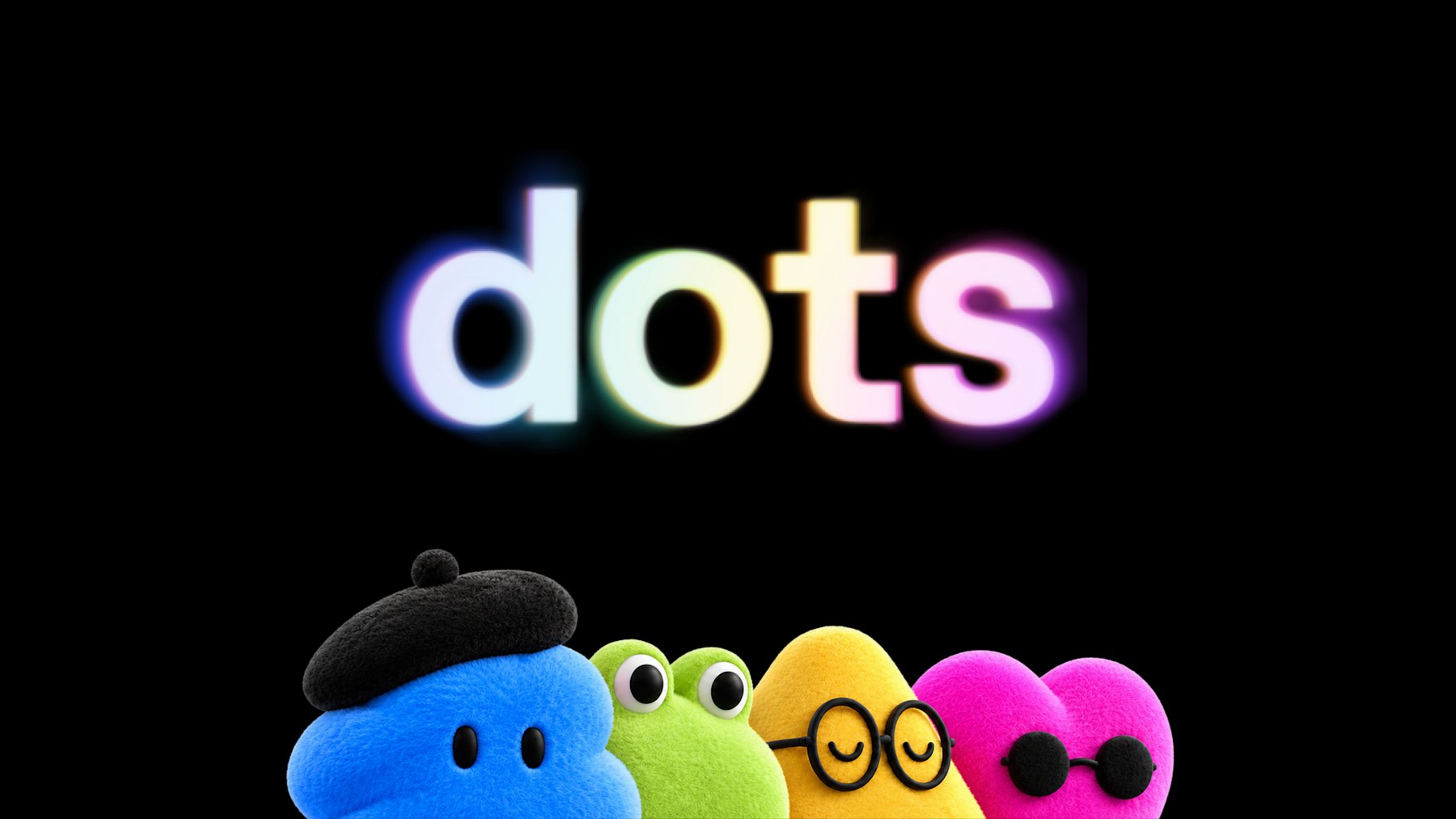
OpenAI’s DevDay hit all three in about 50 minutes, and opened with a plush blob in a beret.
It is called a dot. It is an AI agent with its own computer that keeps working after you close your laptop, and OpenAI drew it as a soft toy. TechCrunch’s headline settled on “bubbly agentic avatar”.
Most of the day was not for us. OpenAI counted more than 20 launches, and its post about the new model never uses the words design, interface or visual.
Six of them matter anyway. One is that model, GPT-6.1 Sol, which costs half of what Opus 5.5 does. Last week we wrote three briefs to find out what Opus 5.5 could design, and published what came back. We still had the briefs.
So we ran them again. Below is what Sol built, live, next to the Opus versions, with the time and the bill.
After that comes the rest of DevDay, starting with my favourite launch. It’s a sign-in button. Stay with me.
Sixty seconds of vocabulary
- GPT-6.1 Sol. OpenAI’s new mid-priced model. GPT-6 is the generation. Astra is the flagship, Sol sits under it, Luna is the small fast one.
- Opus 5.5. Anthropic’s model from last week’s piece. The one we measure Sol against here.
- ChatGPT Work. The part of ChatGPT that does tasks instead of chatting: documents, decks, sites. Sol lives there. It is not in the regular chat yet.
- Codex. OpenAI’s coding agent, its answer to Claude Code. It now sits inside the ChatGPT desktop app.
- Sites. ChatGPT’s own hosting. It builds a web page and gives you a link.
- Dot. An agent that keeps running on its own computer in the cloud and messages you when it needs a decision.
- Plugin. A connector between ChatGPT and another app, like Figma. A plugin extension lets that app show its own interface inside ChatGPT.
- Tokens. The unit AI is billed in. Everything the model reads and writes costs tokens.
- Effort. How long the model thinks before it answers. Sol defaults to medium. We ran it on high.
- GSAP and Lenis. Two free libraries our briefs ask for by name. One animates, the other smooths scrolling.
That is the whole glossary.
🤖 The model: GPT-6.1 Sol
Released 29 September 2026 · $2 in, $10 out per million tokens · ChatGPT Work and Codex, Plus plan and up · API name gpt-6.1-sol
OpenAI’s pitch fits in a heading: “Near-Astra intelligence for a fifth of the price”. Astra is the flagship, at $10 and $50. Sol is what the Plus plan gets.
Opus 5.5 costs $4 and $20, so Sol is half that. It is also exactly what Anthropic charges for Sonnet 5.5, the cheaper tier we told you to watch last week. That one shipped the day before DevDay. We have not run these briefs on it.
A cheaper model only matters once it is good enough that you stop rationing attempts.
The launch post will not tell you whether it is. It is charts about code, PDFs, business workflows and science. As with Opus last week, the evidence has to come from building things.
One tester got there before us. Ramanpal Singh at PromptsLove built five apps and gave his only perfect score to a watch page with a 3D model that comes apart as you scroll.
On motion he was blunt: “It struggled when I asked for cinematic motion design.” Our second brief is a title sequence. Good.
🧪 Same three briefs, different model
Each brief went to Sol once, word for word. It got the setup Opus had: the same design guidance file, a real browser it could drive and take screenshots with, and the standing instruction to check its work there and fix what it saw, at least twice. We told it the page would be embedded here, about 720 pixels wide.
The guidance file is Anthropic’s frontend-design skill. Yes, we handed OpenAI’s model its rival’s house rules. It is a text file. It worked.
Opus ran inside Claude Code. Sol ran through OpenAI’s API, the pay-per-use route developers use, in a small rig we wrote to give it the same abilities: read a file, write one, edit it, and use the browser. We set effort to high.
No references, no notes from us, one attempt each, and no person touched the files afterwards. One of our own tools hung during the title-sequence run. We fixed the tool, replayed that single check and left the stalled minutes out of its time.
🎨 A website: sea salt, and a hero made of water
The client every studio turns down, again. Two people, a great story, no budget.
Build a one-page website for Lenn, a two-person sea salt
harvest on the salt marshes of Guérande, in Brittany.
Visitors are chefs and food lovers who might order a tin
or come and visit.

Mood: quiet, tidal, tactile. Grey Atlantic light, not
beach kitsch. Pick distinctive type, one or two families.

The one memorable thing: the hero is water. A real-time
WebGL water surface fills the screen and ripples where the
cursor moves, with the Lenn wordmark under the surface,
refracting. As you scroll, the tide drains away and salt
crystals appear on the clay.

After that: how the salt is raked by hand (a short
scroll-driven story in three moments), the three salts and
what to cook with each, visiting the marsh, and ordering.

Motion: one orchestrated page load, then scroll-linked
scenes with GSAP ScrollTrigger and Lenis. No fade-up on
every section. Respect prefers-reduced-motion. It must work
on a phone. Quality bar: a site we would feature on Muzli
Picks. Single HTML file, libraries from a CDN.
GPT-6.1 Sol · 17 minutes · 3 fix passes · 51 KB · $0.98
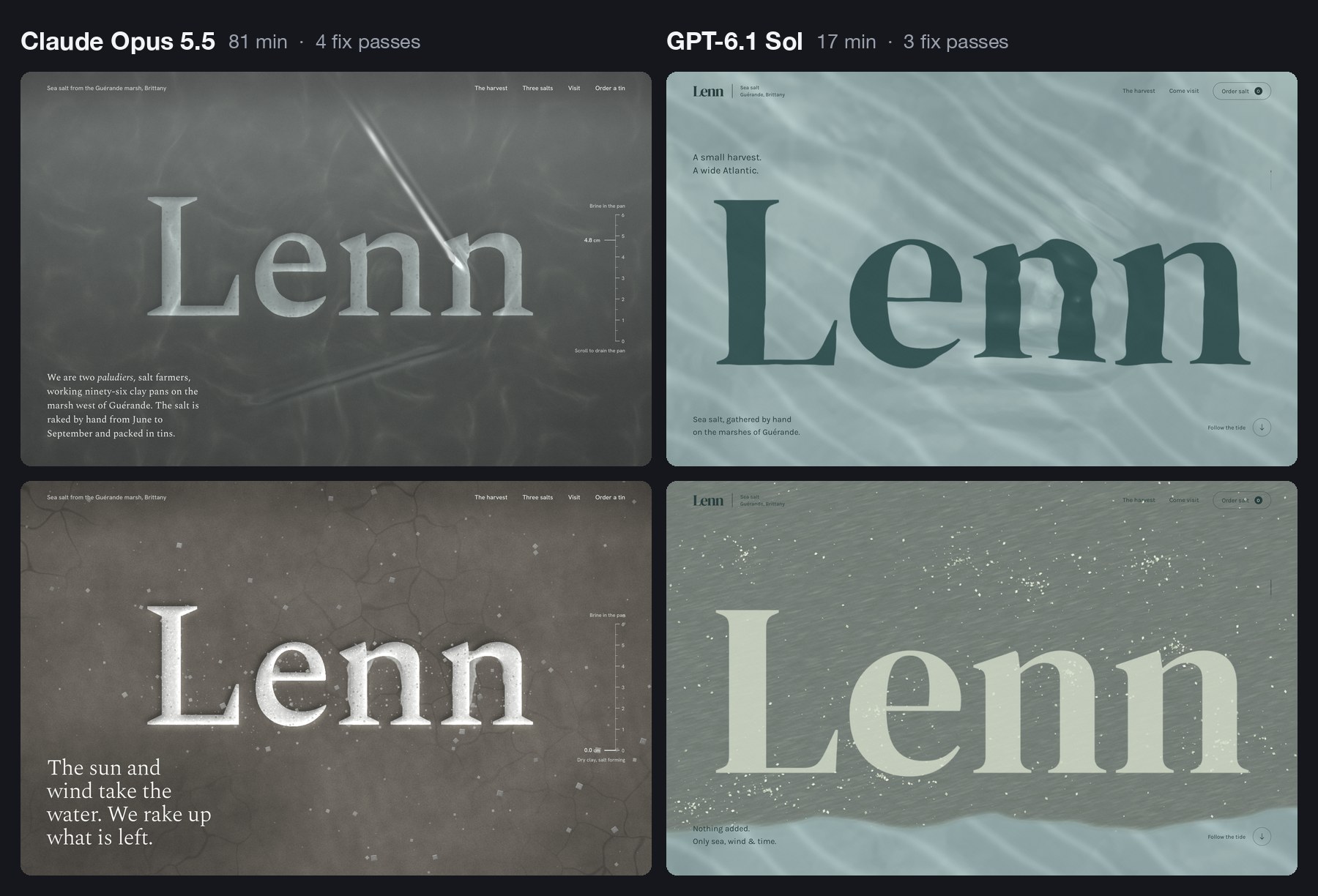
It did everything on the list. The hero is live water, drawn on the graphics card, with the wordmark lying under it. Move the cursor and the letters bend.
Scroll and a tide line travels down the screen. Above it the wordmark dries pale on grey clay while salt gathers in clusters.
Below the hero there is a pinned harvest story in three steps, drawn as the pans seen from above. Then three tins drawn in code and a map of the marsh. The type is DM Serif Display and Karla.
Nobody asked for the next part. The order form adds up and saves a summary, and a small planner lets you pick a month for a visit. Sol’s extras are practical ones.
Its notes show it read the same warnings Opus read. Before building, it wrote: “I’m avoiding the usual cream-and-terracotta craft-food look and photographic placeholders.” On the second pass it wanted the salt to “gather in natural clusters rather than read as scattered confetti”.
On its first look, the water was a black rectangle. A shader, the small program that draws the water, had failed to compile. Sol read the browser’s error log, fixed it and moved on. That loop is the reason any of this works.
Now put it next to the Opus version. Opus carved the wordmark into the clay, added a tide gauge that falls from 4.8 cm to zero, and wrote the harvest in the marsh’s own vocabulary. It took 81 minutes. Sol took 17 and made the site a client signs off. Opus made the one you screenshot.
One real flaw, and you may have just met it. Inside a frame like the one above, Sol’s page keeps your scroll wheel even when it has nothing left to scroll, so the article around it stops moving.
Opus hit the same trap last week, noted that “a blog reader could get stuck”, and handed the wheel back to the page. Sol checked that its page scrolls inside a frame. It did not check what happens at the end.
What it tells you: at 17 minutes and under a dollar, you stop asking for one site. You ask for three directions and pick.
🎬 Motion: a title sequence you can scrub
This is the brief I expected it to fumble.
Make a 12-second looping title sequence for a fictional
design festival called Offset, as a web page.

Think opening titles, not a website: kinetic type on a
strict grid. Letters slide in along the grid, the grid
itself rotates and stretches, colours swap in hard cuts on
the beat, and it resolves into the Offset lockup with the
dates (14-16 May, Vilnius) before looping cleanly.

Build it on one GSAP timeline. Add a small After Effects
style transport bar at the bottom: play/pause, a scrubber I
can drag, the current time, and 0.25x / 1x speed. Easing
should feel designed, so name the curves you use in a code
comment. Single HTML file. No stock fade-ins.
GPT-6.1 Sol · 8 minutes · 2 fix passes · 16 KB · $0.36
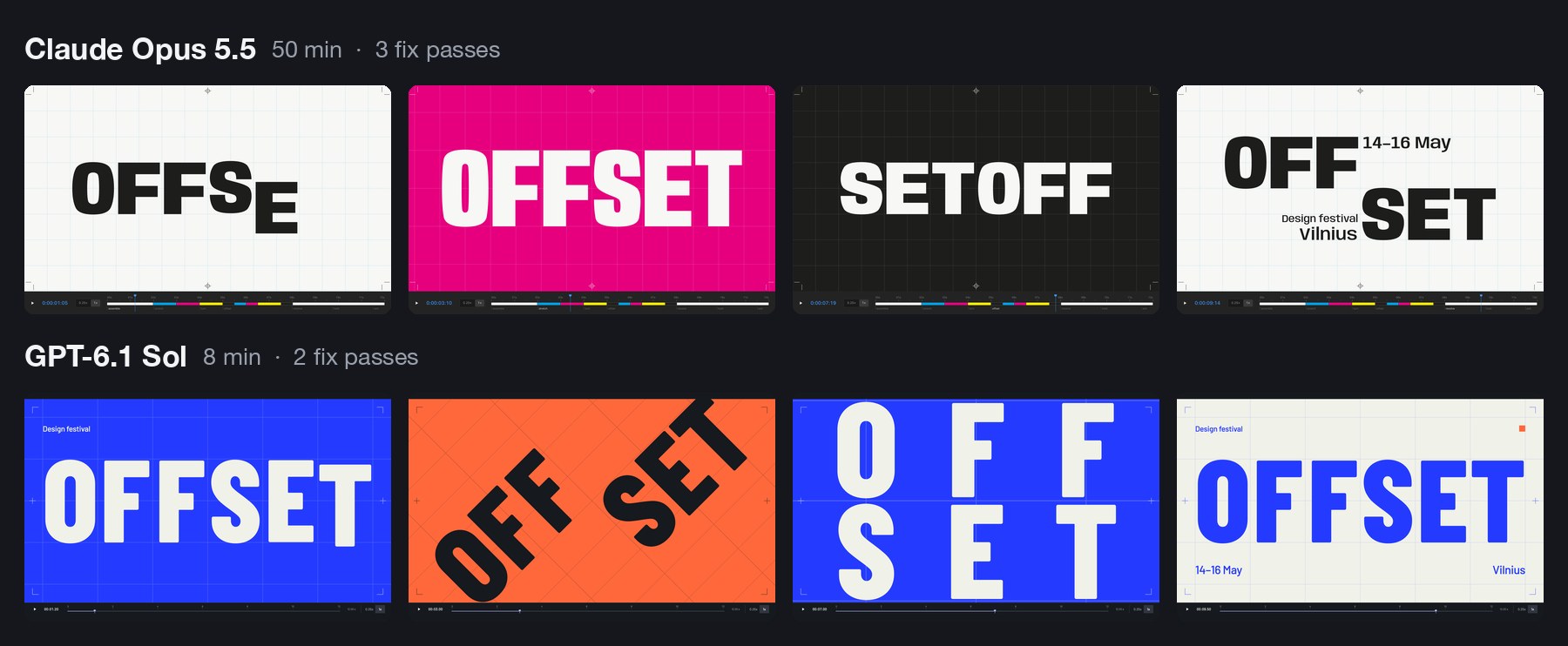
It did not fumble. Twelve seconds on one GSAP timeline, and a last frame that matches the first. Barlow Condensed in ultramarine, paper, ink and orange.
The letters ride in on six columns. The whole grid swings through a quarter turn, the word blows up past the edges of the frame, splits into two rows and lands on the lockup with the dates. The colours change in hard cuts.
It named its curves, as asked:
register  (.16, 1, .30, 1)   a fast rail move, precisely
                             arrested.
torque    (.76, 0, .24, 1)   heavy symmetric acceleration
                             for grid pivots.
shunt     (.83, 0, .17, 1)   a short hold, then a decisive
                             regrouping.
Here is the strange part. Last week Opus named its curves rail, shunt and crank. Two models from two companies read one sentence about letters sliding along a grid, and both thought of a railway yard. Both called a curve “shunt”. The word is not in the brief or in the guidance file, and neither model saw the other’s work.
They also both read the festival’s name as a printing term. Sol planned “a moving print-registration system” and put crop marks in the corners. Opus went the whole way: four ink plates, a print run, and the word reeling round until it read SETOFF, which in printing is another word for offset.
That is the gap in one example. Sol used the idea as trim. Opus built the whole sequence out of it.
One requirement slipped. The brief wanted cuts “on the beat”. Sol’s cuts land at 2, 3, 4.5, 6, 7.65 and 11.5 seconds, which is nobody’s idea of a beat. Opus set a tempo of 120 BPM and cut on it.
What it tells you: bring the concept and Sol executes it in eight minutes. If you want the concept supplied, that is still the slower, more expensive model.
👆 Interaction: a player you can catch mid-spring
A Figma prototype shows where a screen ends up. It cannot show how it feels to throw it there.
Prototype the mini player to full player transition of a
music app, in a phone frame, as a web page I can use with
a mouse or a finger.

The mini player sits above a tab bar. Drag it up and the
album art grows out of it into the full player, following
my finger 1:1, then settles with a spring. Fling it down to
dismiss; the release speed decides whether it closes. In
the full player: a waveform I can scrub, a like button with
a small burst, and a queue I can reorder by dragging.

Everything must be interruptible: grab it mid-animation and
it stops where it is. Add a "slow motion" switch that runs
all motion at 10% speed so I can review the curves.
Draw the album art in code. Single HTML file.
GPT-6.1 Sol · 11 minutes · 3 fix passes · 38 KB · $0.53
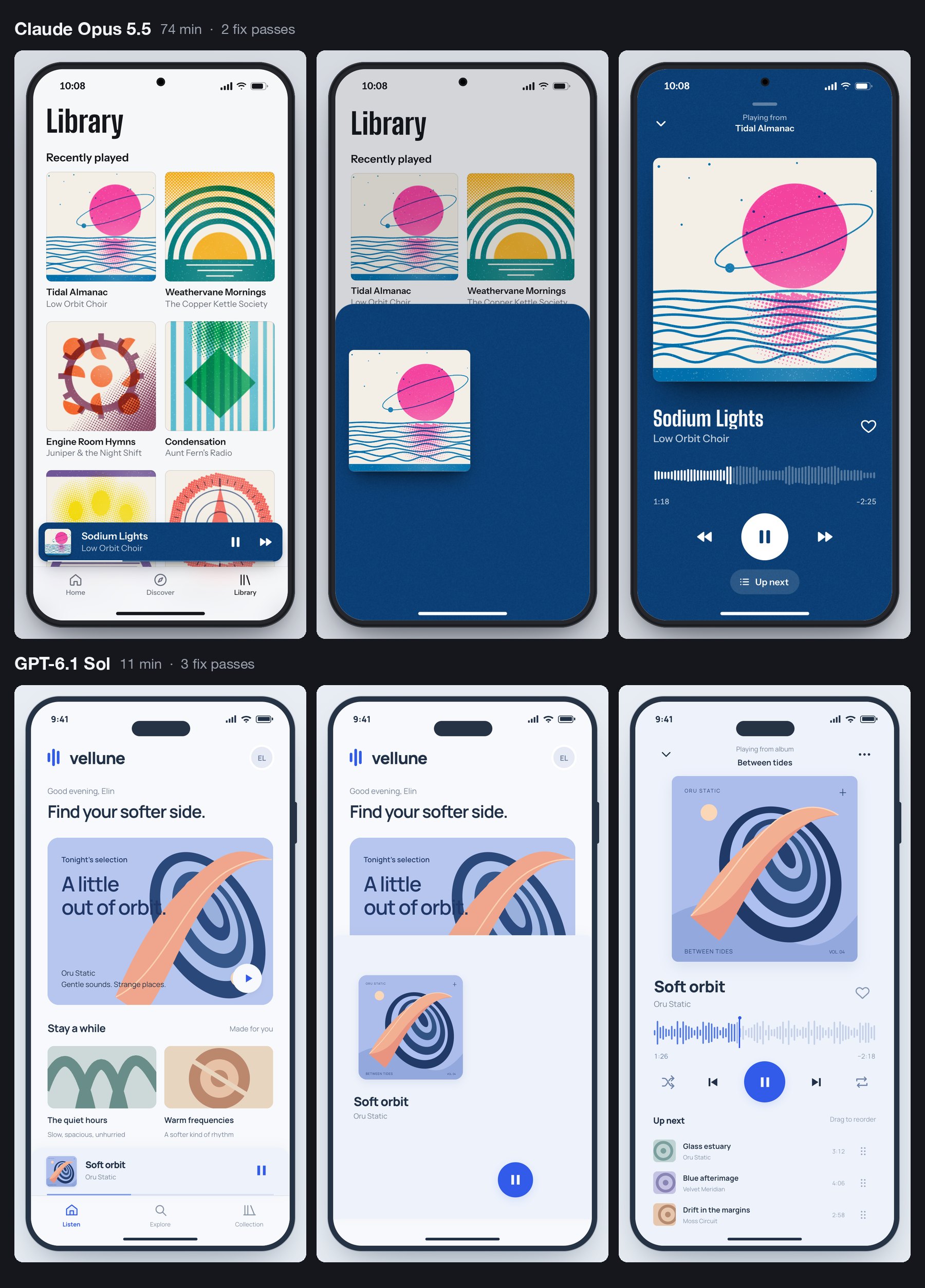
Sol invented an app called vellune and one album, drew the cover in code, and built the whole transition around that one piece of art travelling from the mini bar to the full player.
The requirements hold. The sheet follows the pointer one to one, and Sol measured it: “a 33 px pointer move produced 33 px of sheet movement”. Let go and a spring takes over, written by hand with no library, at stiffness 230 and damping 25.
Fling down fast and it closes. Drag the same distance slowly and it springs back open. We tried both. The waveform scrubs, the heart throws a small burst, the queue reorders, and the slow-motion switch runs everything at a tenth of the speed. Grab the player mid-flight and it stops where it is.
It found its own bugs in the screenshots: a play button in the wrong place, the mini player covering the tab bar, a title colliding with the cover halfway through a drag.
It missed one. A press that does not move counts as a tap, and a tap toggles the player. So touching the album art in the open player closes it. The Opus version stays open.
A person finds that in ten seconds. A screenshot never will.
Against the Opus version, the difference is appetite again. Opus drew six albums as two-colour risograph prints and let the player take its colours from the cover. Sol drew one album cover, two simple playlist tiles and a clean pale-blue interface that could belong to any streaming app. Both would do their job in a design review. Only one gives the room something to talk about afterwards.
What it tells you: “does this gesture feel right” now costs 53 cents and eleven minutes to answer.
⚖️ What three runs add up to
Three briefs is a small test. One attempt each, in a rig we built, outside OpenAI’s own apps. Trust the pattern more than the decimals.
- Speed changes the method. Sol needed about 35 minutes for all three. Opus needed about 205. When a build takes 80 minutes, you write one brief and wait. When it takes ten, you run three directions before lunch and give notes on the one that deserves them.
- It builds the drawing. Sol is the builder who delivers exactly what is on the plan, plus a sensible extra socket. Opus is the one who phones at nine to say he had an idea about the staircase. Which one you want depends on the week.
- It checks what it thinks of checking. Both models look at screenshots and fix what they see. Neither can feel a spring. Sol let two things through that Opus did not: the scroll trap and the tap that closes the player.
- Good guidance travels. Anthropic wrote the skill file for Claude. Sol read it and avoided the same clichés by name. What you learned about briefing last week still applies.
- Price is no longer a reason to skip the test. $1.88 bought three working builds, each about half the file size of its Opus twin. We can’t give you the same bill for Opus, because it ran on a Claude Code subscription and no invoice exists. On list price it costs twice as much per token, and it worked about six times as long.
All six builds are live, in pairs, further down.
🗓️ The rest of DevDay, sorted for designers
OpenAI’s recap runs to 25 entries. Besides the model, five are worth your time.
The first is the one I’m most excited about, and the one you can do least with this week. The other four follow in the order I would open them.
🔑 Sign in with ChatGPT: the one I’m most excited about
Sign-in: everyone · spending your plan in other apps: Plus and Pro · 16 launch partners, including Notion, Vercel and Devin · other apps: a waitlist
An app with an AI feature pays the AI company for every request you make. So it eats the cost, asks you to paste in a developer key, or sells you its own credits on top of its subscription. Grant Harvey at The Neuron called these the “three ugly choices”.
Sign in with ChatGPT adds a fourth. The button itself has been on a few partner sites since July.
What DevDay added is the second step. After signing in, you can let the app spend from your ChatGPT plan. The consent screen has one toggle, labelled “Use your ChatGPT plan”.
It is bring-your-own-bottle for AI. The app provides the table, you bring the tokens, and the house may still charge corkage. OpenAI’s help page says the same in plainer words: the app “may charge separately for its subscription, infrastructure, services, or premium features”.
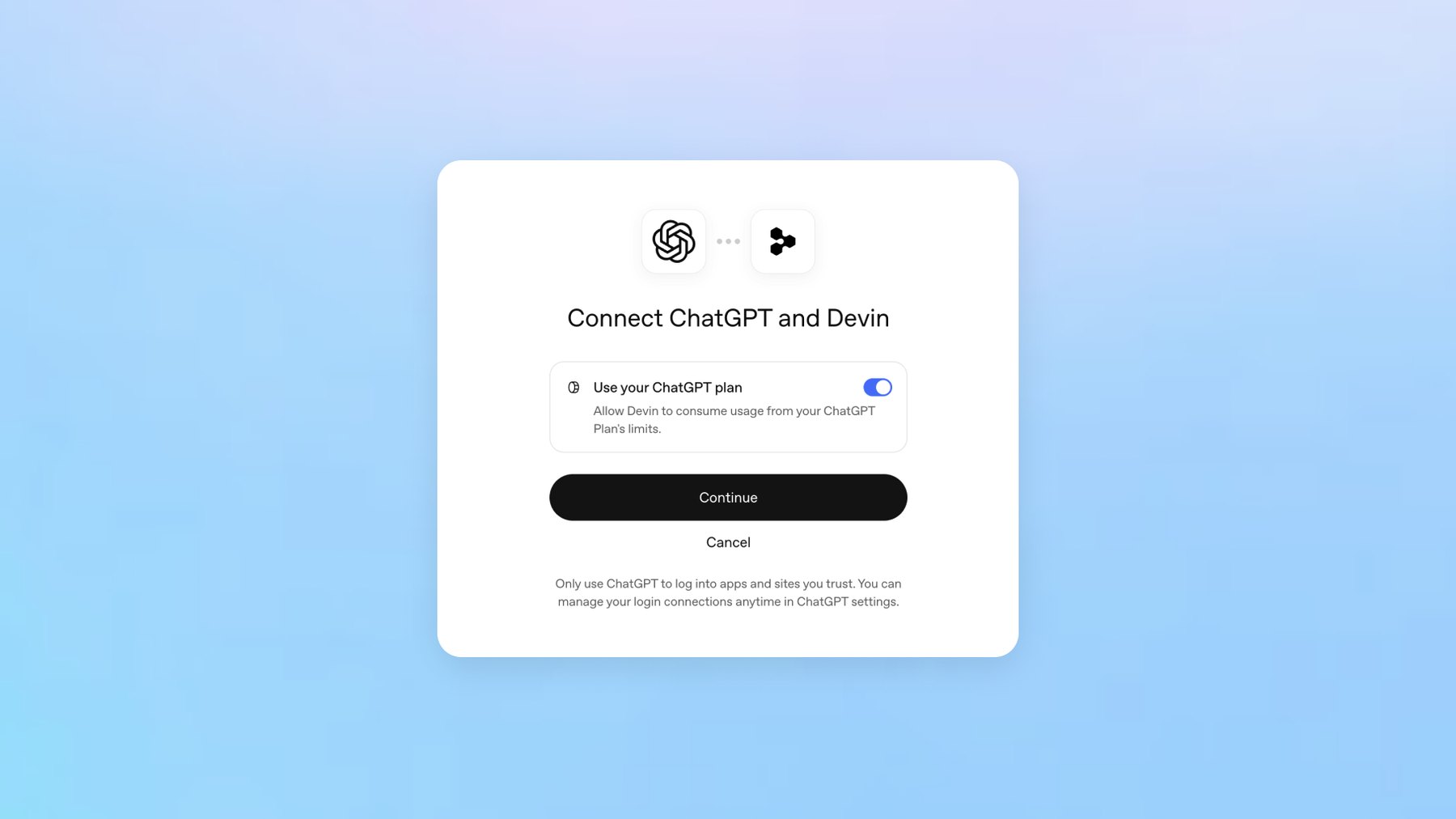
You decide how much each app may pour. In ChatGPT’s settings you give it a weekly share of your plan, from 10% to all of it. Sharing your plan does not show the app your chats.
For now the partners are mostly developer tools. Notion is on the list, Lovable is coming, and Canva takes only the sign-in.
My excitement is partly selfish. At Muzli we use a few AI design tools in-house that we have never shipped to you.
This button would let them run on your plan instead of our bill, inside a limit you set. I’m adding it to Muzli as soon as OpenAI lets us in.
That is the catch. Plan sharing is open to open-source tools and a few selected companies. Every other app, Muzli included, joins a waitlist.
And for now a plan cannot pay for image generation, which design tools will notice.
I also hope it doesn’t stay an OpenAI feature. Every’s DevDay review called OpenAI “the first major lab to take this step”. Anthropic’s help page still tells anyone building a product for others to “use API key authentication”.
I want this button from every AI company, so you pay once for the model you like and take it into every tool you open.
What it unlocks: AI features your company does not pay the model bill for, and fewer AI subscriptions for everyone using them. The screens it needs are below.
🌐 Sites: ChatGPT hosts what it builds
Public beta · Plus, Pro, Business, Enterprise and Edu · a chatgpt.site address or your own domain
You have a prototype in a chat window. Getting it to a link you can send a client still means a hosting account and a favour from a developer.
Sites removes that step. Ask ChatGPT for a website, or type @Sites. It builds, shows you a private preview, and publishes when you say so.
You pick who can open it: selected people, your workspace, or everyone. You can point your own domain at it.
It is not new. At the DevDay session, Simon Willison noted that it “launched earlier this year and is already hosting 8m sites”. What DevDay added is the layer around it: scheduled tasks that keep a Site current, Sites that read each visitor’s own connected apps on business plans, and shareable profiles.
A profile is a page at chatgpt.com/u/your-name that shows up to 12 of your Sites. OpenAI’s mock-up also shows an activity grid and a count of lifetime tokens, which makes it the first portfolio I have seen that reports how hard you worked the machine. The catch is that people have to be signed in to ChatGPT to see it.
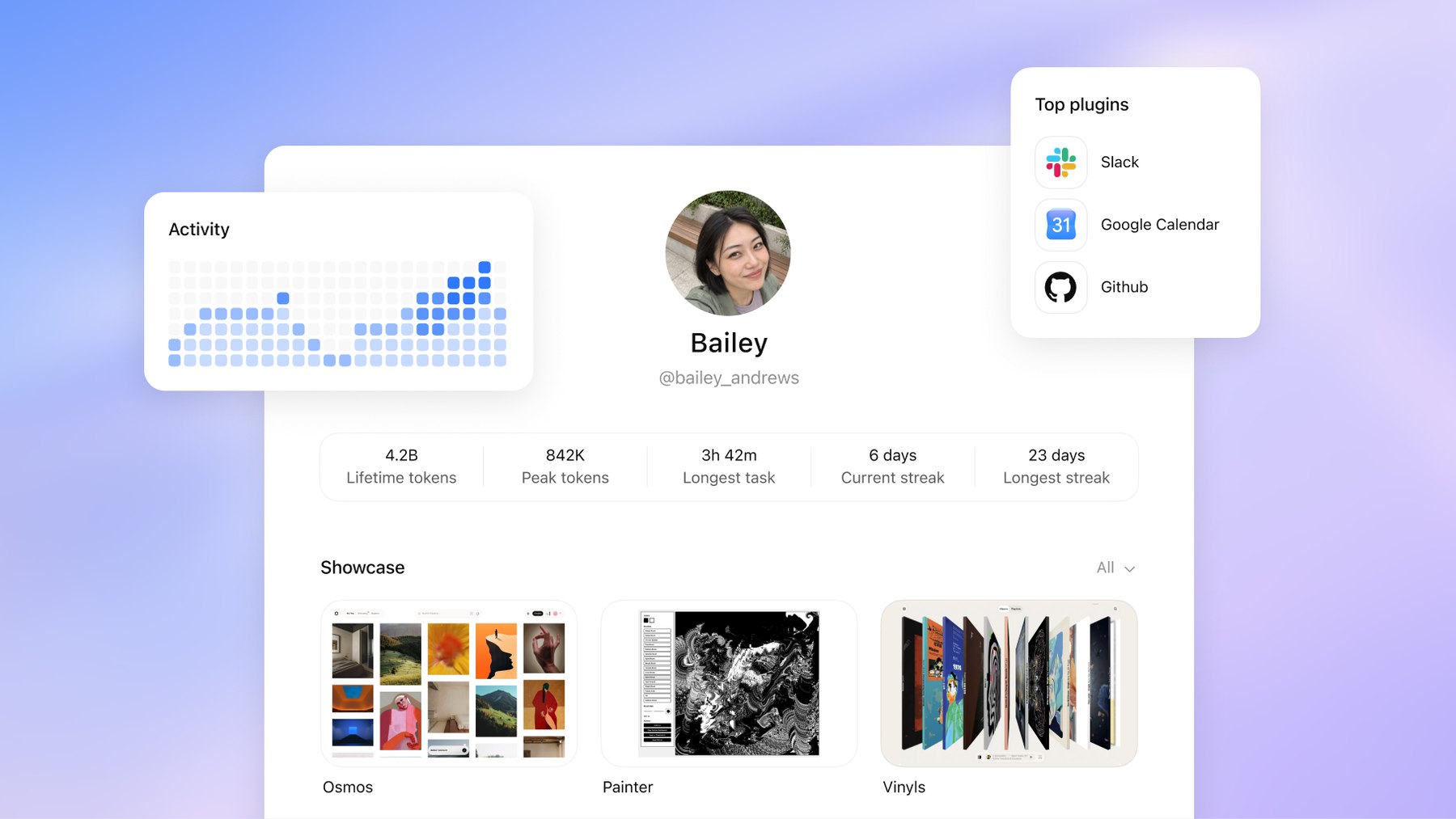
OpenAI also publishes a showcase of Sites with the full prompts that built them. What those prompts teach is further down.
We did not publish through Sites for this piece. Our demos sit on our own server, so this section comes from OpenAI’s documentation. We have not used it ourselves.
What it unlocks: a brief becomes a link in one sitting, on the $20 Plus plan, which is €23 here in the EU. A pitch microsite. A case study with a working prototype in it. A client review that needs no deploy.
🧩 Plugin extensions: your tools move into the chat window
All plans, per OpenAI · on the web, "coming soon" for Free and Go · Figma mentions need the desktop app
Until now an app inside ChatGPT was a connector. The chat could fetch things from Figma, and that was all. An extension gives the app its own interface in three places: an entry in the sidebar that opens it full screen, a panel beside the conversation, and a viewer that opens when you click a file the app owns.
OpenAI’s three launch examples are all design tools:
- Canva builds and previews designs in a sidebar tab.
- Figma lets you search for your files and mention them from the message box.
- Adobe opens files for editing “with Acrobat and Photoshop directly in ChatGPT”.
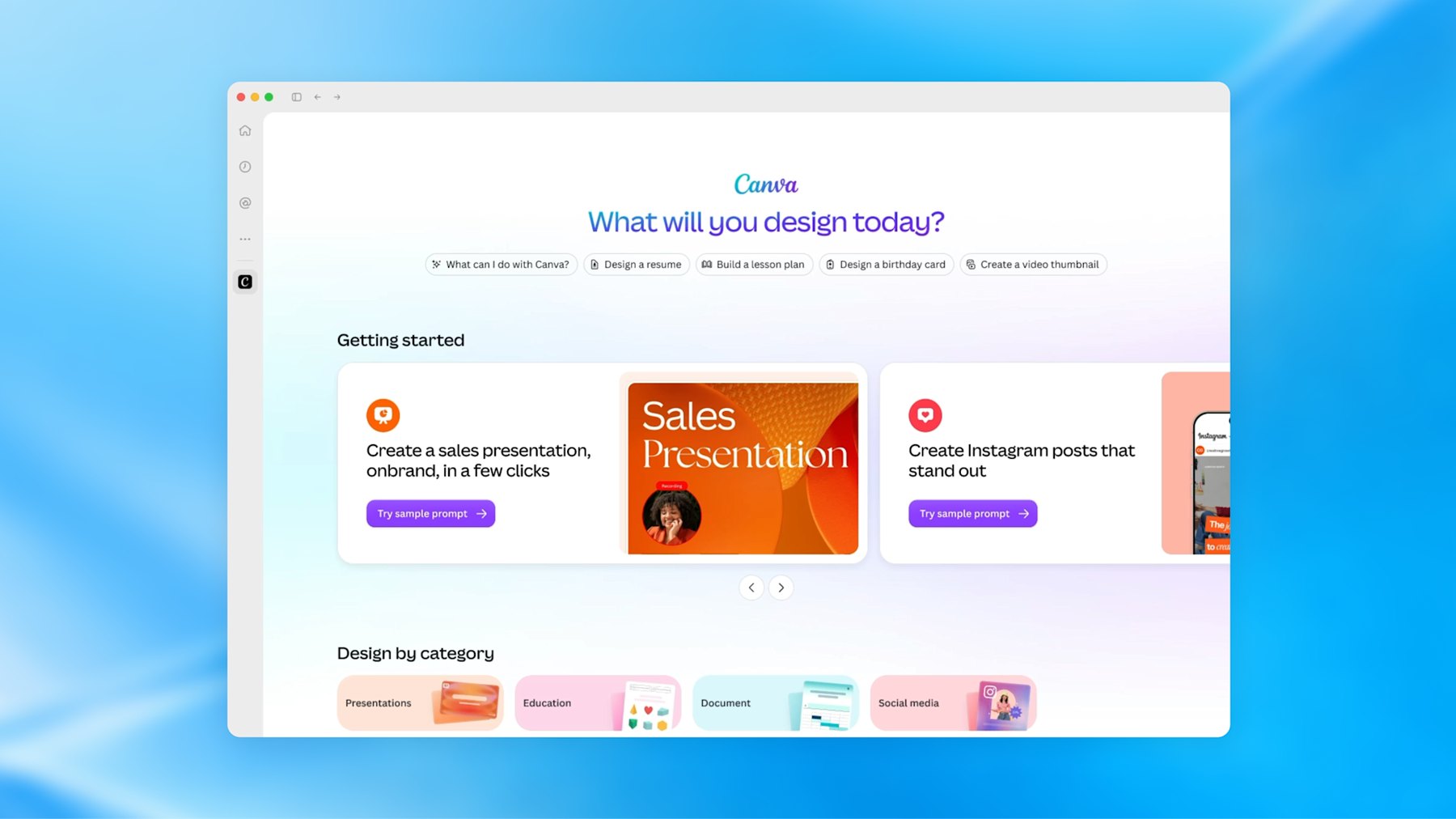
Think of a brand’s corner inside a department store. You get the footfall. They own the floor plan.
What it unlocks: for you as a user, fewer trips between a chat and a canvas. For you as a designer of products, a new place to design for, with someone else’s rules. If your company ships a plugin, somebody has to design the version of your product that lives in a narrow panel beside a conversation.
🫧 Dots: the mascot and the agent
Rolling out now · Pro and Business Premium · on Pro, not in the European Economic Area, Switzerland or the UK · runs on GPT-6 Astra
A dot is one never-ending conversation with an agent that has its own computer in the cloud. You give it a goal. It keeps going while your laptop is shut and messages you, in ChatGPT, Slack or Teams, when it needs a decision.
Think of a colleague who never closes the laptop and has read all your email. That is the promise, and also the worry.
OpenAI’s own example for our trade: “A new design arrives, and dots turn it into a working app while the team focuses on customer feedback.” Look closely at the launch screenshot and the desktop of the dot’s computer holds Blender, GIMP, Inkscape and Kdenlive.
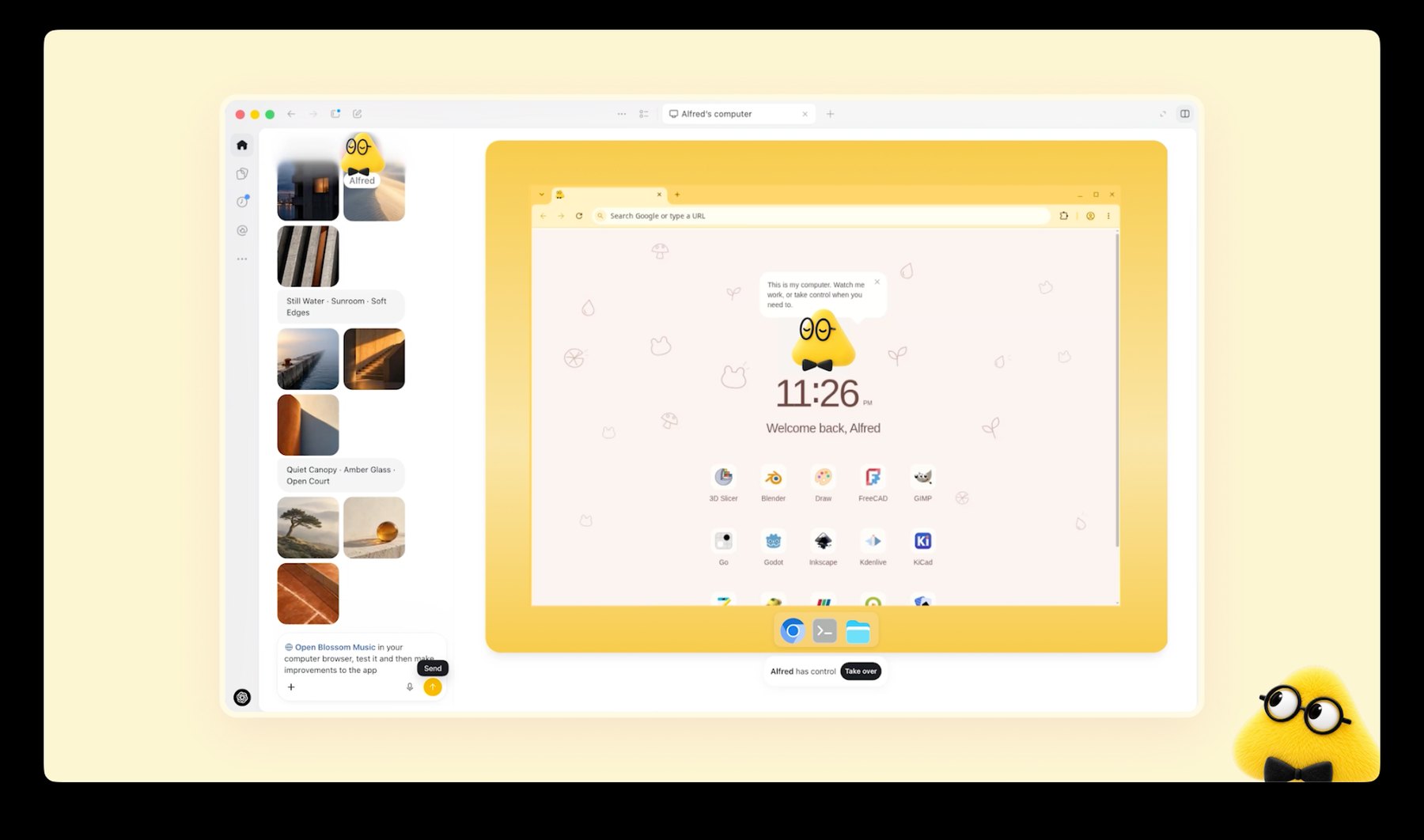
Now the small print. Dots need a Pro plan, which starts at $100 a month, or Business Premium. On Pro, OpenAI does not offer them in the European Economic Area, Switzerland or the UK. If you are a designer in Europe on a personal plan, a dot is a screenshot for now.
And the one long hands-on review says wait. Dan Shipper at Every tested a dot for days. It “has become the main way I use ChatGPT”, he wrote, and it was “too buggy for me to recommend now”. His advice is to give it a week or two.
The design story is the blob itself. Meta’s Muse did it, Grok Bots did it, and now dots. The always-on agent keeps arriving as a soft toy.
TechCrunch called it “the latest example of a company attempting to make AI more relatable”. I would put it less kindly. The more access a product asks for, the softer its mascot gets.
What it unlocks: handing over the watching. The feedback channel. The launch whose scope keeps moving. Just not this month, and not in Europe.
📄 Space, Pages and slides
Space and Pages: Pro, Business and Enterprise · slides: "in the coming weeks"
Space is where ChatGPT now keeps your files, shared with your team and its agents. A Page is a document that people and AI edit together. OpenAI’s list of uses includes turning “a teammate’s design into engineering tasks”.
The part for us is slides. OpenAI says you will “create interactive slides with ChatGPT and your team, from a conversation or your own template”, then present them in ChatGPT or “export to PowerPoint or Google Slides with formatting intact”.
What it unlocks: read “your own template” twice. When an agent builds the deck, the template is the only thing holding the brand in place. Name the layouts and lock the colours.
Last week Every watched Opus 5.5 turn its green into purple in a deck built from its own template. Nobody has shown this one doing better yet, so try it on a deck that does not matter.
The rest is plumbing and pricing. Ultrafast makes Astra write up to eight times faster for people on the new $500 plan. Codex runs in the cloud and takes orders by voice.
If none of that raised your pulse, you read it correctly.
What the room made of it
- Read it as one move. Grant Harvey at The Neuron: “OpenAI spent DevDay assembling the pieces of an operating layer for AI agents.”
- Impressive, and tiring. Dan Shipper closed Every’s review with: “I’d be even more excited if the next time I opened ChatGPT, there was less for me to figure out.”
- Some of it was overdue. Simon Willison live-blogged from the room, failed demos included. On Sites getting sharing controls: “(I admit I thought they had that feature already.)” On signing in with ChatGPT: “I’ve wanted this one for years!” Sam Altman said as much in the closing session: “we should have done it a long time ago”.
- The safety argument has not gone away. Axios noted that OpenAI said the same week it would hold back its newest flagship, GPT-6.1 Astra, over security concerns.
🧭 What changes in your work
- Design the lending moment. If your product has AI features, someone will ask for “Sign in with ChatGPT”. OpenAI’s guidelines already sketch the screens: a ChatGPT button as prominent as your other sign-in options, a one-time “You’re using your ChatGPT plan” note, a “Using ChatGPT plan” label by the message box, and a “Usage limit reached” state whose main button opens ChatGPT’s settings, with your own credits second. Your pricing page has to say which of your plans include it. All of it still needs your product’s voice.
- Design the side-panel version. A plugin extension is your product in a panel beside a chat. Decide which three tasks deserve that panel. Everything else stays a link.
- Make screens an agent can read. Dots operate software by looking at it, the way our rig’s browser did. Icon-only buttons, hover-only actions and unlabelled states were always bad for people. Now they also stall your customer’s assistant.
- Test what screenshots can’t see. Our two bugs were a scroll that would not let go and a tap in the wrong place. Both are invisible in a still image. Put your hands on every build before it leaves the room.
Try it this week
🛠️ If you do not write code: the fifteen-minute tour
- Open the six demos in pairs, full screen. Scroll both salt sites. Scrub both title sequences at 0.25x. Fling both players shut. Decide which one you would have signed off, and notice why.
- Open Frame Studio or Type Field in OpenAI’s showcase. Press “Try it live”, then read the prompt under “Build process”. Count the lines that forbid something.
- If you have the Plus plan, open ChatGPT, switch to Work, pick GPT-6.1 Sol and paste a brief with the word “website” in it. Look at the private preview before you publish anything.
🛠️ If you build with AI tools
OpenAI’s own showcase prompts forbid different things than ours do. Ours ban looks: no fade-up on every section, no beach kitsch. Theirs ban fakes.
The Type Field prompt says: “Do not claim to have designed an existing font, fabricate unsupported variable axes, or simulate width by merely stretching every glyph.” Frame Studio wants real animation, “not stock footage or a screenshot pretending to play”. A good brief needs both lists.
So last week’s template grows two lines. We have not run this one through Sites ourselves:
Build a website for [who]. @Sites
Visitors are [audience] who want to [job].

Mood: [three words]. Not [the cliché you fear].
Type: [families, or "pick distinctive type"].

The one memorable thing: [the moment people will
screenshot]. Everything else stays quiet.

Sections: [in order].

Motion: [the one orchestrated moment]. Respect
prefers-reduced-motion. Works on a phone.

Do not use: [the looks you are tired of].
Do not fake: logos, awards, reviews, or a form that
pretends to send.

Save a version and show me the preview. Do not
deploy until I say so.
That last line matters. OpenAI’s docs warn: “Every Sites deployment URL is a production deployment.”
A build is cheap now, so ask for directions first:
Before building, give me three directions for this
brief: three palettes, three type pairings and three
versions of the one memorable thing. One short
paragraph each. I will pick one, then you build.
After the first build, send the follow-up aimed at the two bugs our screenshots missed:
Now use it like a visitor, not a camera. Scroll to the
very end and keep scrolling. Tap every element once
without dragging. Open it inside an iframe on a longer
page. Tell me what surprised you, then fix it.
🛠️ If you write code
The model name is gpt-6.1-sol. A first call looks like this:
import OpenAI from "openai";
const client = new OpenAI();

const response = await client.responses.create({
  model: "gpt-6.1-sol",
  reasoning: { effort: "high" },
  input: "Your brief goes here.",
});
console.log(response.output_text);
In Codex it is one flag: codex -m gpt-6.1-sol.
One call writes a page. What made ours work was the loop around it. The model gets a browser tool, loads its own page, looks at the screenshot, reads the error log and edits the file. Our rig is about 700 lines of Python on top of Playwright.
If you give the model tools, use the Responses API. OpenAI’s docs say Chat Completions does not support function calling for this model.
If you already have a project, OpenAI’s docs supply the prompt:
Deploy this project with Sites. Check whether it is
compatible, make any required changes, and give me
the deployment URL.
🆚 Opus 5.5 and GPT-6.1 Sol, side by side
Here are all six, in pairs. My verdict: the Opus versions are more creative and more refined. Sol’s are faster and far cheaper, and every requirement but one works.
🎨 Lenn, the sea salt website
- Opus 5.5, live. 81 minutes, 4 fix passes, 97 KB. A wordmark carved into the clay, a tide gauge that drains from 4.8 cm to zero, and copy in the marsh’s own words. The water is the grey the brief asked for, and the page hands your scroll wheel back when it ends.
- GPT-6.1 Sol, live. 17 minutes, 3 fix passes, 51 KB, $0.98. A flat wordmark under sea-green water, plus practical extras: an order form that adds up and a visit planner. It keeps your scroll wheel inside the frame.
🎬 Offset, the title sequence
- Opus 5.5, live. 50 minutes, 3 fix passes, 31 KB. Four ink plates, the word turning into SETOFF, and a lockup with the dates tucked between OFF and SET. It cuts on a 120 BPM beat, and the transport bar shows timecode to the frame, with its sections named like markers in After Effects.
- GPT-6.1 Sol, live. 8 minutes, 2 fix passes, 16 KB, $0.36. A grid that swings a quarter turn and a word that splits into two rows. The cuts miss the beat, and the transport bar is a plain scrubber.
👆 The music player
- Opus 5.5, live. 74 minutes, 2 fix passes, 66 KB. Six albums drawn as two-colour risograph prints, and a player that takes its colour from the cover as it grows. Tap the art and the player stays open.
- GPT-6.1 Sol, live. 11 minutes, 3 fix passes, 38 KB, $0.53. One album cover, two simple playlist tiles and a clean pale-blue app, with a measured one-to-one drag and a hand-written spring. On the home screen the artwork cuts through the headline, and a tap on the art closes the player.
All three took Opus about 205 minutes. Sol needed about 35, for $1.88.
So split the work. Ask Sol for the quick directions, then give the one worth keeping to Opus for the version with your name on it.
Worth bookmarking
🤖 The model
- Introducing GPT-6.1 Sol. Prices, availability and the charts.
- DevDay 2026 recap. All 25 entries, each with who gets it.
- The keynote. About 50 minutes, failed demos included.
🔑 Sign in with ChatGPT
- How it works. The partner list, the consent screen and the limits you can set.
- The UI guidelines. The screens OpenAI expects in your app, drawn out.
- The partner waitlist. For companies that want the button in their own product.
🌐 Publish
- ChatGPT Sites. What it is and who can use it.
- The Sites guide. Versions, sharing, domains and analytics.
- The Sites showcase. Live examples with the prompts that built them.
- Shareable profiles. How the public page works and what it shows.
🧩 Inside ChatGPT
- Plugin extensions. The places an app can take over, with short videos.
- ChatGPT Space. Pages now, slides when they arrive.
🫧 Agents
- Introducing dots. The pitch and the safeguards.
- Getting started with your dot. Plans, regions and setup.
🧰 Carried over from last week
- frontend-design. The guidance file both models read.
- Opus 5.5 builds Muzli Picks-level websites. The first run of these three briefs, and how to set up the loop.
🏆 Get picked
- Share your work on Muzli Me. Paste a link, get a project page.
- Nominate for Muzli Picks. One free nomination, three a month on PRO.
The landing
Here is my verdict. DevDay’s gift to designers was not the blob. It was a second model that can build a real brief, at a price where trying costs next to nothing.
Last week each build took Opus between 50 and 81 minutes. This week all three cost $1.88 and were done before the coffee went cold. The idea stays your job.
The thing I’m watching is who pays. Sol made a build cheap. Sign in with ChatGPT moves the cost onto a plan the user already pays for, inside a limit they set.
If every AI company copies it, any small team can ship AI features without a token bill hanging over it.
So do the cheap thing. Take one brief and ask for three directions. Build the one you would defend in a review, then use it like a visitor: scroll past the end, tap what should not be tapped. Fix what you find and nominate it.
When a build costs 36 cents, the brief is the only expensive thing left.
Sources: OpenAI, DevDay 2026 recap, Introducing GPT-6.1 Sol, Introducing dots, ChatGPT Sites, ChatGPT Space, help center, release notes, developer docs, Sign in with ChatGPT docs and showcase. Anthropic, Claude Sonnet 5.5 and help center. Simon Willison, Every, TechCrunch, The Neuron, Axios, RuntimeWire, Ben’s Bites, PromptsLove. Test runs, timings and costs: Muzli, 2 October 2026, billed through OpenRouter at OpenAI’s list price. Demos and comparison images: Muzli, built with GPT-6.1 Sol and Claude Opus 5.5. Other images: OpenAI.